1. Introduction
This manual provides essential information for the installation, maintenance, and specifications of your XiaoPengYo RC Quadcopter Drone Motor Gear Spare Parts. These gears are designed as replacement components for various RC drone models, ensuring your drone maintains optimal flight performance.
2. Product Overview
These are replacement motor gears specifically designed for RC quadcopters. Each gear features 11 teeth and an overall diameter of 3.82mm. The package includes gears with two different shaft hole diameters: 1mm (approximately 0.9mm) and 1.2mm, to accommodate various motor shaft sizes.
3. Compatibility
These motor gears are compatible with a wide range of RC quadcopter drones, including but not limited to the following models:
- F181, F181C, F181W, F181DH, F181WH
- Hubsan H502S, H502E, H502T, H507A
- VISUO XS809, XS809W, XS809HW, XS809S, XS816, XS812, XS818, GPS Drone ZEN MINI
- UDI U817, U817C, U817A, U818, U818A, U818A-1, U818G, SP650, SPA-- S5C
- JJRC H12C, H12W, H12CH, H12WH, H12
4. Package Contents
The package includes the following items:
- 8 pieces of gears with 1mm (approx. 0.9mm) axis hole diameter
- 8 pieces of gears with 1.2mm axis hole diameter

Image: Overview of the included motor gears.
5. Installation Guide
Replacing motor gears requires careful handling. Always refer to your specific drone's service manual for detailed disassembly and reassembly instructions, as procedures may vary significantly between models.
- Preparation: Ensure the drone is powered off and the battery is disconnected. Gather necessary small tools such as small pliers and screwdrivers.
- Access Motors: Carefully remove the drone's casing or propeller guards to access the motor shafts. This step is highly dependent on your specific drone model.
- Remove Old Gear: Gently cut or pry off the worn or damaged gear from the motor shaft. Exercise caution to avoid damaging the motor or the shaft itself.
- Select Correct Gear: Identify the correct gear size (1mm or 1.2mm axis hole) that fits snugly onto your motor shaft. The gear must fit tightly to prevent slippage during operation.
- Install New Gear: Align the new gear with the motor shaft. Using small pliers or a similar tool, carefully press the new gear onto the shaft until it is fully seated. Ensure the gear is straight and does not bind.
- Test Fit: Manually rotate the motor shaft to ensure the newly installed gear spins freely without any obstruction.
- Reassemble: Reattach any removed casing or propeller guards. Reconnect the battery.
- Function Test: Perform a low-power test flight or motor spin test to confirm proper operation before attempting a full flight.
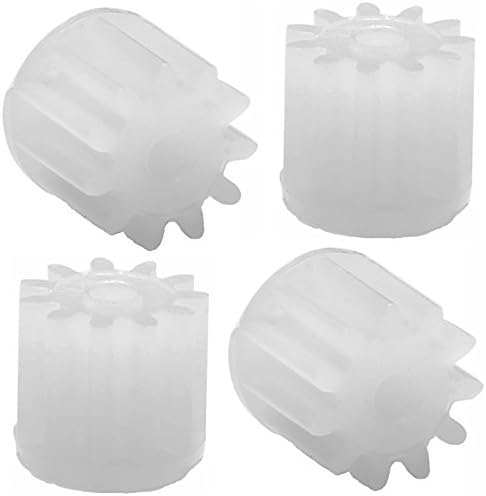
Image: Detailed view of a gear with 0.95mm axis hole diameter.

Image: Detailed view of a gear with 1.2mm axis hole diameter.
6. Maintenance
To ensure optimal performance and longevity of your motor gears, follow these maintenance guidelines:
- Regularly inspect the gears for any signs of wear, cracks, or missing teeth.
- Clean any debris such as dust, hair, or small particles that may accumulate around the gears and motor shafts.
- Avoid hard landings or crashes, as these can significantly damage the gears and other drone components.
- Store spare gears in a clean, dry place away from direct sunlight and extreme temperatures.
7. Troubleshooting
If you encounter issues after installing the new motor gears, consider the following:
- Gear slips on shaft: Ensure that the correct gear size (1mm or 1.2mm hole) was selected for your motor shaft. If the fit is still loose, a small amount of hobby-grade adhesive designed for plastics can be applied to the shaft before pressing the gear on. Allow sufficient drying time before operation.
- Drone not flying straight or motor issues: Check all motor gears for any signs of damage or improper installation. Also, ensure that propellers are correctly attached and undamaged.
- Gears making unusual noise: Inspect the gears and motor area for foreign objects, misalignment, or excessive wear. Replace any damaged gears promptly.
8. Specifications
| Feature | Detail |
|---|---|
| Brand | XiaoPengYo |
| Model Name | Gear |
| Item Model Number | U818A (General reference, specific gear sizes vary) |
| Gear Teeth | 11 |
| Gear Diameter | 3.82 mm |
| Axis Hole Diameter | 1mm (approx. 0.9mm) and 1.2mm |
| Product Dimensions (Packaging) | 3.4 x 2.4 x 0.1 inches |
| Item Weight (Packaging) | 0.176 ounces |
| Recommended Age | 13 years and up |
| UPC | 678279395068 |
9. Warranty and Support
No specific warranty information is provided for these spare parts. For product support or inquiries, please contact the retailer or manufacturer directly.


