
Panasonic HC-WXF1K
Contents
Panasonic HC-WXF1 4K Camcorder Instruction Manual
Model: HC-WXF1K
Introduction
This manual provides detailed instructions for the safe and effective use of your Panasonic HC-WXF1 4K Cinema-like Camcorder. This camcorder features a 24x Leica Dicomar Lens, a 1/2.5" BSI Sensor, and three Optical Image Stabilization (O.I.S.) systems for impressive video capture. Please read this manual thoroughly before operating the device and keep it for future reference.
Product Overview
The Panasonic HC-WXF1 camcorder is designed for 4K video enthusiasts, offering cinema-like recording capabilities. It integrates advanced optical and sensor performance with user-friendly controls.

Figure 1: Front view of the Panasonic HC-WXF1 4K Camcorder.
Key Features:
- 4K UHD Recording: Capture stunning video in 4K Ultra High Definition.
- Leica Dicomar Lens: Equipped with a 24x optical zoom lens (25-600mm) with a bright F1.8-4.0 aperture.
- 1/2.5" BSI MOS Sensor: Large sensor for excellent low-light performance.
- Three O.I.S. Stabilizer Systems: Features 5-Axis HYBRID O.I.S.+, Ball O.I.S., and Adaptive O.I.S. for superior image stability.
- Electronic Viewfinder (EVF): Provides a clear view for precise framing, especially in bright conditions.
- Manual Control Ring: Offers tactile control over focus, zoom, and iris settings.
- Active Contrast & HDR Movie Mode: Enhances image quality by equalizing gradation and expanding dynamic range.
Getting Started
Unpacking Contents
Ensure all items are present before proceeding:
- Panasonic HC-WXF1K Camcorder
- AC Adaptor
- DC Cable
- Battery (1 Lithium Ion battery)
- HDMI Cable
- Lens Hood
- USB Cable
Battery Installation and Charging
- Open the battery compartment cover on the rear of the camcorder.
- Insert the supplied battery pack, ensuring it clicks into place.
- Connect the AC Adaptor to the DC cable, then plug the DC cable into the camcorder's DC IN terminal.
- Plug the AC Adaptor into a wall outlet. The charge indicator will illuminate.
- Charging is complete when the indicator light turns off.
Memory Card Insertion
The camcorder supports SDXC flash memory cards.
- Locate the memory card slot, typically behind the LCD screen or on the side.
- Insert the SDXC card with the label facing the correct direction until it clicks.
- To remove, push the card in once, and it will eject slightly.
Basic Operation
Power On/Off
To power on the camcorder, open the LCD monitor or pull out the electronic viewfinder. To power off, close the LCD monitor and push in the electronic viewfinder.
Display and Viewfinder

Figure 2: Side view of the camcorder with the LCD screen open, showing the display.
The camcorder features a flip-out LCD touchscreen for viewing and menu navigation. An electronic viewfinder (EVF) is also available for use in bright conditions or when a more stable viewing experience is desired. The EVF can be pulled out for use and pushed back in for storage.
Zoom Functionality
The HC-WXF1 features a powerful 24x optical zoom (25mm wide to 600mm telephoto). Additionally, it includes an intelligent digital zoom that can extend magnification further, though image quality may degrade at extreme digital zoom levels.
Recording Video
Press the RECORD/STOP button to start and stop recording. Ensure your desired recording format (e.g., 4K UHD) is selected in the menu settings.
Advanced Settings
Recording Formats
The camcorder supports various recording formats:
- 4K UHD: Available in 30p and 24p. Note that 4K recording is typically at a 72 Mbps bitrate.
- Full HD (1080p): Also available in 24p and other frame rates.
To change the recording format:
- Open the LCD screen and navigate to the menu.
- Select 'RECORD SETUP'.
- Choose 'REC FORMAT' and then select your desired resolution and frame rate.
Manual Controls

Figure 3: Side view of the camcorder highlighting the manual control ring.
The HC-WXF1 offers comprehensive manual controls for precise image adjustments:
- Manual Control Mode: Access manual settings via the menu (often labeled 'MNL' or similar).
- White Balance: Adjust color temperature to match lighting conditions (e.g., Daylight, Indoor, Custom).
- Shutter Speed: Control the duration the sensor is exposed to light. For 24p video, a 1/48 shutter speed is often recommended.
- Iris (Aperture): Adjust the lens opening to control depth of field and exposure.
- Focus: Manually adjust focus for critical sharpness.
Use the dedicated buttons near the lens and the manual control ring to cycle through and adjust these settings once in manual mode.
Audio Features
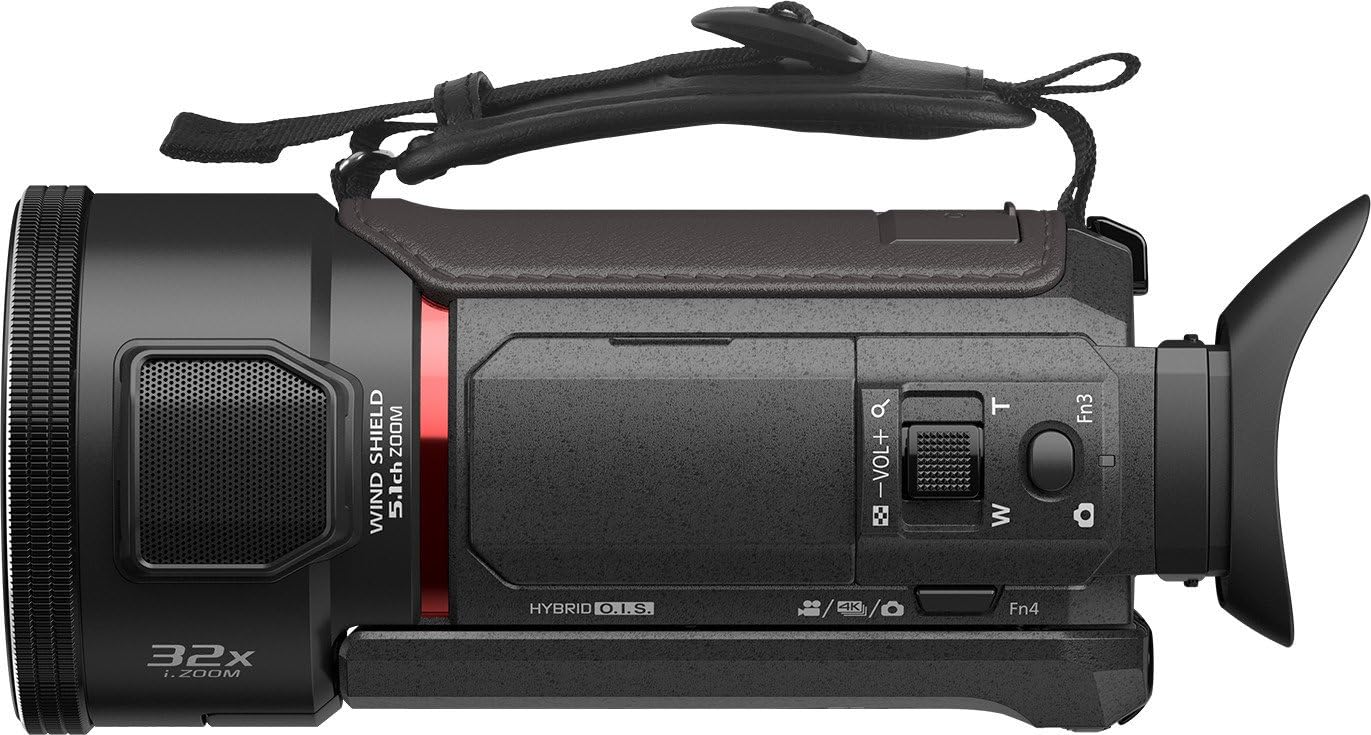
Figure 4: Rear view of the camcorder showing the microphone and headphone jacks.
- Microphone Input: A dedicated microphone jack allows for external microphone connection for improved audio quality.
- Headphone Output: Monitor audio levels during recording using the headphone jack. Note: Some users report a slight audio delay when using headphones.
- Built-in Microphone with Wind Shield: The integrated microphone features a wind shield to reduce wind noise in outdoor environments. It performs well for voice capture, but be mindful of handling noise if holding the camera directly.
Connectivity
- Wi-Fi: The camcorder supports IEEE 802.11b/g/n for wireless connectivity, enabling features like remote control and file transfer.
- Cold Shoe: A cold shoe mount is available for attaching accessories such as external lights or microphones (note: this is a passive mount without electronic contacts).
Maintenance and Care
Cleaning
- Lens: Use a soft, lint-free cloth specifically designed for optical lenses. Avoid harsh chemicals.
- Body: Wipe the camcorder body with a soft, dry cloth. For stubborn dirt, slightly dampen the cloth with water.
Battery Care
- Store batteries in a cool, dry place when not in use.
- Avoid fully discharging batteries frequently to prolong their lifespan.
- Use only genuine Panasonic batteries or reputable third-party alternatives compatible with the HC-WXF1K.
Storage
When storing the camcorder for extended periods, remove the battery and store it separately. Keep the camcorder in a dry, dust-free environment, ideally in a protective case.
Troubleshooting
- Audio Delay with Headphones: If you experience a slight audio delay when monitoring with headphones, this is a known characteristic. Adjusting your monitoring workflow may be necessary.
- Handling Noise in Audio: The built-in microphone can pick up handling noise if the camcorder is moved excessively while recording. For critical audio, consider using an external microphone.
- Wide-Angle Adapter Compatibility: If using a wide-angle adapter, ensure it is at least 62mm (preferably 72mm) to avoid vignetting or seeing the edges of the adapter in your footage, especially at the widest lens setting (25mm).
Specifications
| Feature | Description |
|---|---|
| Brand | Panasonic |
| Model Number | HC-WXF1K |
| Video Capture Resolution | 4K |
| Lens Type | LEICA DICOMAR 24x Optical Zoom (25-600mm) |
| Maximum Aperture | F1.8 |
| Sensor Type | 1/2.5" BSI MOS Sensor |
| Image Stabilization | 5-axis HYBRID O.I.S.+ with Active Mode, Ball O.I.S., Adaptive O.I.S. |
| Connectivity Technology | Wi-Fi (802.11ac) |
| Flash Memory Type | SDXC |
| Screen Size | 3 Inches |
| Item Weight | 1 Pounds |
| Supported Audio Format | AAC |
| Shooting Modes | Active Contrast, Automatic, HDR Movie |
Warranty and Support
Warranty Information
This product is covered by a manufacturer's warranty. Please refer to the warranty card included in your product packaging for specific terms and conditions, including coverage duration and claim procedures.
Customer Support
For further assistance, technical support, or service inquiries, please visit the official Panasonic support website or contact their customer service hotline. Keep your product model number (HC-WXF1K) and proof of purchase handy when contacting support.
Documents and downloads
Ask a question about this manual
Ask about setup, troubleshooting, compatibility, parts, safety, or missing instructions. Manuals+ will review the question and use this page’s manual context to help answer it.