
1. Product Overview
The EVCO EVX003N7XXBXX02 is an advanced electronic regulator designed for precise temperature control in various industrial and commercial applications. It features a clear 4-digit display for easy monitoring and parameter adjustment. This device is built for panel mounting and is compatible with NTC type probes. Its robust design ensures reliable performance in demanding environments.
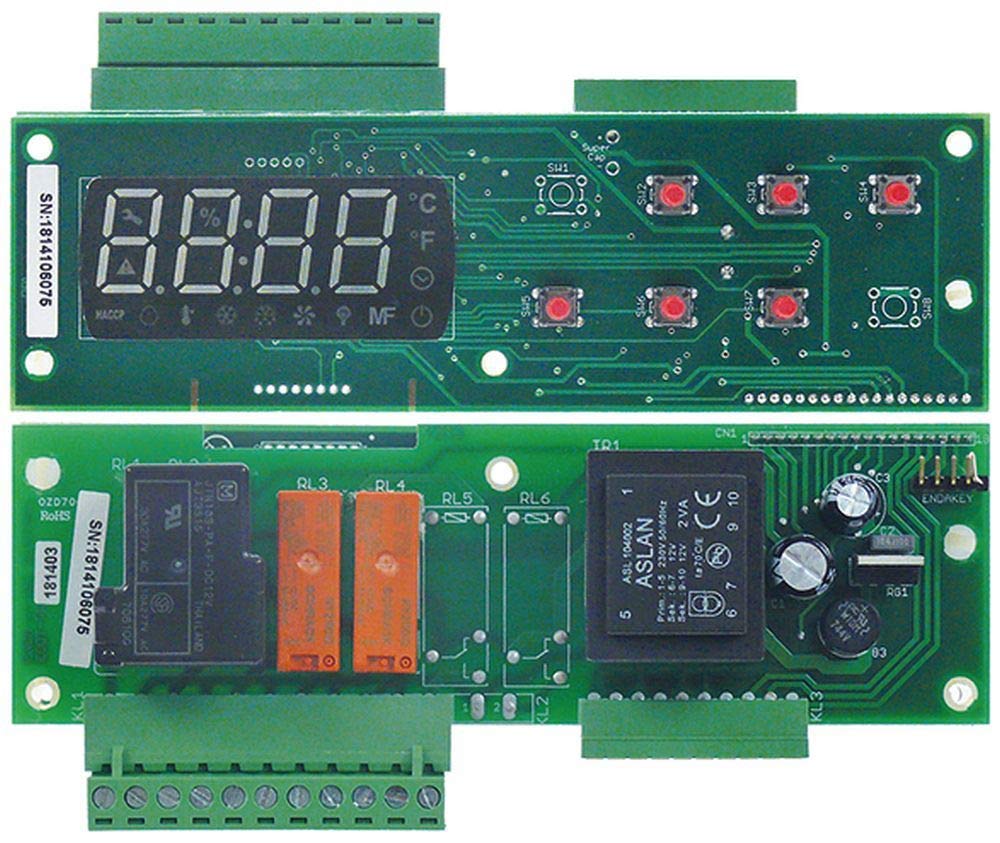
Figure 1: Front view of the EVCO EVX003N7XXBXX02 Electronic Regulator. This image shows the device's 4-digit display and control buttons, indicating its compact design for panel integration.
2. Safety Information
Please read this manual carefully before installation, operation, or maintenance of the EVCO EVX003N7XXBXX02 electronic regulator. Failure to follow these instructions may result in product damage, property damage, or personal injury.
- Electrical Hazard: Installation and maintenance must be performed by qualified personnel only. Disconnect power before servicing.
- Voltage: Ensure the power supply voltage matches the device's specifications (230 V AC).
- Environment: Do not expose the device to excessive moisture, dust, or corrosive substances.
- Mounting: Ensure the device is securely mounted according to the specified dimensions.
- Grounding: Proper grounding is essential to prevent electrical shock.
3. Product Features
The EVCO EVX003N7XXBXX02 electronic regulator offers the following key features:
- 4-Digit Display: Provides clear and precise temperature readings and parameter values.
- Compact Design: Designed for easy integration into control panels with standard mounting dimensions.
- NTC Probe Compatibility: Supports NTC type temperature sensors for accurate measurement.
- Versatile Application: Suitable for a wide range of temperature control tasks.
- Robust Construction: Built for durability and long-term performance.
4. Installation and Setup
Follow these steps for proper installation of the EVCO EVX003N7XXBXX02 regulator:
- Panel Preparation: Create a cut-out in the control panel with dimensions of 155 mm x 45 mm.
- Mounting: Insert the regulator into the prepared cut-out. The device has an embedding depth of 56 mm. Secure the regulator using the provided mounting clips or brackets.
- Wiring: Refer to the wiring diagram (Section 5) for correct electrical connections. Ensure all connections are secure and comply with local electrical codes.
- Probe Connection: Connect the NTC temperature probe to the designated terminals. Ensure correct polarity if applicable.
- Power Connection: Connect the power supply (230 V AC) to the appropriate terminals. Double-check all wiring before applying power.
5. Wiring Diagram
A precise wiring diagram is essential for the correct and safe operation of the EVCO EVX003N7XXBXX02 electronic regulator. Due to the specific nature of electrical connections, it is imperative to refer to the wiring diagram printed on the device label or included in the official packaging. Always ensure that wiring is performed by a qualified electrician in accordance with all local and national electrical codes.
Key connections typically include:
- Power Supply (L, N)
- NTC Probe Input
- Relay Outputs for Control (e.g., compressor, heater)
Warning: Incorrect wiring can lead to device malfunction, electrical shock, or fire. Always consult the official product documentation for the exact wiring schematic.
6. Operating Instructions
Once installed and powered, the EVCO EVX003N7XXBXX02 regulator will display the current temperature measured by the NTC probe. The operation typically involves setting the desired temperature (setpoint) and configuring control parameters.
6.1. Setting the Setpoint
- Press the SET button (or equivalent) to enter setpoint adjustment mode.
- Use the UP and DOWN arrow buttons to adjust the desired temperature value.
- Press SET again to confirm and save the new setpoint.
6.2. Accessing Parameters
Advanced parameters (e.g., hysteresis, probe calibration, alarm settings) are usually accessed via a combination of button presses or a long press on a specific button. Consult the full technical manual for a complete list of parameters and their functions.
- Typically, a long press (e.g., 3-5 seconds) on the SET button or a dedicated PRG (Program) button will grant access to the parameter menu.
- Navigate through parameters using UP and DOWN buttons.
- Press SET to view/edit a parameter value.
- Press SET again to save the change.
- Exit the parameter menu by pressing a specific EXIT button or by waiting for a timeout.
Note: Specific button functions and parameter codes may vary. Always refer to the detailed programming manual for comprehensive instructions.
7. Maintenance
Regular maintenance ensures the longevity and optimal performance of your EVCO EVX003N7XXBXX02 regulator.
- Cleaning: Periodically clean the front panel with a soft, damp cloth. Do not use abrasive cleaners or solvents. Ensure no liquid enters the device.
- Inspection: Regularly inspect wiring connections for looseness or signs of damage. Check the temperature probe for physical damage or corrosion.
- Power Disconnection: Always disconnect power to the device before performing any cleaning or inspection.
8. Troubleshooting
This section provides solutions to common issues you might encounter with the EVCO EVX003N7XXBXX02 regulator.
| Problem | Possible Cause | Solution |
|---|---|---|
| Display is off | No power supply; Incorrect wiring; Blown fuse. | Check power connections; Verify wiring against diagram; Check and replace fuse if necessary. |
| Incorrect temperature reading | Faulty probe; Incorrect probe type; Probe not connected properly; Calibration error. | Check probe connection; Ensure NTC probe is used; Replace probe if damaged; Check calibration settings. |
| Output (e.g., compressor) not activating | Setpoint not reached; Hysteresis setting too wide; Output relay fault; Wiring issue. | Verify setpoint and current temperature; Adjust hysteresis; Check output wiring; Consult a technician if relay is suspected faulty. |
| Device not responding to button presses | Device locked; Internal fault. | Check if a key lock function is active (refer to full manual); Power cycle the device; If issue persists, contact support. |
If the problem persists after attempting these solutions, please contact EVCO technical support or a qualified service technician.
9. Technical Specifications
| Parameter | Value |
|---|---|
| Model | EVX003N7XXBXX02 |
| Display | 4 digits |
| Mounting Dimensions (Cut-out) | 155 x 45 mm |
| Mounting Depth | 56 mm |
| Probe Type | NTC |
| Protection Rating | IP00 |
| Voltage | 230 V AC |
| Current Rating (NO-16A) | 16A (5) |
| Manufacturer Reference | 4251391455757 |
10. Warranty and Support
For information regarding the product warranty, please refer to the warranty card included with your purchase or visit the official EVCO website. For technical support, spare parts, or service inquiries, please contact your authorized EVCO distributor or the manufacturer directly.
Manufacturer: EVCO
Please have your product model number (EVX003N7XXBXX02) and serial number ready when contacting support.