
1. Important Safety Information
Please read and understand this entire owner's manual, including all safety information, before plugging in or using this product. Failure to do so could result in fire, electric shock, or serious personal injury.
- Always disconnect the fireplace from the power supply before cleaning, performing maintenance, or relocating.
- Do not operate any fireplace with a damaged cord or plug, or if the heater has malfunctioned, been dropped, or damaged in any manner.
- Do not use outdoors. This fireplace is intended for indoor use only.
- Keep combustible materials, such as furniture, pillows, bedding, papers, clothes, and curtains at least 3 feet (0.9 m) from the front of the fireplace.
- This appliance is hot when in use. To avoid burns, do not let bare skin touch hot surfaces.
- Always use a properly grounded, fused, and polarized outlet.
- Do not run cord under carpeting. Do not cover cord with throw rugs, runners, or similar coverings. Arrange cord away from traffic area and where it will not be tripped over.
- The fireplace is equipped with an overheat protection feature. If the heater overheats, it will automatically shut off. If this occurs, unplug the fireplace from the electrical outlet and wait 5-10 minutes before plugging it back in.
2. Product Overview
The ROVSUN 30-inch Electric Fireplace offers a modern heating solution with versatile installation options and customizable ambiance. It features a 1500W heater, realistic flame effects, and smart control capabilities.
Key Features:
- Versatile Installation: Designed for both wall-mounted and recessed installation.
- Efficient Heating: Powerful 1500W output, adjustable temperature from 62°F-82°F, suitable for various room sizes (approx. 300 sq.ft).
- Customizable Ambiance: 12 realistic dancing flame colors, 12 LED bed colors, and 5 brightness levels for personalized atmosphere.
- Smart Control: Operate via remote control, touch screen control panel, or a dedicated Smart mobile application.
- Safety Features: ETL certified, includes overheat protection and automatic shutoff if tilted more than 45 degrees.

3. Setup and Installation
The ROVSUN Electric Fireplace can be installed as a wall-mounted unit or recessed into a wall. Ensure the installation location is away from other appliances and combustible materials.
Dimensions:
- Product Dimensions: 3.7"D x 30"W x 18.5"H
- Recessed Opening Dimensions: Approximately 29.3"W x 17.8"H x 4.3"D
Installation Options:
- Wall-Mounted Installation:
Secure the included mounting bracket to a wall stud using appropriate hardware. Carefully lift the fireplace and hang it onto the mounting bracket. Ensure it is level and securely fastened. - Recessed Installation:
Create an opening in the wall according to the specified recessed dimensions. Ensure there is adequate clearance and ventilation. Slide the fireplace into the opening and secure it using the provided screws.


4. Operating Instructions
Your ROVSUN Electric Fireplace can be controlled using the included remote control, the touch screen control panel on the unit, or the dedicated Smart mobile application.
Control Panel and Remote Functions:
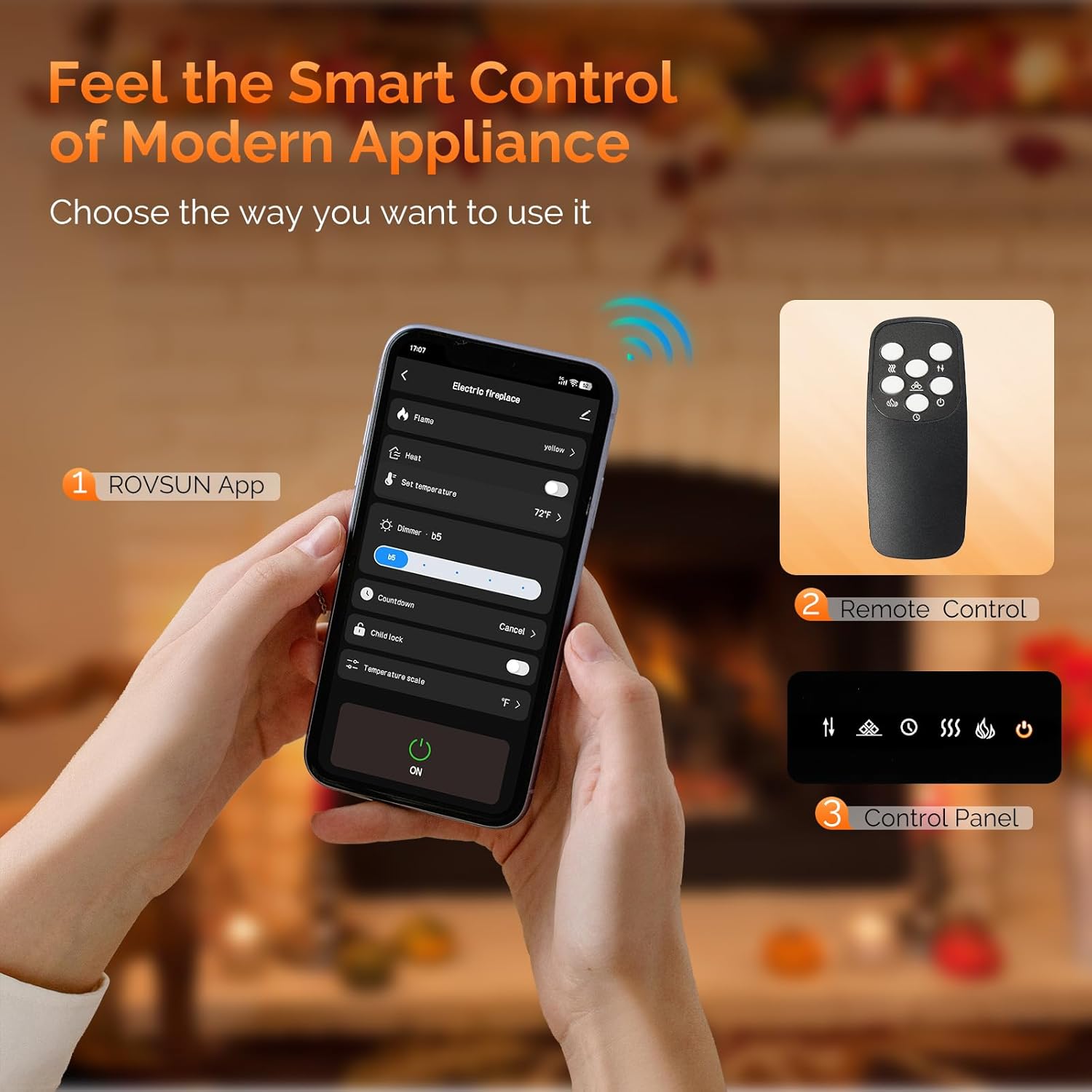
- Power Button: Turns the fireplace ON or OFF.
- Heater Button: Activates the heating function. Press repeatedly to cycle through heat settings (e.g., H1, H2, or temperature settings).
- Temperature Adjustment: Use the adjusting buttons (up/down arrows) to set the desired temperature between 62°F and 82°F.
- Flame Button: Changes the flame color. Press repeatedly to cycle through the 12 available flame colors.
- Crystal Button: Changes the LED bed color. Press repeatedly to cycle through the 12 available bed colors.
- Adjusting Button (Flame Brightness): Use the adjusting buttons (up/down arrows) to select one of the 5 flame brightness levels.
- Timer Button: Sets the automatic shut-off timer from 1 to 12 hours.
Smart App Control:
Download the ROVSUN Smart mobile application from your device's app store. Follow the in-app instructions to connect your fireplace via WiFi. The app provides comprehensive control over all fireplace functions, including power, temperature, flame colors, bed colors, brightness, and timer settings.


5. Maintenance
Regular maintenance ensures optimal performance and longevity of your electric fireplace.
- Cleaning: Always unplug the fireplace before cleaning. Use a soft, damp cloth to wipe the exterior surfaces. Do not use abrasive cleaners or sprays.
- Ventilation: Ensure the air vents are clear of dust and debris to maintain proper airflow for the heater.
- Storage: If storing the fireplace for an extended period, unplug it and store it in a dry, dust-free location.
6. Troubleshooting
If you encounter issues with your fireplace, refer to the following troubleshooting guide:
| Problem | Possible Cause | Solution |
|---|---|---|
| Fireplace does not turn on. | No power, power cord not plugged in, circuit breaker tripped. | Ensure the power cord is securely plugged into a grounded outlet. Check your household circuit breaker. |
| Heater does not produce heat. | Heater function not activated, temperature setting too low, overheat protection activated. | Press the Heater button to activate. Increase the temperature setting. If overheat protection activated, unplug for 5-10 minutes. |
| Flame effect not working. | Flame function not activated, LED light issue. | Ensure the fireplace is powered on. Press the Flame button to activate or change flame colors. If issue persists, contact customer support. |
| Remote control not working. | Dead batteries, obstruction, remote out of range. | Replace batteries in the remote. Ensure no obstructions between remote and fireplace. Operate within recommended range. |
| WiFi app connection issues. | Incorrect WiFi password, router issues, app not updated. | Verify WiFi password. Restart your router. Ensure the app is updated to the latest version. Refer to the app's help section for specific connection steps. |
| Unusual odors or sounds. | New unit odor, dust accumulation, internal component issue. | A slight odor may occur during initial use; this is normal. If strong or persistent odors/sounds occur, immediately unplug the unit and contact customer support. |
7. Specifications
| Feature | Detail |
|---|---|
| Brand | ROVSUN |
| Model Name | 611890863417 |
| Power Source | Corded Electric |
| Product Dimensions | 3.7"D x 30"W x 18.5"H |
| Material | Glass |
| Finish Type | Tempered Glass |
| Installation Type | Wall Mount, Recessed |
| Heat Output | 5200 British Thermal Units (BTU) |
| Heating Coverage | Approx. 300 sq.ft |
| Color | Black |
| Room Type | Bedroom, Living Room |
| Item Weight | 22.1 Pounds |
| Burner Type | Quartz |
| UPC | 611890863417 |
8. Warranty Information
This ROVSUN Electric Fireplace comes with a Limited Warranty. For specific terms, conditions, and duration of the warranty, please refer to the warranty card included with your product packaging or contact ROVSUN customer support directly. Keep your proof of purchase for warranty claims.
9. Customer Support
For any questions, technical assistance, or service inquiries regarding your ROVSUN Electric Fireplace, please contact ROVSUN customer support. Contact information can typically be found on the product packaging, the official ROVSUN website, or within the product's included documentation.