1. Introduction
The Steelcase Series 1 Office Chair is engineered to provide essential ergonomics and quality, offering a blend of performance, style, and choice. This manual will guide you through the chair's features, assembly, adjustments, and care to ensure optimal use and longevity.
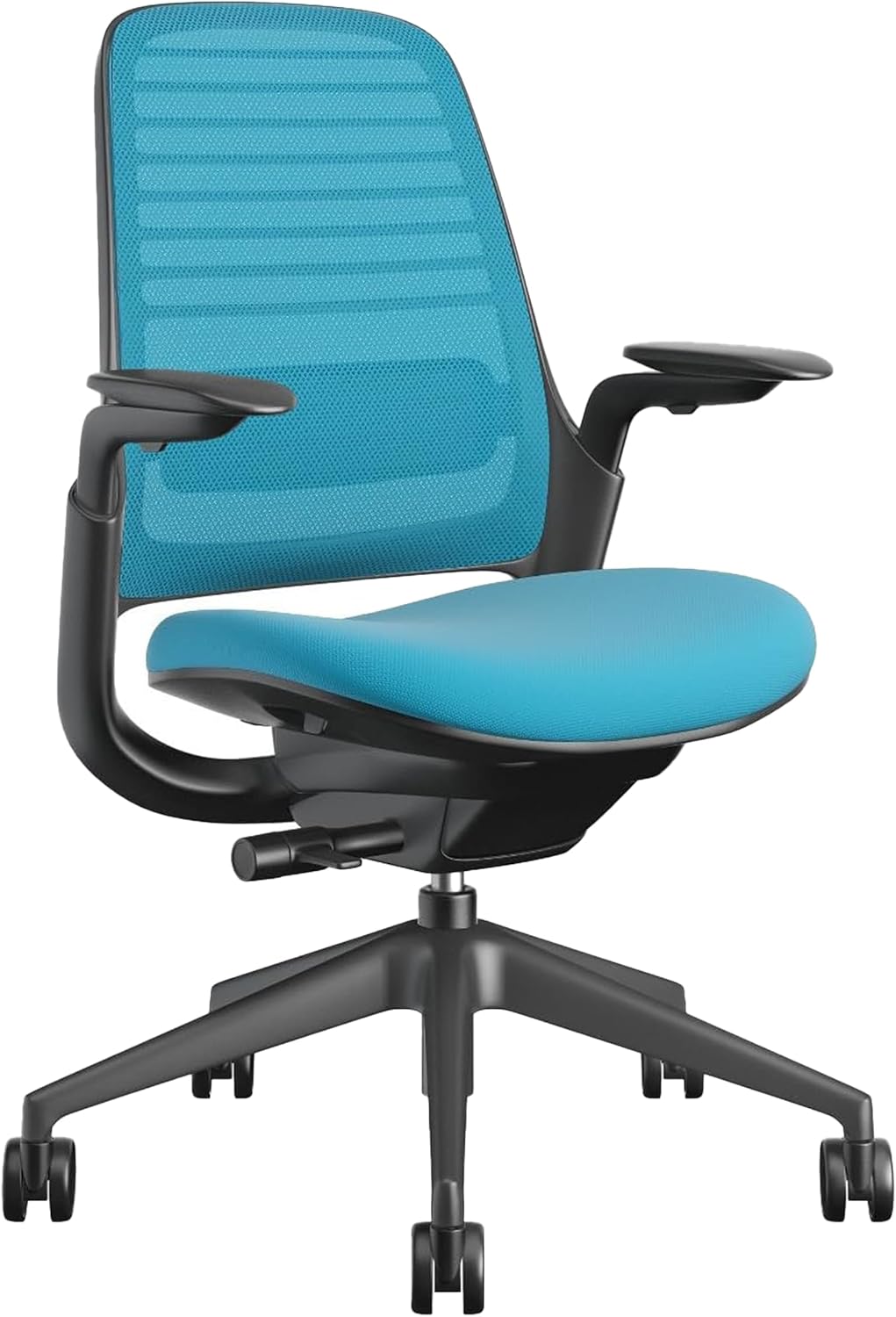
Figure 1: Steelcase Series 1 Office Chair (Blue Jay)
2. Important Safety Information
WARNING:
- Do not use if you exceed the maximum weight capacity of 300 pounds.
- Be cautious when using the chair, as its space-efficient design may affect stability.
3. Setup and Assembly
The Steelcase Series 1 chair is designed for quick and easy assembly, requiring no tools and taking less than 2 minutes. The chair arrives in a few main components: the base with casters, the gas lift cylinder, and the seat/back assembly.
- Carefully remove all components from the packaging.
- Insert the gas lift cylinder firmly into the center hole of the chair base.
- Align the seat/back assembly with the top of the gas lift cylinder and press down firmly until it clicks into place.
- Ensure all connections are secure before use.
For a visual guide, please refer to the assembly video below.
Video: Assembly and Demonstration of the Steelcase Series 1 Chair. This video illustrates the simple, tool-free assembly process and provides an overview of the chair's features.
4. Operating Your Chair (Adjustments)
The Steelcase Series 1 chair offers several intuitive adjustments to customize your seating experience for optimal ergonomic support.
- Seat Height Adjustment: Locate the lever under the right side of the seat. Pull the lever up to raise the seat, or remain seated and pull the lever up to lower the seat. Release the lever to lock the height.
- Seat Depth Adjustment: The seat can be adjusted forward or backward to provide adequate leg support. Locate the lever under the left side of the seat. Pull the lever and slide the seat to your desired depth. Release the lever to lock.
- Armrest Adjustments: The armrests are 4-dimensional for comprehensive support.
- Height: Press the button on the side of the armrest support and move the armrest up or down. Release the button to lock.
- Pivot: The armrest pads can pivot inward and outward.
- Depth: The armrest pads can slide forward and backward.
- Width: The armrests can be moved closer or further from the seat.
- Recline and Tilt Tension: The chair features a weight-activated mechanism that automatically adjusts to your body. Use the knob under the seat to fine-tune the tilt tension to your preference. The chair offers two reclining positions.
- Lumbar Support: The flexible backrest provides adaptive bolstering for pressure-free support. The lumbar support can be adjusted vertically by sliding it up or down on the backrest to target your lower back curve.

Figure 2: Detail of the chair's LiveBack Flexor System and adaptive bolstering for lumbar support.
5. Maintenance
To maintain the appearance and functionality of your Steelcase Series 1 chair, follow these simple care instructions:
- Cleaning: Spot wash the fabric components as needed. Use a mild soap and water solution with a soft cloth. Avoid harsh chemicals or abrasive cleaners.
- Inspection: Periodically check all moving parts and fasteners to ensure they are secure. Tighten any loose screws if necessary.
- Casters: Keep casters free of debris (hair, lint, etc.) to ensure smooth movement.
6. Troubleshooting
If you encounter any issues with your Steelcase Series 1 chair, please refer to the following common solutions:
- Chair not adjusting height: Ensure the height adjustment lever is fully engaged or disengaged. Check for any obstructions in the gas lift mechanism.
- Casters not rolling smoothly: Inspect casters for trapped debris and clean as necessary. Ensure the casters are appropriate for your flooring type (carpet casters are installed on this model).
- Backrest not reclining: Verify that the tilt lock mechanism is disengaged. Adjust the tilt tension knob to ensure it's not set too tightly.
For persistent issues, please contact Steelcase customer support.
7. Specifications
| Feature | Detail |
|---|---|
| Brand | Steelcase |
| Model Name | Series 1 work chair |
| Item Model Number | 435A00 |
| Color | Blue Jay |
| Product Dimensions | 31"D x 28.5"W x 16"H |
| Item Weight | 29 pounds |
| Maximum Weight Recommendation | 300 Pounds |
| Style | Carpet Casters |
| Special Feature | Adjustable |
| Reclining Position Count | 2 |
| Assembly Required | No (Easy assembly, no tools required) |

Figure 3: Key dimensions of the Steelcase Series 1 Office Chair.
8. Warranty and Support
For detailed warranty information and customer support, please refer to the official Steelcase website or contact your authorized Steelcase dealer. Keep your purchase receipt for warranty claims.


