
Introduction
This manual provides detailed instructions for the safe and efficient use of your MIPRO ACT-32H UHF Handheld Transmitter. Please read this manual thoroughly before operating the device and retain it for future reference.
The MIPRO ACT-32H handheld transmitter features improved RF circuitry, a rugged housing, premium low power consumption characteristics, a lockable silent on/off switch, extremely low handling noise, improved anti-pop characteristics, and unsurpassed off-axis rejection. It is designed for professional audio applications requiring reliable wireless transmission.
Safety Information
- Do not expose the device to rain or moisture.
- Do not disassemble the device. Refer all servicing to qualified personnel.
- Use only specified batteries.
- Keep the device away from heat sources and direct sunlight.
- Ensure proper ventilation during operation.
Package Contents
Verify that all items listed below are present in your package:
- MIPRO ACT-32H UHF Handheld Transmitter
- Battery
- User Manual (this document)
Product Overview
Familiarize yourself with the components of your ACT-32H handheld transmitter.

Figure 1: MIPRO ACT-32H Handheld Transmitter with approximate dimensions. The transmitter measures approximately 9.2 inches in length and 2 inches in width at the microphone head.
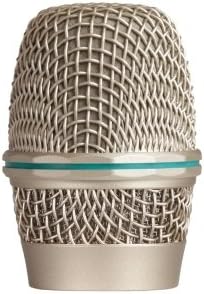
Figure 2: Close-up of the microphone head, highlighting the durable metal grille and the teal accent ring.
Setup
1. Installing the Battery
- Unscrew the lower part of the transmitter body to access the battery compartment.
- Insert the battery, ensuring correct polarity (+/-).
- Screw the lower part back onto the transmitter body until secure.
2. Powering On/Off
- To power on, slide the power switch to the "ON" position. The display will illuminate.
- To power off, slide the power switch to the "OFF" position. The display will turn off.
- The ACT-32H features a lockable silent on/off switch to prevent accidental power changes during use.
3. Frequency Synchronization
The ACT-32H transmitter must be synchronized with a compatible MIPRO receiver. Refer to your receiver's manual for specific synchronization procedures. Generally, this involves:
- Ensure both the transmitter and receiver are powered on.
- Activate the ACT (Automatic Channel Targeting) function on your receiver.
- Align the IR port of the transmitter with the IR port of the receiver.
- The receiver will transmit the selected frequency to the transmitter.
- Confirm successful synchronization on both devices' displays.
Operating Instructions
1. Holding the Transmitter
Hold the microphone firmly but comfortably. Avoid covering the grille with your hand, as this can affect sound quality and RF performance.
2. Speaking into the Microphone
Speak directly into the top of the microphone grille. Maintain a consistent distance for optimal sound pickup. The ACT-32H features improved anti-pop characteristics and unsurpassed off-axis rejection, minimizing unwanted noise.
3. Monitoring Battery Life
The transmitter's display will indicate the current battery level. Replace batteries promptly when the indicator shows low power to avoid interruption during use.
4. Adjusting Gain (if applicable)
If your model supports gain adjustment on the transmitter, refer to the specific instructions for setting the input sensitivity to match your vocal level and prevent distortion.
Maintenance
1. Cleaning
- Wipe the exterior of the transmitter with a soft, dry cloth.
- For stubborn dirt, use a slightly damp cloth and then dry thoroughly.
- Do not use abrasive cleaners, solvents, or harsh chemicals.
- Periodically clean the microphone grille with a soft brush to remove debris.
2. Battery Care
- Remove batteries if the transmitter will not be used for an extended period to prevent leakage.
- Dispose of used batteries responsibly according to local regulations.
3. Storage
- Store the transmitter in a cool, dry place, away from direct sunlight and extreme temperatures.
- Protect the microphone from physical impact.
Troubleshooting
| Problem | Possible Cause | Solution |
|---|---|---|
| No sound output | Transmitter not powered on; Low battery; Incorrect frequency; Receiver not powered on or muted. | Ensure transmitter is on; Replace battery; Resynchronize frequency with receiver; Check receiver power and mute status. |
| Intermittent signal or dropouts | Interference; Transmitter too far from receiver; Obstructions; Low battery. | Change operating frequency; Reduce distance between transmitter and receiver; Remove obstructions; Replace battery. |
| Poor sound quality (distortion, noise) | Input gain too high/low; Microphone placement; Environmental noise. | Adjust transmitter gain (if available) or receiver gain; Adjust microphone distance from mouth; Minimize environmental noise. |
Specifications
| Feature | Detail |
|---|---|
| Model | ACT-32H |
| Brand | MIPRO |
| Microphone Form Factor | Handheld |
| Connectivity Technology | UHF Wireless |
| Frequency Range | 506-530 MHz (5A band) |
| Power Source | Battery Powered |
| Material | Metal |
| Number of Channels | 1 |
| Polar Pattern | Unidirectional |
| Item Weight | 3 pounds |
| Included Components | Battery |
| Special Feature | Lightweight |
| Compatible Devices | Smartphone, Laptop, Tablet, Camera, Speaker (via compatible receiver) |
Warranty and Support
For warranty information and technical support, please refer to the official MIPRO website or contact your authorized dealer. Keep your purchase receipt as proof of purchase.
MIPRO products are designed for reliability and performance. Should you encounter any issues not covered in this manual, professional assistance is recommended.


