
Introduction
The Sony XBR49X900F is a 49-inch 4K Ultra HD Smart LED Android TV designed to deliver a high-quality viewing experience. It features the X1 Extreme Processor for enhanced picture processing, X-tended Dynamic Range PRO 6X for superior contrast, and a TRILUMINOS display for vibrant colors. With X-Motion Clarity technology, fast-moving scenes are rendered smoothly and clearly. This television integrates smart features through the Android TV operating system, offering voice control compatibility with Google Assistant and Alexa for convenient navigation and control.
What's in the Box
- Sony XBR49X900F 4K Ultra HD Smart LED Android TV
- Voice Remote Control
- 2 x AA Batteries (for remote control)
- AC Power Cord (US, 2-pin, flat blades, Polarity)
- IR Blaster
- Operating Instructions
- Quick Setup Guide / Supplement CUE
- Table Top Stand (Assembly required)
Setup
1. Unpacking and Stand Assembly
Carefully remove the TV and all components from the packaging. Assemble the table top stand according to the instructions provided in the Quick Setup Guide. Ensure the stand is securely attached to the TV and placed on a stable, level surface.

Image: Close-up view of the TV's table top stand, showing its design and how it supports the screen.
2. Connecting Peripherals
Connect your external devices such as gaming consoles, Blu-ray players, or sound systems to the TV's input ports. The TV features 4 HDMI ports, 2 USB 2.0 ports, 1 USB 3.0 port, and 1 Composite port.
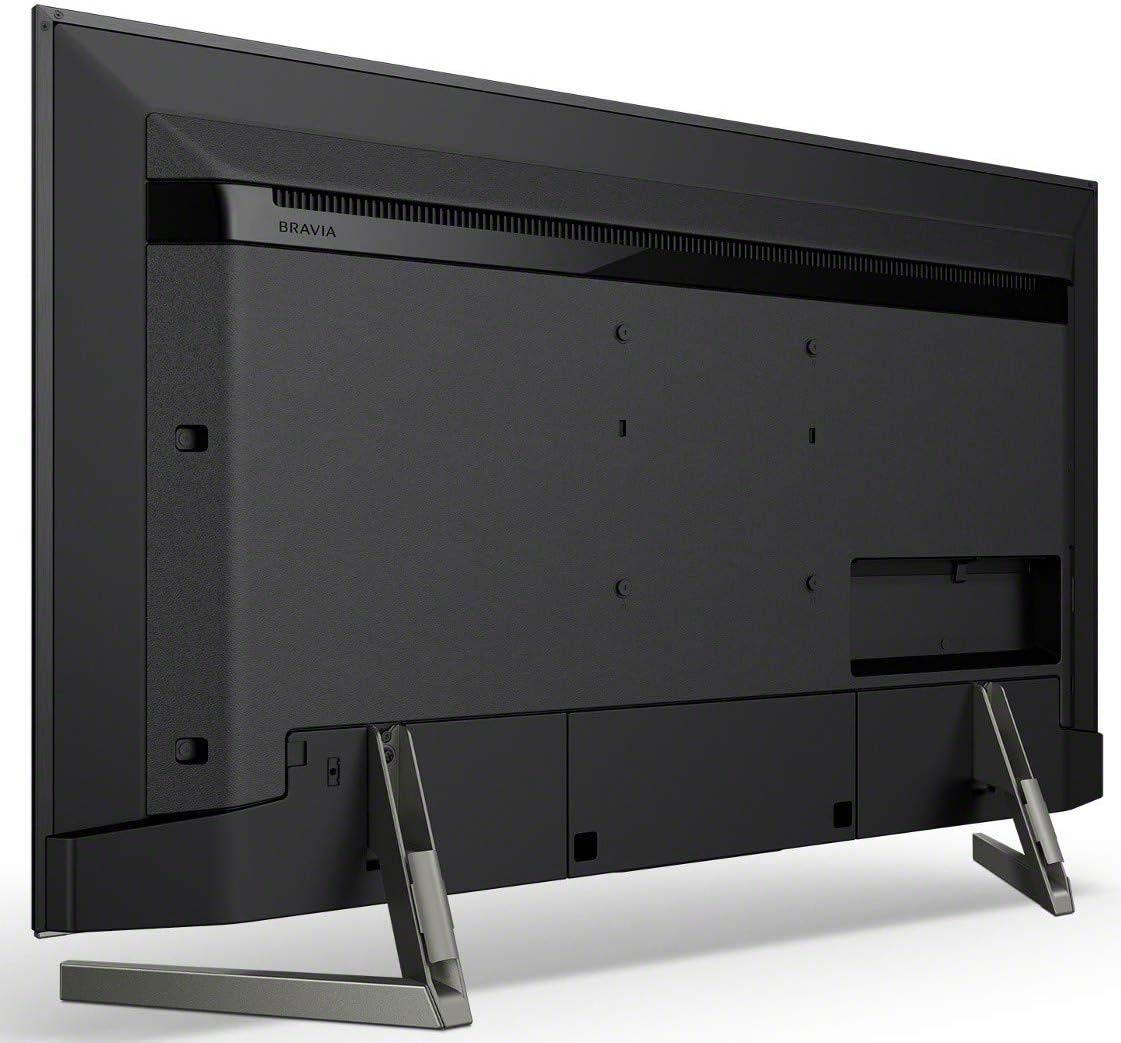
Image: Rear view of the Sony XBR49X900F television, highlighting the various input and output ports for connecting external devices.
3. Power On and Initial Setup
Plug the AC power cord into the TV and a wall outlet. Press the power button on the remote control or the TV. Follow the on-screen instructions to complete the initial setup, including connecting to your Wi-Fi network and configuring Android TV settings.
Video: An official seller video demonstrating the features of the Sony XBR75X900F, which shares many functionalities with the XBR49X900F model, including smart features and picture quality enhancements.
Operating Instructions
1. Basic TV Functions
Use the provided Voice Remote Control to power the TV on/off, adjust volume, change channels, and navigate menus. The remote also features dedicated buttons for popular streaming services.

Image: The Sony Voice Remote Control, featuring a prominent Google Assistant button for voice commands.
2. Picture Quality Enhancements
- X1 Extreme Processor: This processor enhances picture quality through 4K X-Reality PRO, which upscales images to near 4K resolution, and X-tended Dynamic Range PRO 6X, which provides superior brightness and contrast.
- TRILUMINOS Display: Experience a wider, brighter, and more vivid color palette for a lifelike viewing experience.
- X-Motion Clarity: This technology ensures smooth and clear on-screen action by controlling blurriness, ideal for fast-paced content.
- HDR Support: The TV supports HDR10, HLG, and Dolby Vision formats, delivering enhanced contrast and color detail in compatible content.
3. Smart TV Features (Android TV)
The TV runs on the Android TV operating system, providing access to a wide range of apps and services. Use the intuitive interface to browse content, stream videos, and manage settings.
- Voice Control: The TV is compatible with Google Assistant and Alexa. Use your voice remote to search for content, control playback, adjust settings, and even manage smart home devices.
- Internet Applications: Access popular apps like YouTube directly from your TV.
Image: The Sony Voice Remote Control, featuring a prominent Google Assistant button for voice commands.
4. Connectivity
The TV offers various connectivity options:
- Wi-Fi: Built-in Wi-Fi for wireless internet connection.
- Bluetooth: For connecting compatible wireless accessories.
- HDMI: 4 ports for high-definition audio and video input.
- USB: 2 USB 2.0 ports and 1 USB 3.0 port for media playback and device connection.
- Composite: 1 port for older video devices.
Maintenance
To ensure the longevity and optimal performance of your Sony TV, follow these maintenance guidelines:
- Cleaning the Screen: Gently wipe the screen with a soft, dry, lint-free cloth. For stubborn smudges, lightly dampen the cloth with water or a screen-cleaning solution specifically designed for electronics. Avoid harsh chemicals or abrasive materials.
- Cleaning the Frame: Use a soft, dry cloth to wipe the TV frame.
- Ventilation: Ensure proper ventilation around the TV. Do not block the ventilation openings on the back or sides of the TV.
- Power Cord: Regularly check the power cord for any damage. If damaged, discontinue use and contact customer support.
- Avoid Direct Sunlight: Do not expose the TV to direct sunlight or excessive heat, as this can affect performance and lifespan.
Troubleshooting
If you encounter issues with your TV, refer to the following common troubleshooting steps:
- No Power: Ensure the power cord is securely plugged into both the TV and a working electrical outlet. Try plugging another device into the same outlet to confirm it has power.
- No Picture/Sound: Verify that the correct input source is selected. Check all cable connections (HDMI, Composite) to ensure they are secure. If using an external receiver, ensure it is powered on and configured correctly.
- Poor Picture Quality: Adjust picture settings (brightness, contrast, color) in the TV menu. Ensure your content source is of high quality. If using an antenna, check its connection and position.
- Remote Control Not Working: Replace the batteries in the remote control. Ensure there are no obstructions between the remote and the TV's IR sensor.
- Smart Features/Apps Not Working: Check your internet connection. Restart the TV by unplugging it from the power outlet for a few minutes, then plugging it back in. Update the TV's software if an update is available.
- TV Not Responding (e.g., Flashing Lights): If the TV exhibits unusual behavior like indicator lights flashing repeatedly, unplug the TV from the power outlet for several minutes, then plug it back in. If the issue persists, consult the full operating manual or contact Sony support.
Specifications
| Feature | Specification |
|---|---|
| Screen Size | 49 Inches |
| Brand | Sony |
| Display Technology | LED-LCD |
| Resolution | 4K |
| Refresh Rate | 120 Hz |
| Special Feature | Flat |
| Connectivity Technology | Built-in Wi-Fi, HDMI, USB, Bluetooth |
| Aspect Ratio | 16:9 |
| Product Dimensions (D x W x H) | 10.63"D x 43.13"W x 27.38"H |
| Contrast Ratio | High |
| HDR Format Supported | Dolby Vision, HDR10, HLG |
| Motion Enhancement Technology | X Motion Clarity |
| Picture Quality Enhancement Technology | 4K X-Reality PRO, X-tended Dynamic Range PRO 6X, Full-array local dimming, TRILUMINOS display |
| Display Backlight Technology | LED |
| Item Weight | 32 Pounds |
| Internet Applications | YouTube |
| Total Number of HDMI Ports | 4 |
| Hardware Interface | HDMI, USB 2.0, USB 3.0 |
| Total USB 3.0 Ports | 1 |
| Total USB Ports | 3 |
| Operating System | Android |
| Control Method | Voice |
| Controller Type | Remote Control |
| Model Year | 2018 |
| VESA Mount Standard | 400 x 200 mm |
| Color | Black |
| Compatible Devices | Laptop, Gaming Console, Desktop, Cellphone, Speaker, Tablet |
| Tuner Type | ATSC |
Warranty
This Sony XBR49X900F television comes with a 1 Year Limited Warranty. For detailed terms and conditions, please refer to the warranty documentation included with your product or visit the official Sony support website.
Support
For further assistance, product registration, or to access additional resources, please visit the official Sony Store or contact Sony customer support.


