
Product Overview
The ZAGG Rugged Book is a versatile and durable detachable case and keyboard designed to transform your iPad into a portable workstation. It offers robust protection and multiple viewing modes, enhancing productivity and convenience for various tasks. This manual provides essential information for setup, operation, maintenance, and troubleshooting.

Image: ZAGG Rugged Book Detachable Case and Keyboard in a closed position, showcasing its robust design.
What's in the Box
- Keyboard Case
- Owners Manual
- USB-C to USB-C Cable
Setup and Installation
Follow these steps to set up your ZAGG Rugged Book:
- Insert iPad: Carefully slide your iPad into the bottom of the case. Ensure it is seated securely.
- Snap into Place: Gently press the top-right and then the top-left corners of your iPad until it snaps firmly into the case.
- Bluetooth Pairing: Turn on the keyboard. On your iPad, go to Settings > Bluetooth and select 'ZAGG Rugged Book' from the list of available devices to pair.

Image: Step-by-step visual guide demonstrating the simple snap-fit installation of the iPad into the Rugged Book case.
For detailed installation instructions, please refer to the official Installation Manual (PDF) available via the provided documentation link.
Operating Instructions
The ZAGG Rugged Book offers multiple modes for enhanced usability:
- Keyboard Mode: Use your iPad like a laptop with the full-size, backlit keyboard. The magnetic hinge allows for adjustable viewing angles.
- Video Mode: Detach the keyboard and use the case as a stand for watching videos or presentations.
- Case Mode: Remove the keyboard entirely for a protective case that shields your iPad from drops and scratches.
- Book Mode: Fold the keyboard back to use your iPad like a book for reading or browsing.
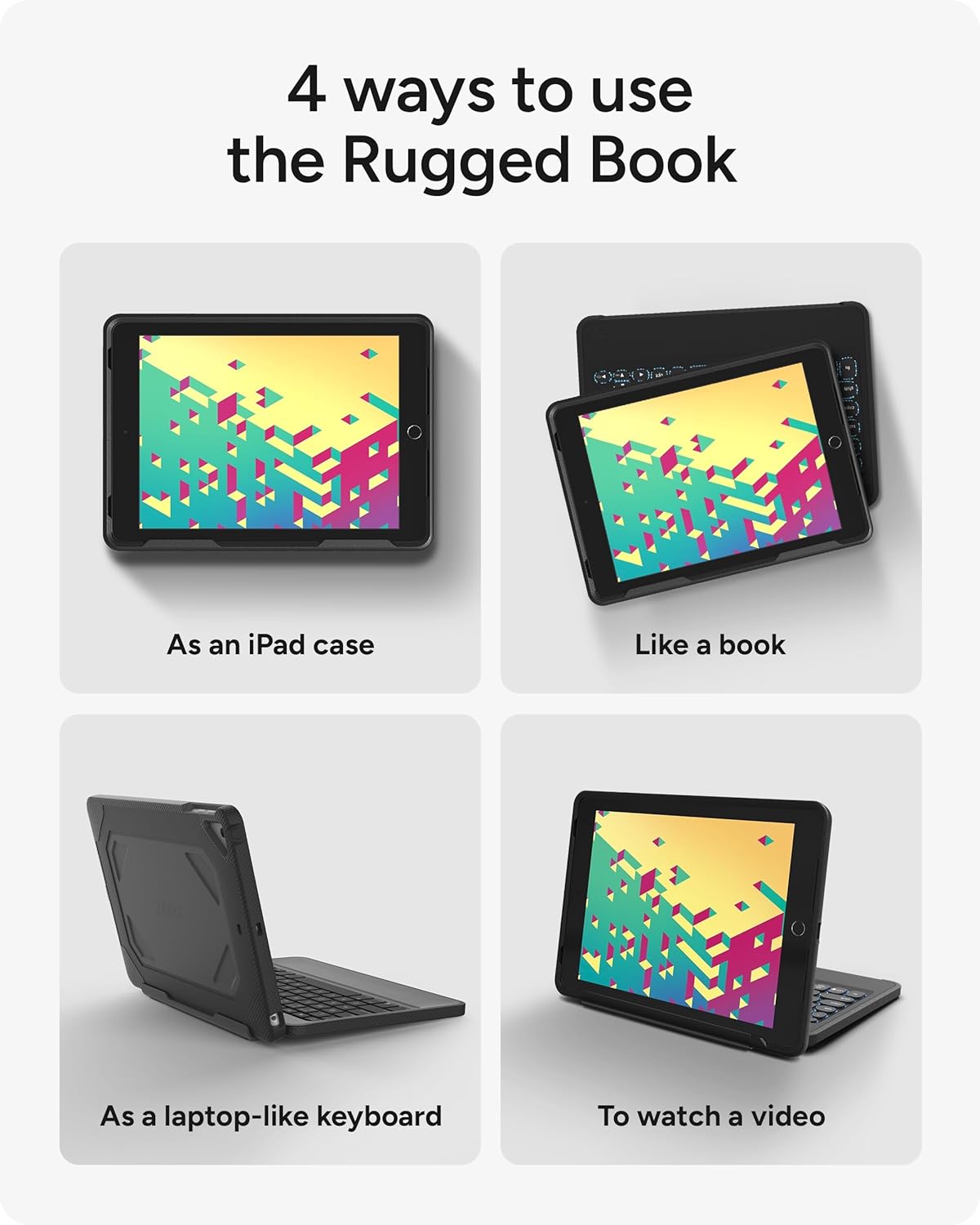
Image: Illustration showing the four versatile ways to use the ZAGG Rugged Book: as an iPad case, like a book, as a laptop-like keyboard, and for watching videos.
Keyboard Features
- Backlit Keys: The laptop-style keys feature backlighting in 7 colors, allowing for comfortable typing in low-light conditions.
- Multi-Device Pairing: Connect up to three Apple, Android, or Windows devices simultaneously via Bluetooth and easily switch between them.
- Long-Lasting Battery: The rechargeable battery can last up to 2 years between charges, depending on backlight usage. The sleep/wake function helps conserve battery life.

Image: Close-up of the backlit, laptop-style keys on the ZAGG Rugged Book keyboard, designed for clean and precise keystrokes.

Image: Visual representation of the multi-device pairing capability, showing the ZAGG Rugged Book connected to an iPad and a smartphone via Bluetooth.
Maintenance
To ensure the longevity and optimal performance of your ZAGG Rugged Book, follow these maintenance guidelines:
- Cleaning: Use a soft, damp cloth to wipe down the exterior of the case and keyboard. Avoid harsh chemicals or abrasive materials.
- Battery Care: While the battery is long-lasting, regular charging when low is recommended. Avoid completely draining the battery for extended periods.
- Storage: When not in use, store the Rugged Book in a cool, dry place away from direct sunlight and extreme temperatures.
Troubleshooting
If you encounter issues with your ZAGG Rugged Book, try the following:
- Keyboard Not Connecting: Ensure Bluetooth is enabled on your iPad and the keyboard is charged. Try unpairing and re-pairing the keyboard in your iPad's Bluetooth settings.
- Keys Not Responding: Check the keyboard's power switch. If individual keys are unresponsive, ensure no debris is lodged beneath them.
- Charging Issues: Verify that the USB-C cable is securely connected to both the keyboard and a power source. Try a different USB-C cable or power adapter.
- Case Fit: If the iPad does not fit securely, ensure you have the correct model of ZAGG Rugged Book for your iPad. Refer to the compatibility section.
Product Specifications
| Feature | Specification |
|---|---|
| Standing screen display size | 9.7 Inches |
| Brand | ZAGG |
| Series | ZAGG Rugged Book Durable Case and Bluetooth Keyboard for Apple iPad (Last |
| Item model number | A97RGK-BB0 |
| Operating System | Windows, Android |
| Item Weight | 2.56 pounds |
| Product Dimensions | 9.84 x 1.1 x 7.2 inches |
| Item Dimensions LxWxH | 9.84 x 1.1 x 7.2 inches |
| Color | Black |
| Number of Processors | 1 |
| Power Source | Battery Powered |
| Batteries | 1 Lithium Polymer batteries required. (included) |
| Manufacturer | ZAGG |
| ASIN | B078CY8YDZ |
| Country of Origin | China |
| Is Discontinued By Manufacturer | No |
| Date First Available | December 5, 2017 |
| Compatible Devices | Apple iPad Pro 9.7 (iPad Pro 9.7 Gen 1), Apple iPad Air (Gen 1), Apple iPad Air 2 (iPad Air Gen 2), Apple iPad 9.7" (1st Gen, 2nd Gen, 3rd Gen, 4th Gen, 5th Gen, 6th Gen) |
| Connectivity Technology | Bluetooth |
| Keyboard Description | ergonomic |
| Recommended Uses For Product | Travel |
| Special Feature | Bluetooth, Lighting |
| Number of Keys | 78 |
| Keyboard backlighting color support | RGB |
| Style | iPad Pro 9.7" (Gen 1)/ iPad 9.7" (Gen 1 to 5)/ iPad Air 9.7" (Gen 2, 1) |
Warranty and Support
ZAGG offers various protection plans for your product. For detailed information on warranty coverage and support options, please refer to the following:
- Protection Plans: Additional protection plans are available for purchase, including a 4-Year Protection Plan and a Complete Protect plan.
- User Guide: An official user guide is available for download at https://manuals.plus/m/380d6cc99d9b0e81f92c69b7752f6ac741277f019f89eff53033980c8b746c30.
- Instructions for Use (IFU): Additional instructions can be found at https://manuals.plus/m/e1ca16f8facf9af562d307bdf6dbf7a207de73380ad26ef0cc3c8b97c4f96e4b.
For further assistance, please visit the official ZAGG website or contact their customer support.


