
1. Product Overview
The Samsung DC92-01803B is a genuine OEM electronic control board (ASSY PCB MAIN) designed for specific Samsung washing machine models. This component is crucial for managing the various functions and cycles of your washer, ensuring proper operation. As an OEM part, it is manufactured to the exact specifications of your appliance, guaranteeing compatibility and reliable performance.
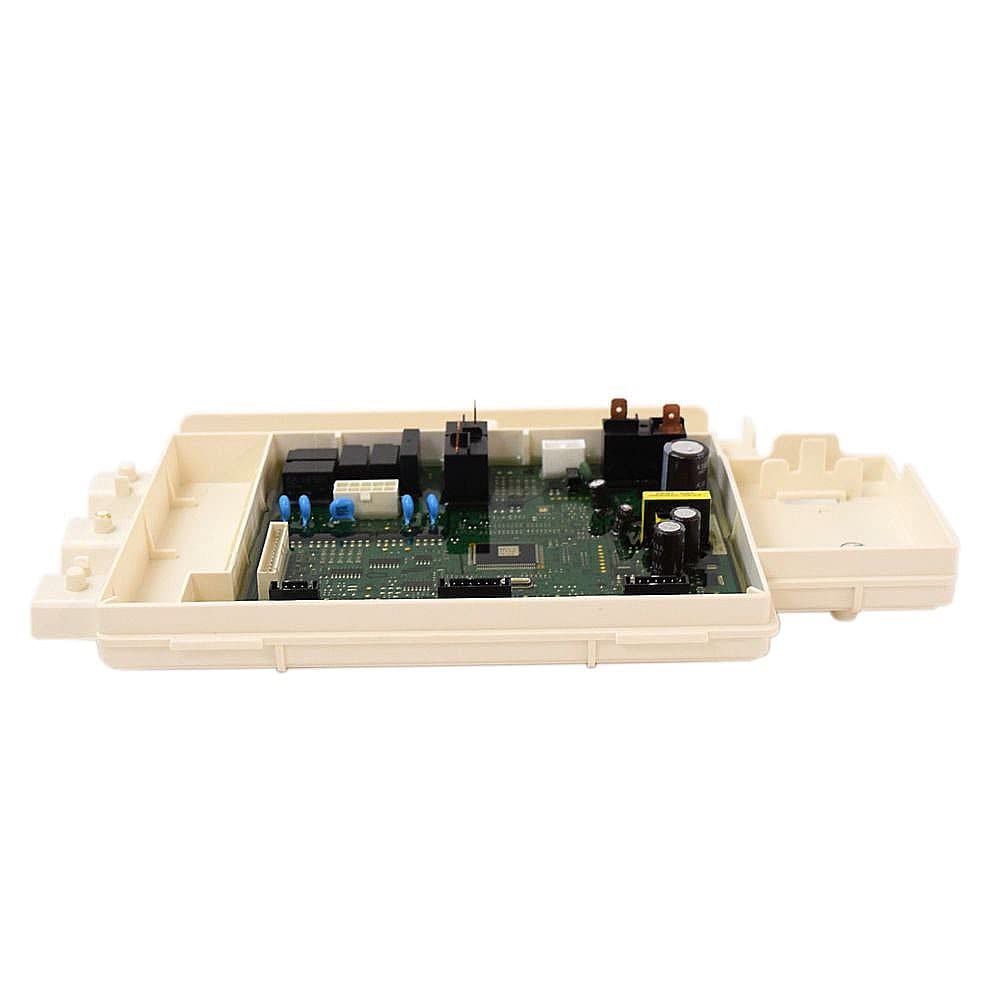
Image 1.1: Top view of the Samsung DC92-01803B Washer Electronic Control Board, showing electronic components and connectors. A ruler is visible for scale, indicating the board's approximate length is around 10-11 inches.

Image 1.2: Bottom view of the Samsung DC92-01803B Washer Electronic Control Board, showing the casing and mounting points.
2. Compatibility
This electronic control board is compatible with the following Samsung washing machine models:
- WF42H5400AF/A2
- WF42H5400AW/A2
- WF42H5500AF/A2
- WF42H5600AP/A2
- WF42H5600AW/A2
- WF42H5700AG/A2
- WF45H6100AP/A2
- WF45H6300AG/A2
- WF45H6300AW/A2
- WF56H9100AG/A2
- WF56H9100AW/A2
Important: Always verify the compatibility of this part with your specific washing machine model number before purchase. Many parts may appear similar but are not interchangeable.

Image 2.1: Visual reminder to check your appliance's model number for compatibility before purchasing replacement parts.
3. Safety Information
Appliance repair, especially involving electrical components, can be hazardous. Please observe the following safety precautions:
- Disconnect Power: Always unplug the washing machine from the electrical outlet and turn off the circuit breaker before attempting any repair or installation.
- Professional Installation Recommended: Due to the complexity and electrical nature of this component, installation by a qualified technician is strongly recommended.
- Static Discharge: Electronic components are sensitive to static electricity. Handle the control board by its edges and avoid touching the circuit board directly. Consider using an anti-static wrist strap.
- Wear Protective Gear: Use appropriate personal protective equipment, such as gloves and safety glasses.
- Inspect for Damage: Before installation, carefully inspect the new part for any signs of damage during shipping.
4. Installation (Setup)
This section provides general guidance for replacing an electronic control board. Specific steps may vary depending on your washing machine model. Refer to your appliance's service manual for detailed, model-specific instructions.
- Prepare the Appliance: Ensure the washing machine is completely disconnected from power (unplugged and circuit breaker off). Turn off water supply lines.
- Access the Control Board: Depending on your model, you may need to remove the top panel, back panel, or control panel assembly to access the existing control board.
- Document Connections: Before disconnecting any wires, take clear photos or make diagrams of all wire connections to the old control board. This will aid in correct reassembly.
- Disconnect and Remove Old Board: Carefully disconnect all wire harnesses and mounting screws securing the old control board. Remove the old board.
- Install New Board: Position the new DC92-01803B control board in place and secure it with the mounting screws.
- Reconnect Wires: Using your documented photos/diagrams, carefully reconnect all wire harnesses to the new control board. Ensure all connections are secure and correctly seated.
- Reassemble Appliance: Reattach any panels or covers that were removed.
- Test Functionality: Restore power to the washing machine and test its operation to ensure the new control board is functioning correctly.
If you are unsure about any step, consult a professional appliance repair technician.
5. Operation
The DC92-01803B electronic control board is an internal component that manages the washing machine's functions. It does not have user-operable controls directly on the board itself. Once installed, its operation is integrated into the washing machine's overall system.
For instructions on how to operate your Samsung washing machine (e.g., selecting cycles, starting washes, using features), please refer to the user manual provided with your specific washing machine model.
6. Maintenance
The electronic control board itself requires no routine maintenance. To ensure the longevity of your appliance and its components, consider the following general maintenance tips for your washing machine:
- Keep the area around the washing machine clean and free of dust and debris.
- Ensure proper ventilation to prevent excessive heat buildup.
- Address any leaks or moisture issues promptly to prevent damage to electronic components.
7. Troubleshooting
If your washing machine is experiencing issues after replacing the control board, or if you suspect the control board is faulty, consider the following:
- No Power/No Display: Double-check all electrical connections to the control board and ensure the appliance is receiving power. Verify the circuit breaker is on.
- Error Codes: If the washing machine displays an error code, consult your washing machine's user manual or service manual to interpret the code and identify the potential cause.
- Incorrect Functionality: If the washer is not performing cycles correctly or specific functions are not working, re-verify all wire connections to the control board. Ensure no wires are loose or incorrectly connected.
- Professional Diagnosis: For persistent issues, it is highly recommended to contact a qualified appliance repair technician for diagnosis and repair. Complex electronic issues often require specialized tools and expertise.
8. Specifications
| Specification | Detail |
|---|---|
| Part Number | DC92-01803B |
| Description | ASSY PCB MAIN;FWM_INV,WF5000/6000/9100,1 |
| Brand | Samsung |
| Manufacturer | Samsung |
| Operation Mode | Manual (refers to the washer's overall operation, not the board itself) |
9. Warranty and Support
As a genuine Samsung OEM part, this control board is typically covered by Samsung's standard warranty for replacement parts. Warranty terms may vary, so it is advisable to retain your purchase receipt and consult Samsung's official warranty documentation or contact their customer support for specific details.
For technical assistance, warranty claims, or to locate a certified service technician, please visit the official Samsung support website or contact Samsung customer service directly.
Samsung Support: www.samsung.com/us/support/
