
Motorola B8P00810YDEMAG
Motorola T82 Extreme Two-Way Radio
User Manual
Introduction
The Motorola T82 Extreme is a robust and weatherproof two-way radio designed for reliable communication in various environments. With a range of up to 10 km, 16 channels, and 121 sub-channels, it offers clear and consistent communication. This manual provides essential information for setting up, operating, maintaining, and troubleshooting your T82 Extreme radios.
What's in the Box
Upon unboxing your Motorola T82 Extreme, you should find the following components:
- 2 x Motorola T82 Extreme Radios
- 2 x NiMH Rechargeable Batteries
- 1 x Dual Charger (with Y-splitter for simultaneous charging)
- 2 x Belt Clips
- 2 x Lanyards
- 2 x Headsets
- 1 x Transport Case
- User Manual (this document)

Figure 1: All components included in the Motorola T82 Extreme package.
Setup
1. Battery Installation
- Ensure the radio is turned off.
- Locate the battery compartment cover on the back of the radio.
- Open the cover by sliding it down or unlatching it.
- Insert the NiMH rechargeable battery pack, ensuring the contacts align correctly.
- Close the battery compartment cover securely.
2. Charging the Batteries
Before first use, fully charge the batteries. The included dual charger allows both radios to be charged simultaneously.
- Connect the dual charger to a power outlet.
- Place each radio into a charging cradle. Ensure the charging contacts on the radio align with those on the cradle.
- The charging indicator light on the radio will illuminate to show charging is in progress.
- Charging typically takes several hours. The indicator light will change or turn off when charging is complete.
3. Attaching Accessories
- Belt Clip: Slide the belt clip into the slot on the back of the radio until it clicks into place.
- Lanyard: Thread the lanyard through the loop at the bottom of the radio.
- Headset: Plug the headset into the audio jack located on the side of the radio.

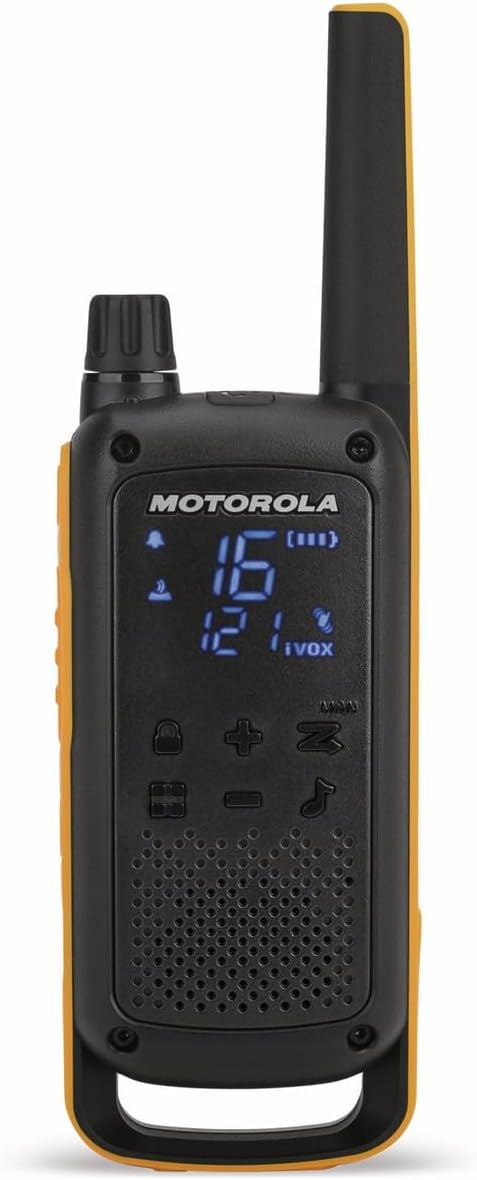
Figure 2: Attaching the belt clip (left) and headset (right) to the radio.
Operating Your Radio
1. Power On/Off
To turn the radio on or off, press and hold the Power button (usually located on the side or front) until the display illuminates or turns off.
2. Channel Selection
The T82 Extreme has 16 channels. To select a channel:
- Press the Menu button to enter channel selection mode.
- Use the Up/Down arrow buttons to scroll through the available channels (1-16).
- Press the PTT (Push-To-Talk) button or Menu button again to confirm your selection.
3. Sub-Channel (Privacy Code) Selection
To ensure privacy and reduce interference, you can select one of 121 sub-channels (privacy codes) for each main channel.
- After selecting a main channel, press the Menu button again to enter sub-channel selection mode.
- Use the Up/Down arrow buttons to select a sub-channel.
- Press the PTT button or Menu button to confirm.

Figure 3: The hidden LED display showing channel and sub-channel information.
4. Transmitting and Receiving
- To Transmit: Press and hold the PTT button on the side of the radio. Speak clearly into the microphone. Release the PTT button when finished speaking.
- To Receive: Ensure the PTT button is not pressed. The radio will automatically receive transmissions on the selected channel and sub-channel.
5. VOX Function (Voice Operated Transmission)
The VOX function allows hands-free operation. When activated, the radio will transmit automatically when it detects your voice.
- Access the Menu and navigate to the VOX setting.
- Select an appropriate sensitivity level (e.g., 1-3, with 3 being most sensitive).
- Confirm the setting.
6. Roger Beep
The Roger Beep is an audible tone transmitted when you release the PTT button, signaling to other users that you have finished speaking.
- Enable or disable the Roger Beep through the radio's menu settings.
7. Vibration Alarm
The vibration alarm provides a silent alert for incoming calls, useful in noisy environments or when discretion is required.
- Activate or deactivate the vibration alarm via the radio's menu.
8. Easy Pairing Function
The easy pairing function simplifies setting up multiple radios to the same channel and sub-channel.
- Refer to the on-screen prompts or specific menu option for "Easy Pairing" to synchronize settings with other T82 Extreme radios.
9. Channel Scan and Monitor
- Scan: Activates a scan function to detect activity on all available channels.
- Monitor: Allows you to listen to a channel without privacy codes, useful for checking for activity or weak signals.
10. Built-in Flashlight
The T82 Extreme includes a convenient LED flashlight. Press the dedicated flashlight button (often on the side) to turn it on or off.
Figure 4: Location of the flashlight button on the side of the radio.
Maintenance
1. Cleaning Your Radio
To maintain optimal performance and appearance, clean your radio regularly.
- Wipe the exterior with a soft, damp cloth.
- Do not use abrasive cleaners or solvents.
- Ensure the radio is dry before use or charging.
2. Battery Care
- Always use the original Motorola NiMH batteries and charger.
- Avoid overcharging or completely draining the batteries for extended periods.
- Store batteries in a cool, dry place when not in use.
3. Weather Resistance (IPx4)
The T82 Extreme is rated IPx4 weatherproof, meaning it is resistant to splashing water from any direction. It is not designed to be submerged in water. Ensure all port covers are securely closed to maintain weather resistance.
Troubleshooting
| Problem | Possible Cause | Solution |
|---|---|---|
| Radio does not turn on. | Battery is low or not installed correctly. | Charge the battery or re-install it correctly. |
| Cannot communicate with other radios. | Radios are on different channels or sub-channels. Out of range. | Ensure all radios are set to the same channel and sub-channel. Move closer to the other radio. |
| Poor audio quality or static. | Weak signal, interference, or radio is out of range. | Move to an open area. Check for obstructions. Adjust volume. |
| PTT button delay. | Normal operation characteristic. | Wait approximately one second after pressing PTT before speaking to ensure the beginning of your transmission is not cut off. |
Specifications
| Feature | Detail |
|---|---|
| Model | B8P00810YDEMAG (Motorola T82 Extreme) |
| Range | Up to 10 Kilometers (6.2 miles) |
| Channels | 16 |
| Sub-Channels (Privacy Codes) | 121 |
| Transmission Power | 500 mW |
| Weather Resistance | IPx4 (Weatherproof) |
| Frequency Range | 450-470 MHz |
| Batteries | 2 x AA NiMH rechargeable (included) |
| Item Weight | 6.7 ounces (approx. 190g) |
| Product Dimensions | 1.3 x 2.24 x 7.09 inches (approx. 3.3 x 5.7 x 18 cm) |
| Display | Hidden LED display with backlight |
| Special Features | VOX function, Roger Beep, Vibration alarm, Easy pairing, Channel scan/monitor, Built-in LED flashlight |
Warranty and Support
For detailed warranty information and technical support, please refer to the official Motorola website or contact Motorola customer service directly. Keep your proof of purchase for warranty claims.
Motorola Official Website: www.motorola.com
Related documentsB8P00810YDEMAG


Ask a question about this manual
Ask about setup, troubleshooting, compatibility, parts, safety, or missing instructions. Manuals+ will review the question and use this page’s manual context to help answer it.