
Introduction
Thank you for choosing the Technoline WS 8006 Radio-Controlled Wall Clock. This device provides precise timekeeping, calendar functions, temperature display, and indoor humidity monitoring. Its large, high-contrast display ensures excellent readability. This manual will guide you through the setup, operation, and maintenance of your new clock.
Safety Information
- Read these instructions carefully before using the device.
- Keep this manual for future reference.
- Do not expose the device to extreme temperatures, direct sunlight, or high humidity.
- Avoid dropping or subjecting the device to strong impacts.
- Use only the specified battery type (2 x AA 1.5V). Ensure correct polarity.
- Remove batteries if the device will not be used for an extended period.
- Do not mix old and new batteries or different types of batteries.
- Do not attempt to repair or modify the device yourself. Contact qualified personnel for service.
Package Contents
Please check that all items are present and in good condition:
- 1 x Technoline WS 8006 Radio-Controlled Wall Clock
- 2 x AA 1.5V Batteries (Please verify packaging for battery inclusion)
- 1 x Instruction Manual (this document)
Product Overview
Front Display

Image 1: Front view of the Technoline WS 8006 clock. The upper section displays the radio-controlled time with seconds. The lower section shows temperature, date (day-month), day of the week, and humidity percentage.
- Time Display: Large digits for hours, minutes, and seconds. Includes radio signal icon.
- Temperature Display: Current indoor temperature in °C or °F.
- Date Display: Day and month.
- Day of Week Display: In multiple languages.
- Humidity Display: Indoor humidity percentage (% RH).
Rear Panel and Controls

Image 2: Rear view of the Technoline WS 8006 clock. This image shows the battery compartment, foldable stand, and control buttons labeled SET, ALARM, UP/DOWN arrows, WAVE, and SNOOZE.
- SET Button: Enters setting mode.
- ALARM Button: Activates/deactivates alarm and enters alarm setting mode.
- UP (▲) / DOWN (▼) Buttons: Adjust values in setting mode.
- WAVE Button: Manually initiates DCF signal search.
- SNOOZE Button: Activates snooze function when alarm sounds.
- Battery Compartment: Holds 2 x AA 1.5V batteries.
- Foldable Stand: For tabletop use.
- Wall Mount Holes: For wall installation.
Setup
1. Battery Installation
- Open the battery compartment cover on the back of the clock.
- Insert 2 x AA 1.5V batteries, ensuring correct polarity (+ and -).
- Close the battery compartment cover.
Upon battery insertion, the clock will automatically begin searching for the DCF-77 radio signal. This process may take several minutes. The radio signal icon will flash during the search.
2. DCF Signal Reception
- Place the clock in an area with good reception, away from electronic interference (e.g., TVs, computers).
- Once the signal is received, the time and date will be automatically set, and the radio signal icon will appear solid on the display.
- The DCF-77 signal originates from Frankfurt, Germany, and has a range of approximately 1500 km.
- Daylight Saving Time (DST) changes are automatically adjusted.
If the signal is not received within 10 minutes, you may need to manually set the time or try relocating the clock.
Operating Instructions
Manual Time and Date Setting
If the DCF signal is not available or you wish to set the time manually:
- Press and hold the SET button for approximately 3 seconds to enter manual setting mode. The setting item will flash.
- Use the UP (▲) or DOWN (▼) buttons to adjust the value.
- Press SET again to confirm the setting and move to the next item.
- The setting sequence typically includes: Time Zone, 12/24 Hour Format, Hour, Minute, Year, Month, Day, Temperature Unit (°C/°F), Day of Week Language.
- Press SET repeatedly until all settings are confirmed, or wait 15 seconds for the clock to automatically exit setting mode.
Time Zone Setting
If you are outside the standard DCF-77 reception area but still wish to use the radio-controlled time with an offset:
- In manual setting mode (see above), navigate to the Time Zone setting.
- Use the UP (▲) or DOWN (▼) buttons to set the desired time zone offset (e.g., +1 for one hour ahead, -1 for one hour behind).
- Confirm with SET.
Alarm Function
- Press the ALARM button once to display the alarm time.
- Press and hold the ALARM button for 3 seconds to enter alarm setting mode. The alarm hour will flash.
- Use the UP (▲) or DOWN (▼) buttons to adjust the alarm hour. Press ALARM to confirm.
- Adjust the alarm minute using UP (▲) or DOWN (▼). Press ALARM to confirm.
- To activate or deactivate the alarm, press the ALARM button briefly when the current time is displayed. An alarm icon will appear/disappear on the display.
Snooze Function
- When the alarm sounds, press the SNOOZE button to temporarily silence it. The alarm will sound again after approximately 5 minutes.
- To stop the alarm completely, press any other button (e.g., ALARM, SET).
Temperature Unit Selection (°C/°F)
To switch between Celsius and Fahrenheit for temperature display:
- In normal time display mode, press the DOWN (▼) button briefly. The temperature unit will toggle between °C and °F.
Day of Week Language Selection
The day of the week can be displayed in five languages: German, English, French, Spanish, Italian, Dutch, Danish.
- In manual setting mode, navigate to the language setting.
- Use the UP (▲) or DOWN (▼) buttons to select your preferred language.
- Confirm with SET.
Maintenance
Cleaning
- Clean the clock with a soft, damp cloth.
- Do not use abrasive cleaners or solvents, as they may damage the display or casing.
- Ensure no water enters the device.
Battery Replacement
- When the display becomes dim or the clock functions erratically, it's time to replace the batteries.
- Follow the battery installation steps in the "Setup" section.
- Always replace both batteries with new AA 1.5V batteries.
- Dispose of used batteries according to local regulations.
Troubleshooting
| Problem | Possible Cause | Solution |
|---|---|---|
| No display or dim display | Batteries are dead or inserted incorrectly. | Replace batteries with new AA 1.5V batteries, ensuring correct polarity. |
| Time is incorrect or not setting automatically | Poor DCF-77 signal reception due to location or interference. | Relocate the clock to an area with better reception, away from electronic devices. Manually set the time if necessary. Initiate a manual signal search using the WAVE button. |
| Alarm does not sound | Alarm is not activated or alarm volume is too low (if adjustable). | Ensure the alarm icon is displayed. Check alarm settings. (Note: This model has a crescendo alarm, not adjustable volume). |
| Temperature/Humidity readings seem inaccurate | Clock is placed near a heat source, vent, or in direct sunlight. | Move the clock to a location with stable ambient conditions. Allow time for readings to stabilize. |
Specifications
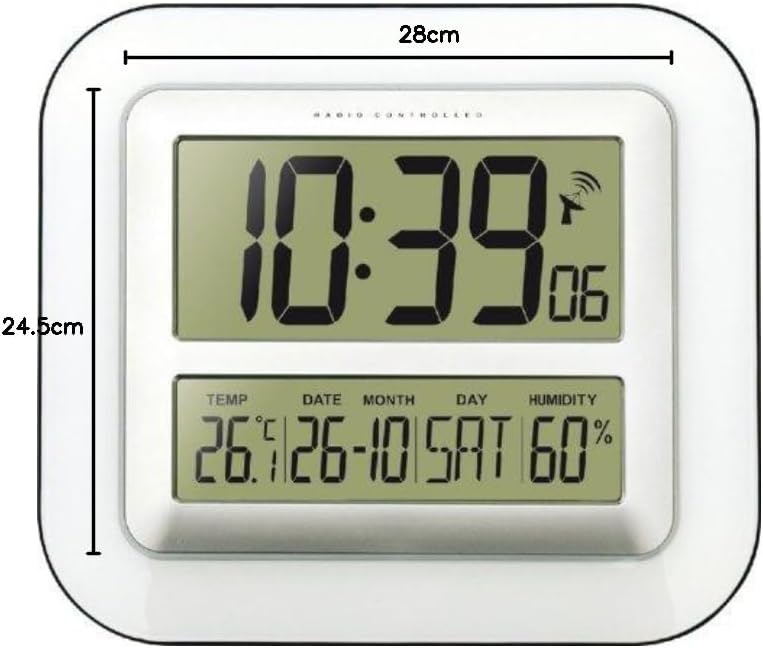
Image 3: Dimensions of the Technoline WS 8006 clock, showing a width of 28 cm and a height of 24.5 cm.
- Model: Technoline WS 8006
- Dimensions (L x W x H): 24.5 x 3.81 x 28 cm (9.65 x 1.5 x 11 inches)
- Weight: 800 grams (1.76 lbs)
- Power Source: 2 x AA 1.5V Batteries
- Timekeeping: DCF-77 Radio-controlled with manual setting option
- Time Display: 12/24 hour format, seconds display
- Calendar: Day, Month, Year, Day of week in multiple languages (German, English, French, Spanish, Italian, Dutch, Danish)
- Temperature Range: 0°C to 50°C (32°F to 122°F)
- Humidity Range: Displayed as % RH (Indoor climate control)
- Alarm: Yes, with 5-minute snooze function (Crescendo alarm)
- Mounting: Wall mountable or tabletop with foldable stand
- Material: Acrylonitrile Butadiene Styrene (ABS)
- Color: White
Warranty and Support
Technoline products are designed for reliability and performance. For specific warranty information, please refer to the warranty card included with your purchase or contact your retailer. For technical support or inquiries, please visit the official Technoline website or contact their customer service department.
You can find more information at: www.technoline.eu


