
1. Introduction
This manual provides instructions for the safe and efficient use of your Woods 50012WD 2-Outlet Outdoor 24-Hour Heavy Duty Mechanical Timer. This device is designed to automate the on/off cycles of outdoor electrical devices, such as seasonal lighting or pond pumps, for convenience and energy saving.
The timer features two grounded outlets and a durable, weather-resistant housing suitable for outdoor use. Please read this manual thoroughly before installation and operation.
2. Important Safety Information
WARNING: To reduce the risk of fire, electric shock, or personal injury, always follow these basic safety precautions:
- Do not immerse the timer in water or expose it to direct water spray. It is weather-resistant, not waterproof.
- Ensure the timer is plugged into a Ground Fault Circuit Interrupter (GFCI) protected outlet when used outdoors.
- Do not exceed the electrical ratings of the timer: 125V, 15A, 1875W, 60Hz.
- Always unplug the timer from the power source before cleaning or performing any maintenance.
- Do not use with extension cords that are not rated for outdoor use.
- Keep children away from the timer and connected devices.
- Do not disassemble the timer. There are no user-serviceable parts inside.
- Ensure all connections are secure and dry before applying power.
3. Package Contents
- Woods 50012WD Outdoor Mechanical Timer
- Instruction Manual (this document)
4. Product Overview
The Woods 50012WD timer features a rotating dial with segments for setting ON/OFF times, a manual override switch, and two grounded outlets.
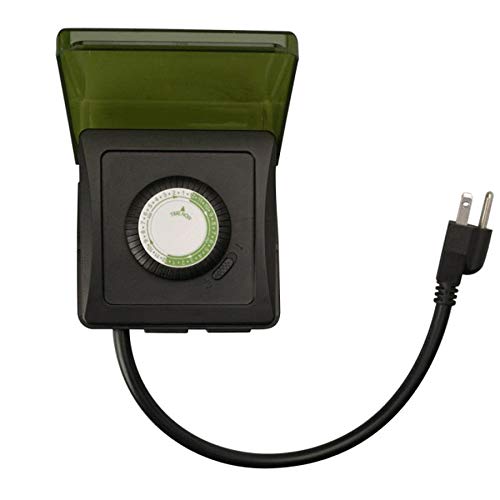
Image 1: Front view of the Woods 50012WD Outdoor Mechanical Timer. The timer is black with a green central dial and a short power cord extending from the bottom. Two grounded outlets are visible on the side.
5. Setup and Installation
- Choose a Location: Select a suitable outdoor location that is protected from direct heavy rain and snow, preferably under an overhang or in a sheltered area. Ensure the timer is placed on a stable surface or mounted securely.
- Plug In the Timer: Insert the timer's power cord into a 125V, 60Hz GFCI-protected outdoor electrical outlet.
- Connect Devices: Plug the devices you wish to control into the two grounded outlets on the timer. Ensure the total wattage of connected devices does not exceed 1875W.
6. Operating Instructions
The Woods 50012WD is a 24-hour mechanical timer. Its operation relies on setting the current time and then pushing down segments on the dial to define ON periods.
6.1 Setting the Current Time
- Locate the rotating dial on the front of the timer. The dial is marked with 24 hours (1-24 or AM/PM indicators).
- Rotate the entire dial clockwise until the current time aligns with the "TIME NOW" arrow or indicator on the timer's housing. For example, if it's 6 PM, align the "18" (or "6 PM") mark with the indicator.
6.2 Setting ON/OFF Times
The dial is surrounded by small segments. Each segment typically represents a 15 or 30-minute interval. Pushing a segment down activates the connected device during that time interval. Pulling a segment up deactivates the device.
- Identify the time periods when you want your connected devices to be ON.
- For each desired ON period, push the corresponding segments on the dial down.
- For all other times, ensure the segments are pulled up.
- The timer will now cycle ON and OFF according to your settings every 24 hours.
6.3 Manual Override Switch
The timer includes a manual override switch, usually located near the dial. This switch allows you to bypass the programmed settings.
- Timer ON: The timer will operate according to the programmed ON/OFF segments.
- Always ON: The connected devices will remain ON, overriding any programmed OFF times.
- Always OFF: The connected devices will remain OFF, overriding any programmed ON times.
Refer to the specific markings on your timer for the exact positions of the manual override switch.
7. Maintenance
- Cleaning: Disconnect the timer from the power outlet before cleaning. Wipe the exterior with a soft, damp cloth. Do not use abrasive cleaners or solvents.
- Storage: If storing the timer for an extended period, ensure it is clean and dry. Store in a cool, dry place away from direct sunlight.
- Inspection: Periodically inspect the timer and its cord for any signs of damage, such as cracks, fraying, or discoloration. If damage is found, discontinue use and replace the unit.
8. Troubleshooting
| Problem | Possible Cause | Solution |
|---|---|---|
| Device does not turn ON/OFF at programmed times. |
|
|
| Timer is not working at all. |
|
|
9. Specifications
- Model: 50012WD
- Type: Heavy Duty Outdoor Mechanical Timer
- Outlets: 2 Grounded Outlets
- Voltage Rating: 125 V
- Amperage Rating: 15 A
- Frequency Rating: 60 Hz
- Power Rating: 1875 W
- Timer Type: 24-Hour Mechanical
- Brand: Woods (Southwire/Coleman Cable)
- UPC: 078693500121
10. Warranty and Support
Woods products are manufactured to high-quality standards. For warranty information or technical support, please refer to the official Woods (Southwire/Coleman Cable) website or contact their customer service department.
Please retain your proof of purchase for warranty claims.
Contact Information: For the most up-to-date support information, please visit the Woods Store on Amazon or the official manufacturer's website.


