
Product Overview
The DreamSky Portable AM/FM Radio is a compact and versatile device designed for convenient listening on the go. It features both AM and FM bands, an integrated alarm clock, and a clear digital display with backlight. This radio is battery-operated, making it ideal for portable use, emergencies, or simply enjoying your favorite stations anywhere.
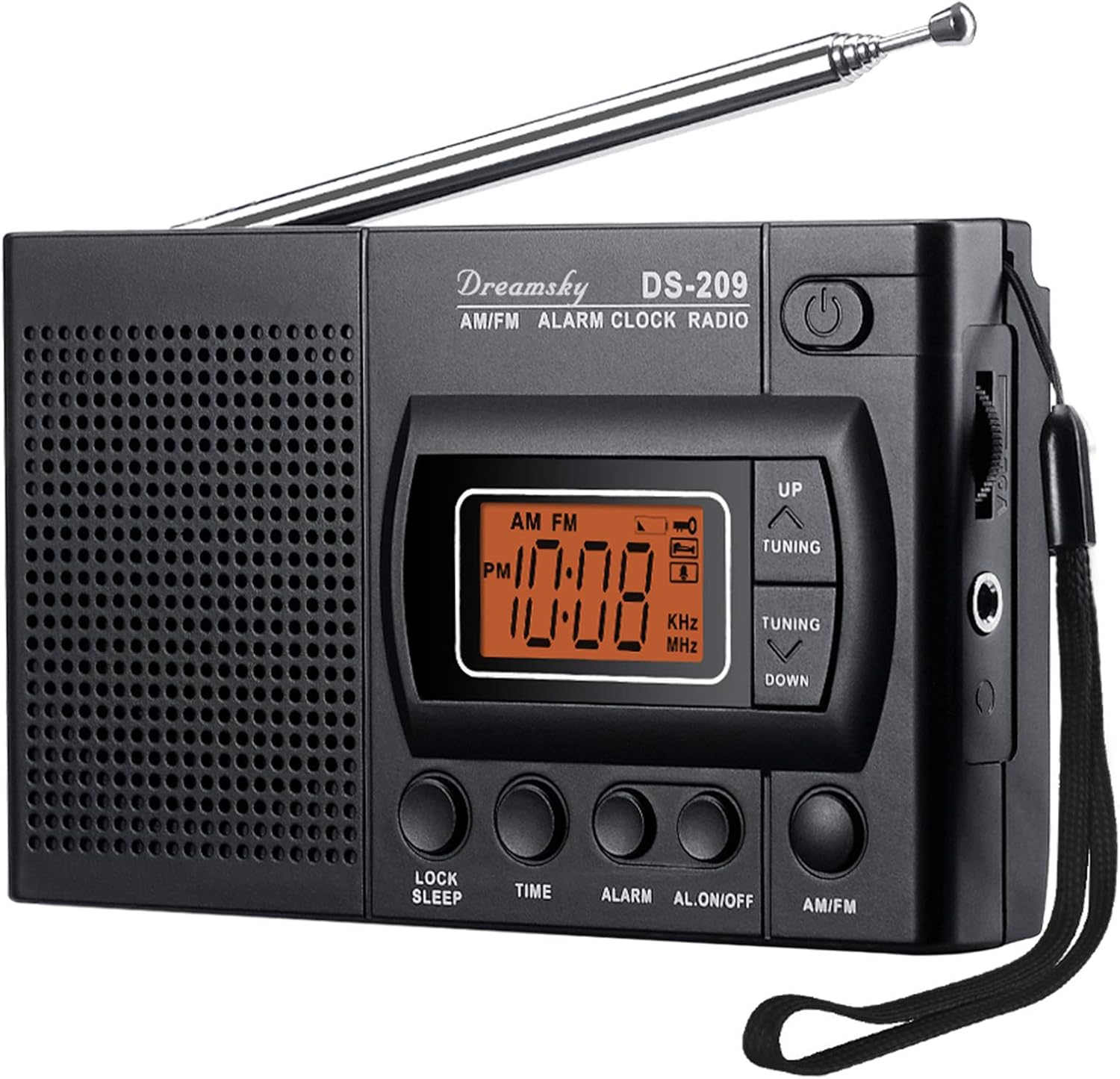
Figure 1: Front view of the DreamSky Portable AM/FM Radio, showing the digital display, control buttons, and telescopic antenna.
Key Features:
- Portable AM/FM radio with excellent reception.
- Built-in loudspeaker for clear audio and a 3.5mm earphone jack for private listening.
- Digital time and alarm display with selectable 12/24-hour format and a 5-second backlight.
- Sleep timer function (10-90 minutes) for falling asleep to radio.
- Battery operated (2 x AA batteries included) for maximum portability.

Figure 2: Visual representation of the radio's main functions: Time, Alarm, AM/FM Radio, Sleep Timer, and Earphone Jack.
Package Contents
Please ensure all items are present in the package:
- DreamSky Portable AM/FM Radio (Model DS-209)
- Carrying Strap
- Earphone Jack
- 2 x AA Batteries

Figure 3: The radio shown with the included AA batteries.
Setup
1. Battery Installation
- Locate the battery compartment cover on the back of the radio.
- Slide the cover open in the direction indicated by the arrow.
- Insert two (2) AA batteries, ensuring the correct polarity (+/-) as marked inside the compartment.
- Close the battery compartment cover securely.
2. Attaching the Carrying Strap
Thread the carrying strap through the designated loop on the side of the radio until it is securely fastened. This allows for easy portability.
Operating Instructions
Power On/Off
- Press the Power button () located on the top right of the radio to turn it on or off.
Setting Time
- With the radio off, press and hold the TIME button. The hour digits will flash.
- Use the UP or DOWN tuning buttons to adjust the hour.
- Press the TIME button again to confirm the hour and move to minute setting. The minute digits will flash.
- Use the UP or DOWN tuning buttons to adjust the minute.
- Press the TIME button once more to confirm and exit time setting.
- To switch between 12-hour and 24-hour format, press the TIME button briefly when the radio is off.
Setting Alarm
- With the radio off, press and hold the ALARM button. The alarm hour digits will flash.
- Use the UP or DOWN tuning buttons to adjust the alarm hour.
- Press the ALARM button again to confirm the alarm hour and move to alarm minute setting. The alarm minute digits will flash.
- Use the UP or DOWN tuning buttons to adjust the alarm minute.
- Press the ALARM button once more to confirm and exit alarm setting.
- To activate or deactivate the alarm, press the AL.ON/OFF button briefly when the radio is off. An alarm icon will appear on the display when activated.
Radio Tuning (AM/FM)
- Turn on the radio using the Power button.
- Press the AM/FM button to switch between AM and FM bands.
- Extend the telescopic antenna for optimal FM reception. For AM reception, rotate the radio for best signal.
- Use the UP or DOWN tuning buttons to manually tune to your desired frequency.
- Adjust the volume using the rotary volume control on the side of the radio.

Figure 4: The compact size of the radio makes it easy to carry for outdoor activities.
Using the Earphone Jack
- Insert any standard 3.5mm stereo earphones into the earphone jack located on the side of the radio.
- The built-in loudspeaker will automatically mute when earphones are connected.

Figure 5: Enjoying private listening with headphones connected to the radio.
Sleep Timer Function
- With the radio on, press the LOCK SLEEP button repeatedly to cycle through sleep timer options (10, 20, 30, 40, 50, 60, 70, 80, 90 minutes, or OFF).
- The radio will automatically turn off after the selected duration.
Lock Function
- To prevent accidental button presses, press and hold the LOCK SLEEP button until a key icon appears on the display. All buttons will be locked.
- To unlock, press and hold the LOCK SLEEP button again until the key icon disappears.
Maintenance
- Clean the radio with a soft, dry cloth. Do not use liquid cleaners or abrasive chemicals.
- Avoid exposing the radio to extreme temperatures, direct sunlight, or high humidity.
- If the radio will not be used for an extended period, remove the batteries to prevent leakage and damage.
- Do not attempt to disassemble or repair the radio yourself. Refer to qualified service personnel.
Troubleshooting
| Problem | Possible Cause | Solution |
|---|---|---|
| Radio does not turn on. | Batteries are dead or incorrectly installed. | Replace batteries with new AA batteries, ensuring correct polarity. |
| Poor radio reception. | Antenna not extended (FM) or radio not positioned correctly (AM). Weak signal area. | Fully extend the telescopic antenna for FM. Rotate the radio for better AM reception. Try moving to a different location. |
| No sound from speaker when earphones are unplugged. | Earphones are still plugged in or earphone jack is faulty. | Ensure earphones are completely unplugged. If issue persists, contact support. |
| Buttons are unresponsive. | Lock function is activated. | Press and hold the LOCK SLEEP button until the key icon disappears from the display. |
Specifications
| Model Number | DS-209 (4336301737) |
| Dimensions (L x W x H) | 4.7 x 1 x 2.9 inches |
| Weight | 9.6 ounces |
| Power Source | 2 x AA Batteries |
| Tuner Technology | AM/FM Digital Tuner |
| Radio Bands Supported | AM, FM |
| Connectivity | 3.5mm Audio Jack (for earphones) |
| Manufacturer | US AMEXS LLC |

Figure 6: Product dimensions for the DreamSky Portable AM/FM Radio.
Warranty and Support
Warranty Information
DreamSky products are designed for reliability and performance. For specific warranty details regarding your DreamSky Portable AM/FM Radio, please refer to the warranty card included in your product packaging or visit the official DreamSky website. Keep your purchase receipt as proof of purchase for warranty claims.
Customer Support
If you encounter any issues or have questions not covered in this manual, please contact DreamSky customer support. For the most up-to-date contact information, please visit the DreamSky store on Amazon or their official website.
Note: This manual provides general guidance. Product features and specifications are subject to change without notice.


