1. Product Overview
The TTEC 2KM102S Tone Bluetooth Headset is designed for wireless communication, offering convenience and clear audio. This manual provides instructions for setting up, operating, and maintaining your headset.
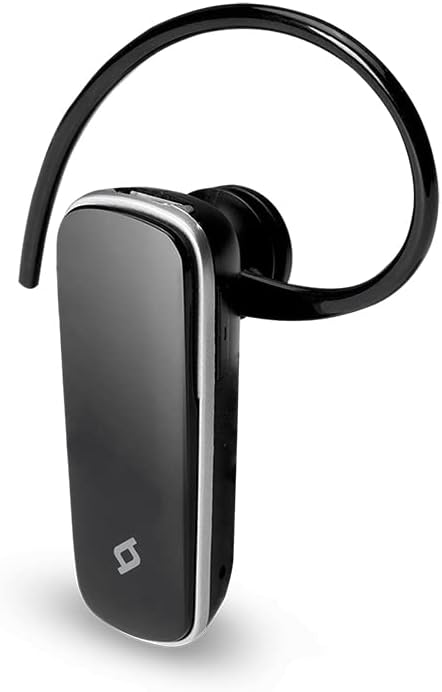
Figure 1: Front view of the TTEC 2KM102S Tone Bluetooth Headset.
2. Package Contents
Ensure all items are present in the package:
- TTEC 2KM102S Tone Bluetooth Headset
- Ear Hook
- USB Charging Cable
3. Setup Guide
3.1 Charging the Headset
Before first use, fully charge the headset. Use the provided USB charging cable.
- Connect the small end of the USB charging cable to the charging port on the headset.
- Connect the larger end of the USB cable to a USB power source (e.g., computer USB port, USB wall adapter).
- The LED indicator on the headset will show the charging status. Refer to the "LED Indicator" section for details.
- Once fully charged, disconnect the charging cable.
Note: The headset features an integrated rechargeable battery. Charging time may vary.
3.2 Pairing with a Device
To use the headset wirelessly, it must be paired with a Bluetooth-enabled device.
- Ensure the headset is turned off.
- Press and hold the multi-function button on the headset until the LED indicator flashes red and blue alternately. This indicates pairing mode.
- On your device (smartphone, tablet, etc.), enable Bluetooth and search for available devices.
- Select "TTEC Tone" or "2KM102S" from the list of found devices.
- Once paired, the LED indicator will flash blue periodically, and you may hear a confirmation tone.
Tip: For iPhone and iPad users, the battery status of the headset can be monitored on your device's screen.
3.3 Multi-Device Pairing
The TTEC Tone headset supports simultaneous connection with two different Bluetooth devices.
- Pair the headset with the first device as described in section 3.2.
- Disable Bluetooth on the first device.
- Put the headset back into pairing mode (LED flashes red and blue).
- Pair the headset with the second device.
- Re-enable Bluetooth on the first device. The headset should automatically connect to both devices.
The headset will manage audio from both connected devices, prioritizing incoming calls.
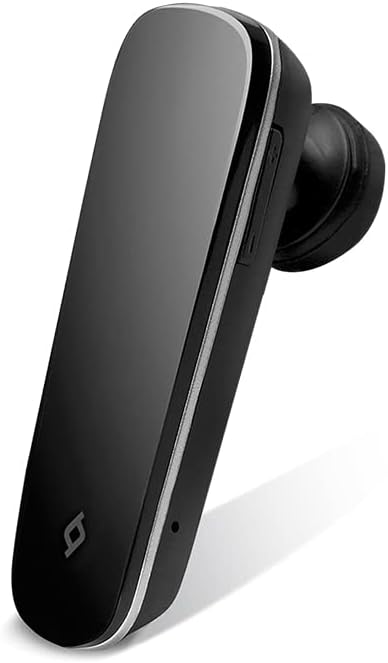
Figure 2: Side view of the TTEC 2KM102S Tone Bluetooth Headset, showing control buttons.
4. Operating Instructions
4.1 Power On/Off
- Power On: Press and hold the multi-function button for approximately 3 seconds until the LED flashes blue.
- Power Off: Press and hold the multi-function button for approximately 5 seconds until the LED flashes red and then turns off.
4.2 Call Management
The multi-function button controls call functions:
- Answer Call: Press the multi-function button once when a call comes in.
- End Call: Press the multi-function button once during a call.
- Reject Call: Press and hold the multi-function button for approximately 2 seconds when a call comes in.
- Redial Last Number: Double-press the multi-function button when not on a call.
4.3 Volume Control
Use the dedicated volume buttons on the headset:
- Increase Volume: Press the Volume Up button (+).
- Decrease Volume: Press the Volume Down button (-).
4.4 LED Indicator Status
The LED indicator provides visual cues for the headset's status:
- Flashing Red & Blue: Pairing mode.
- Flashing Blue (slowly): Connected/Standby.
- Solid Red: Charging.
- LED Off (after solid red): Fully charged.
- Flashing Red (rapidly): Low battery.
5. Maintenance
Proper care ensures the longevity of your headset.
- Cleaning: Use a soft, dry cloth to clean the headset. Do not use abrasive cleaners or immerse in water.
- Storage: Store the headset in a cool, dry place away from direct sunlight and extreme temperatures.
- Battery Care: To preserve battery life, avoid fully discharging the headset frequently. Charge it regularly, even if not in use for extended periods.
6. Troubleshooting
| Problem | Possible Solution |
|---|---|
| Headset does not turn on. | Ensure the headset is charged. Connect it to a power source using the USB cable. |
| Cannot pair with a device. |
|
| No audio or poor audio quality. |
|
| Headset disconnects frequently. |
|
7. Product Specifications
| Model Name: | Tone |
| Model Number: | 2KM102S |
| Brand: | TTEC |
| Connectivity: | Bluetooth |
| Device Type: | Bluetooth Headset |
| Talk Time: | Up to 4 hours |
| Standby Time: | Up to 100 hours |
| Multi-point Connection: | Yes, connect to 2 devices simultaneously |
| Dimensions (L x W x H): | 4.5 x 1.7 x 2 cm |
| Color: | Black |
| Charging Port: | USB |
8. Warranty and Support
For warranty information and customer support, please refer to the warranty card included with your product or visit the official TTEC website. Keep your purchase receipt as proof of purchase.
Manufacturer: ttec


