
Sephia A11
Sephia A11 Portable Bluetooth Speaker
User Manual
Introduction
Thank you for choosing the Sephia A11 Portable Bluetooth Speaker. This manual provides essential information for setting up, operating, and maintaining your speaker to ensure optimal performance and longevity. The Sephia A11 offers versatile connectivity options, including Bluetooth, USB, Micro SD, and AUX input, delivering clear and powerful audio in a compact design.
What's in the Box
- Sephia A11 Bluetooth Speaker
- Charging Cable
- Aux Cable
- User Manual (this document)

Image: The Sephia A11 Portable Bluetooth Speaker, showcasing its sleek black design and front grille.
Product Overview
Familiarize yourself with the buttons and ports on your Sephia A11 speaker.
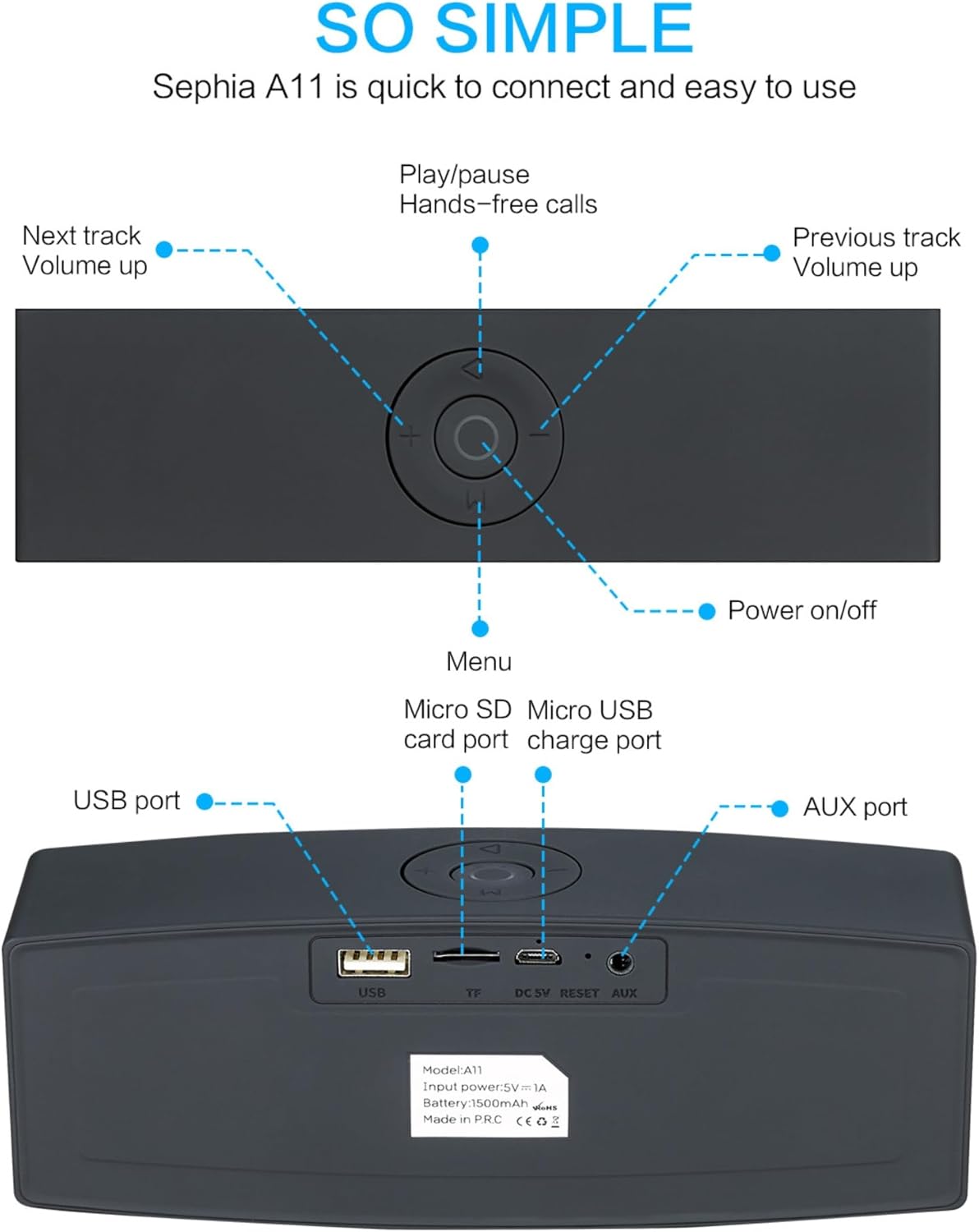
Image: Detailed diagram illustrating the top control panel and rear input/output ports of the Sephia A11 speaker.
Top Controls:
- Power On/Off Button: Press and hold to turn the speaker on or off.
- Play/Pause Button: Press to play or pause audio. Also used for hands-free calls (answer/end).
- Previous Track / Volume Down Button (-): Short press for previous track, long press to decrease volume.
- Next Track / Volume Up Button (+): Short press for next track, long press to increase volume.
- Menu Button (M): Press to switch between input modes (Bluetooth, USB, Micro SD, AUX).
Rear Ports:
- USB Port: For playing audio from a USB drive or charging external devices.
- Micro SD Card Slot (TF): For playing audio from a Micro SD card.
- Micro USB Charge Port (DC 5V): For charging the speaker.
- Reset Button: Small pinhole for resetting the device if needed.
- AUX Port: For wired audio connection using the provided 3.5mm AUX cable.
Setup
1. Charging the Speaker
- Connect the supplied charging cable to the Micro USB Charge Port (DC 5V) on the rear of the speaker.
- Connect the other end of the charging cable to a USB power adapter (not included) or a computer's USB port.
- The charging indicator light will illuminate. Once fully charged, the light will change or turn off (refer to specific model behavior if indicated by LED). A full charge provides up to 8 hours of playtime.
2. Powering On/Off
- To power on, press and hold the Power On/Off button on the top panel until you hear an audible prompt or see an indicator light.
- To power off, press and hold the Power On/Off button again until the speaker shuts down.
3. Bluetooth Pairing
- Ensure the speaker is powered on and in Bluetooth mode. If not, press the 'M' (Menu) button to switch to Bluetooth mode. The speaker will enter pairing mode, indicated by a flashing LED light and an audible prompt.
- On your mobile device (smartphone, tablet, laptop), enable Bluetooth and search for available devices.
- Select "Sephia A11" from the list of found devices.
- Once successfully paired, the speaker will provide an audible confirmation, and the LED indicator will stop flashing.
- The speaker has a Bluetooth range of up to 10 meters (33 feet).
4. Wired Connections (AUX, USB, Micro SD)
- AUX Input: Connect one end of the supplied 3.5mm AUX cable to the AUX port on the speaker and the other end to the audio output of your device (e.g., MP3 player, computer). The speaker will automatically switch to AUX mode or can be selected using the 'M' button.
- USB Playback: Insert a USB flash drive containing audio files into the USB port. The speaker will automatically detect and play the audio files.
- Micro SD Card Playback: Insert a Micro SD card containing audio files into the Micro SD (TF) slot. The speaker will automatically detect and play the audio files.
Operating the Speaker
Audio Playback
- Play/Pause: Press the Play/Pause button to toggle between playing and pausing audio.
- Volume Adjustment: Long press the '+' button to increase volume, and long press the '-' button to decrease volume.
- Next/Previous Track: Short press the '+' button for the next track, and short press the '-' button for the previous track.

Image: A hand demonstrating how to interact with the top control buttons of the Sephia A11 speaker.
Hands-Free Calling
- When a call comes in while connected via Bluetooth, press the Play/Pause button to answer the call.
- Press the Play/Pause button again to end the call.
- The built-in microphone allows for clear communication.
Maintenance
- Cleaning: Use a soft, dry cloth to clean the speaker's surface. Do not use abrasive cleaners, alcohol, or chemical solvents, as these may damage the finish.
- Storage: Store the speaker in a cool, dry place away from direct sunlight and extreme temperatures.
- Battery Care: To prolong battery life, avoid fully discharging the speaker frequently. Charge the speaker regularly, even if not in use for extended periods.
- Water Resistance: This speaker is not waterproof. Avoid exposure to water or excessive moisture.
Troubleshooting
| Problem | Possible Cause | Solution |
|---|---|---|
| Speaker does not turn on. | Low battery; Power button not held long enough. | Charge the speaker fully. Press and hold the Power button for 3-5 seconds. |
| No sound from speaker. | Volume too low; Incorrect input mode; Device not connected properly. | Increase speaker and device volume. Press 'M' button to select correct input mode. Re-pair Bluetooth or re-connect AUX/USB/SD. |
| Bluetooth pairing fails. | Speaker not in pairing mode; Device too far; Interference. | Ensure speaker is in Bluetooth pairing mode (flashing LED). Move speaker closer to device. Turn off other Bluetooth devices. Try forgetting "Sephia A11" on your device and re-pairing. |
| Poor sound quality. | Low battery; Device volume too high (distortion); Interference. | Charge the speaker. Adjust volume on both speaker and device. Move away from sources of interference. |
Specifications
| Model Name | A11 |
| Dimensions | 18 x 7 x 5 cm |
| Weight | 426 g |
| Connectivity Technology | Bluetooth, USB, Micro SD, AUX |
| Speaker Output Power | 6 Watts (2 x 3W drivers) |
| Frequency Response | 20 Hz - 20 kHz |
| Battery Type | Lithium Ion |
| Playtime | Up to 8 hours |
| Bluetooth Range | Up to 10 meters (33 feet) |
| Special Features | Bass Boost, Portable, Hi-Res Audio, Built-in Microphone, Shockproof |

Image: Visual representation of the Sephia A11 speaker's dimensions.
Warranty and Support
The Sephia A11 Portable Bluetooth Speaker comes with a 12-month warranty from the date of purchase, covering manufacturing defects. Please retain your proof of purchase for warranty claims.
For technical support, warranty inquiries, or further assistance, please refer to the contact information provided with your purchase or visit the official Sephia website.
Ask a question about this manual
Ask about setup, troubleshooting, compatibility, parts, safety, or missing instructions. Manuals+ will review the question and use this page’s manual context to help answer it.