
TOPCHANCES MD-3010II
TOPCHANCES MD-3010II Metal Detector User Manual
Model: MD-3010II
Introduction
The TOPCHANCES MD-3010II is a versatile and powerful metal detector designed for locating various metal objects, including coins, relics, jewelry, gold, and silver. Its advanced features and user-friendly design make it suitable for both novice and experienced treasure hunters. This manual provides detailed instructions for assembly, operation, maintenance, and troubleshooting to ensure optimal performance and longevity of your device.
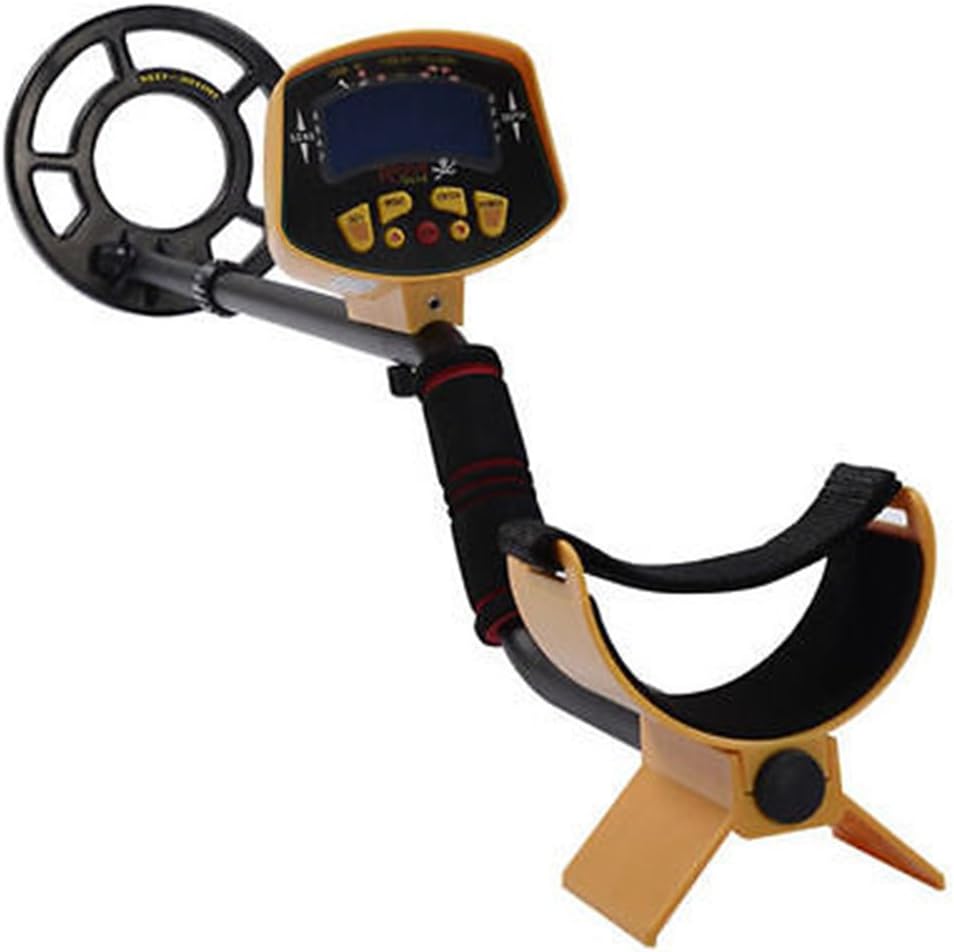
Figure 1: Fully assembled TOPCHANCES MD-3010II Metal Detector, showcasing its main components including the control unit, adjustable stem, search coil, and armrest.
Safety Information
Please read and understand all safety precautions before operating the metal detector. Failure to follow these guidelines may result in injury or damage to the device.
- Water Immersion: Do not submerge the control unit or any part of the detector other than the search coil in water. The search coil is designed for use in shallow water only.
- Battery Safety: Handle and dispose of batteries safely. Do not mix old and new batteries, or different types of batteries. Remove batteries if the device will not be used for an extended period.
- Environmental Awareness: Be aware of your surroundings when operating the detector. Avoid areas with live electrical cables or unexploded ordnance.
- Children: Keep the device out of reach of small children.
Package Contents
Before assembly, ensure all components are present and undamaged:
- Main Control Unit with LCD Display
- Adjustable Stem (Upper and Lower sections)
- Waterproof Search Coil (MD-3010II)
- Armrest with Strap
- Fastening Knob and Washer for Search Coil
- User Manual (this document)
Assembly and Setup
Follow these steps to assemble your MD-3010II metal detector:
- Attach the Search Coil:
Align the search coil with the lower stem. Insert the non-metallic washer into the slot and secure the coil using the fastening knob. Ensure it is tight but do not overtighten.

Figure 2: Close-up view of the MD-3010II search coil, showing its robust design and the "MD-3010II" model marking.
- Connect the Stem Sections:
Slide the lower stem into the upper stem. Adjust the length to a comfortable position and secure it with the locking collar.
- Mount the Control Unit:
Attach the control unit to the top of the upper stem. Ensure it clicks securely into place.
- Connect the Search Coil Cable:
Carefully connect the search coil cable to the port on the control unit. The micro-plug is made of metal for reliable connection. Ensure the cable is wrapped around the stem to prevent tangling during use.

Figure 3: Detailed view of the metal micro-plug connection point between the search coil cable and the main control unit, ensuring a secure and durable link.
- Install Batteries:
The MD-3010II requires six (6) 1.5V AA alkaline batteries. Open the battery compartment, insert the batteries according to the polarity indicators (+/-), and close the compartment securely.
- Adjust Armrest:
Adjust the armrest for comfortable use, ensuring it supports your forearm to reduce strain during prolonged operation. Secure the nylon bracket to prevent hand slip.
Operating Instructions
Familiarize yourself with the controls and functions of your MD-3010II metal detector for effective treasure hunting.
Controls and Display

Figure 4: The main control unit of the MD-3010II, highlighting the LCD display and control buttons for various settings and modes.
- LCD Display: The backlit LCD provides visual information about detected targets, depth, and current settings. It improves visibility in low-light conditions.
- Volume Control: Adjusts the audio output level for the built-in speaker or connected headphones.
- Headphone Jack: Located on the control unit, allows connection of standard stereo or mono headphones for private listening and clearer audio signals.
- Batteries Condition Indicator: Displays the remaining battery life, allowing you to monitor power levels.
- Control Buttons: Various buttons (e.g., SET, MODE, ENTER, SENS, DISC) are used to navigate menus, select modes, and adjust sensitivity or discrimination settings.
Powering On/Off
Press and hold the Power button (usually labeled "POWER" or indicated by a power symbol) to turn the detector on or off. The LCD will illuminate upon startup.
Detection Modes and Settings
- All Metal Mode: The detector operates in a fully automatic mode, detecting all types of metal objects. This is ideal for general searching.
- Unwanted Target Elimination (Discrimination): Use the discrimination function to filter out specific types of metal you do not wish to detect (e.g., iron nails). This allows you to focus on more valuable targets. Refer to the on-screen prompts or specific button labels for adjusting discrimination levels.
- Sensitivity Adjustment: The "SENS" control allows you to adjust the detector's sensitivity. Higher sensitivity can detect smaller or deeper objects but may also pick up more ground noise. Adjust as needed for your search environment.
Target Identification
- Visual Identification: When a metal object is detected, its likely identity (e.g., coin, iron, gold) will be displayed on the LCD. This helps you decide whether to dig.
- Audio Tones: The detector produces unique audio tones corresponding to different types of metal. This allows for target identification without constantly monitoring the LCD, even in low-light conditions.
- 294Hz (re)
- 330Hz (me)
- 349Hz (fa)
- 392Hz (so)
- 440Hz (la)
- 494Hz (ti)
- 523Hz (do)
Searching Techniques
- Sweeping: Hold the search coil parallel to the ground, about 1-2 inches above the surface. Sweep the coil slowly from side to side in overlapping arcs.
- Pinpointing: Once a target is detected, narrow down its location by sweeping the coil in a smaller "X" pattern over the signal area until the strongest signal is found.
- Shallow Water Use: The search coil is waterproof, allowing you to use it in shallow water. Ensure the control unit remains dry.
Maintenance
Proper maintenance ensures the longevity and optimal performance of your metal detector.
- Cleaning: After each use, wipe down the search coil and stem with a damp cloth to remove dirt and debris. Do not use abrasive cleaners or solvents.
- Battery Care: Always remove batteries if the detector will not be used for more than a week to prevent leakage and corrosion. Store batteries in a cool, dry place.
- Storage: Store the detector in a dry, cool environment, away from direct sunlight and extreme temperatures. If disassembling for storage, ensure all components are clean and dry.
- Cable Inspection: Periodically check the search coil cable and its connection for any signs of wear or damage.
Troubleshooting
If you encounter issues with your MD-3010II, refer to the following common problems and solutions:
| Problem | Possible Cause | Solution |
|---|---|---|
| No power/Detector does not turn on | Dead or incorrectly installed batteries. | Replace with fresh 1.5V AA alkaline batteries. Ensure correct polarity. |
| No detection or weak signals | Low sensitivity setting; loose search coil connection; highly mineralized ground. | Increase sensitivity. Check and tighten search coil cable connection. Try reducing sensitivity in highly mineralized areas. |
| Constant false signals/Chattering | High sensitivity setting; electromagnetic interference; nearby metal objects. | Reduce sensitivity. Move away from power lines, cell phones, or other electronic devices. Ensure no metal on your person is interfering. |
| LCD display is dim or flickering | Low battery power. | Check battery condition indicator and replace batteries if low. |
If the problem persists after trying these solutions, please contact TOPCHANCES customer support.
Specifications
| Feature | Specification |
|---|---|
| Brand | TOPCHANCES |
| Model Number | MD-3010II |
| Power Source | 6 x 1.5V AA alkaline batteries (not included) |
| Operating Current | Standby: 65mA, Max: 150mA |
| Operating Voltage Range | 7.2 - 9.6V |
| Operating Frequency | 7.5KHz +/- 1KHz |
| Sensitivity | Min. 8 inch (Test Coin: US ¢50) |
| Audio Frequencies | 294Hz, 330Hz, 349Hz, 392Hz, 440Hz, 494Hz, 523Hz |
| Temperature Range | -20 ℃ to 60 ℃ |
| Dimensions (L x W x H) | 540mm x 345mm x 150mm |
| Weight | 1.1 kg |
| Material | Metal |
| Display Type | LCD |
| International Protection Rating | IP541 (Search coil is waterproof for shallow water use) |
Warranty and Support
TOPCHANCES products are manufactured to high quality standards. For warranty information, technical support, or service inquiries, please contact TOPCHANCES customer support through their official website or the retailer from whom you purchased the product. Please have your model number (MD-3010II) and purchase details ready when contacting support.
For additional resources and product information, visit the TOPCHANCES Store on Amazon.
Ask a question about this manual
Ask about setup, troubleshooting, compatibility, parts, safety, or missing instructions. Manuals+ will review the question and use this page’s manual context to help answer it.