
Important Safety Instructions
WARNING: Read all safety warnings and instructions. Failure to follow the warnings and instructions may result in electric shock, fire, and/or serious injury.
- Work Area Safety: Keep the work area clean and well-lit. Do not operate power tools in explosive atmospheres, such as in the presence of flammable liquids, gases, or dust.
- Electrical Safety: Power tool plugs must match the outlet. Never modify the plug in any way. Avoid body contact with earthed or grounded surfaces. Do not expose power tools to rain or wet conditions.
- Personal Safety: Always wear eye protection. Wear appropriate personal protective equipment such as non-skid safety shoes, hard hat, or hearing protection when necessary. Dress properly; do not wear loose clothing or jewelry.
- Tool Use and Care: Do not force the power tool. Use the correct power tool for your application. Disconnect the plug from the power source before making any adjustments, changing accessories, or storing power tools.
- Service: Have your power tool serviced by a qualified repair person using only identical replacement parts.
Product Overview
The BLACK+DECKER BEHT100 is a lightweight, corded electric hedge trimmer designed for routine trimming of small hedges and shrubs. It features a 16-inch dual-action blade for efficient cutting and reduced vibration.

Figure 1: BLACK+DECKER BEHT100 Electric Hedge Trimmer. This image shows the overall design of the orange and black hedge trimmer with its 16-inch blade.
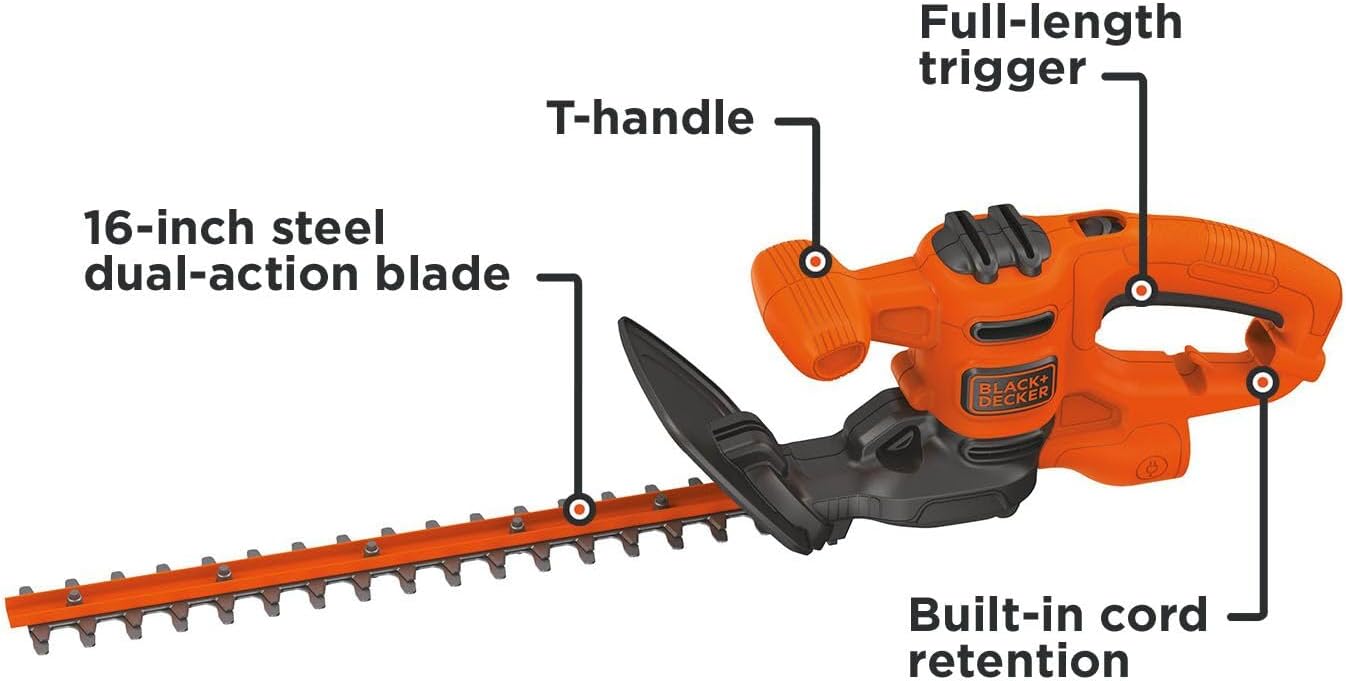
Figure 2: Key components of the BEHT100, including the 16-inch steel dual-action blade, T-handle, full-length trigger, and built-in cord retention system.
Setup and Assembly
The BEHT100 hedge trimmer requires minimal assembly. Ensure the power cord is disconnected before proceeding.
- Attach the Guard: Locate the blade guard. Align it with the designated slots on the trimmer body and push firmly until it clicks into place. Secure with any provided fasteners (e.g., screws) using a Phillips head screwdriver.
- Cord Retention: The trimmer features a built-in cord retention system. Loop the extension cord through the cord retention slot to prevent accidental unplugging during operation.
- Power Connection: Connect the trimmer's power cord to a suitable outdoor-rated extension cord, then plug the extension cord into a grounded 120V AC outlet.

Figure 3: Detail of the built-in cord retention system, designed to secure the extension cord and prevent accidental disconnection.
Operating Instructions
Always wear appropriate safety gear, including eye protection, gloves, and sturdy footwear, before operating the hedge trimmer.
- Starting the Trimmer: To start the trimmer, depress the lock-off button (if present) and squeeze the full-length trigger. The dual-action blade will begin to move.
- Trimming Technique:
- For horizontal cutting, hold the trimmer with both hands, keeping the blade parallel to the ground. Sweep the trimmer in a smooth, arcing motion.
- For vertical cutting, hold the trimmer with both hands, keeping the blade perpendicular to the ground. Move the trimmer up or down along the hedge.
- Avoid cutting branches thicker than 5/8 inch (1.6 cm) to prevent damage to the blade or motor.
- Stopping the Trimmer: Release the full-length trigger to stop the blade.

Figure 4: A user demonstrating horizontal trimming of a hedge with the BEHT100, highlighting the ease of control.

Figure 5: A user performing vertical trimming on a taller shrub, showcasing the lightweight design for maneuverability.
Video 1: This short video demonstrates the BLACK+DECKER BEHT100 hedge trimmer in action, highlighting its easy operation, continuous runtime, bulk-free design, and lightweight nature for effective hedge trimming.
Maintenance and Storage
Proper maintenance ensures the longevity and safe operation of your hedge trimmer.
- Blade Cleaning: After each use, disconnect the power and carefully clean the blades with a stiff brush to remove sap and debris. Apply a light coat of machine oil to the blades to prevent rust.
- Blade Sharpening: If the blades become dull, they can be sharpened by a qualified service center or using a fine-tooth file. Ensure the original cutting angle is maintained.
- General Cleaning: Wipe down the exterior of the trimmer with a damp cloth. Do not use harsh chemicals or abrasive cleaners.
- Storage: Store the trimmer in a dry, secure location out of reach of children. Use the blade sheath to cover the blades when not in use.
Troubleshooting
| Problem | Possible Cause | Solution |
|---|---|---|
| Trimmer does not start. | No power, faulty cord, trigger not fully depressed. | Check power outlet and extension cord. Ensure cord is securely connected. Fully depress the trigger and lock-off button. |
| Blades are dull or not cutting effectively. | Blades need sharpening or cleaning. | Clean blades of sap and debris. Sharpen blades as described in the Maintenance section. |
| Excessive vibration during operation. | Damaged or bent blade, loose components. | Inspect blades for damage. If damaged, replace them. Check for any loose screws or parts and tighten them. If problem persists, contact customer support. |
Specifications
- Brand: BLACK+DECKER
- Model: BEHT100
- Power Source: Corded Electric
- Voltage: 120 Volts
- Blade Length: 16 Inches
- Cutting Capacity: Up to 5/8 inch (1.6 cm)
- Blade Material: Alloy Steel (Dual-Action)
- Item Weight: Approximately 4.62 pounds (2.1 Kilograms)
- Product Dimensions: 4.6"L x 7.3"W x 30.3"H
Warranty and Support
This BLACK+DECKER product is covered by a limited warranty. For specific warranty details, registration, or technical support, please refer to the warranty card included with your product or visit the official BLACK+DECKER website.
Online Support: www.blackanddecker.com
Customer Service: Refer to your product packaging or the official website for regional contact information.


