
1. Overview
The Roland KC-200 is a compact and affordable 100-watt keyboard amplifier designed for musicians requiring powerful, high-fidelity sound and versatile connectivity. It features an integrated mixer with four line input channels, a dedicated auxiliary input, and support for an XLR vocal microphone. The KC-200 incorporates a redesigned power section for enhanced output, stability, and improved bass reproduction, along with a custom two-way speaker system featuring a 12-inch woofer and tweeter.
Key features include:
- 100 watts of power for clear and robust sound.
- Four 1/4-inch line input channels for various instruments.
- Dedicated auxiliary input with 1/8-inch and RCA jacks for external audio devices.
- XLR mic input for vocalists.
- Master EQ for sound shaping.
- Line output, headphones output, and sub output for flexible connectivity.
- Durable metal jacks for increased longevity.

Figure 1: Front view of the Roland KC-200 100-Watt Keyboard Amplifier.
2. Setup
2.1 Unpacking
Carefully remove the KC-200 amplifier from its packaging. Inspect the unit for any signs of damage that may have occurred during transit. Retain all packaging materials for future transport or storage.
2.2 Power Connection
- Ensure the amplifier's power switch is in the OFF position.
- Connect the supplied AC power cord to the AC IN jack on the rear panel of the KC-200.
- Plug the other end of the power cord into a suitable AC outlet.
2.3 Connecting Instruments and Microphones
The KC-200 offers multiple input options:
- Channels 1-4 (1/4-inch Line Inputs): Use standard 1/4-inch instrument cables to connect keyboards, synthesizers, drum machines, or other electronic instruments to these inputs. Adjust the volume for each channel using its dedicated LEVEL knob.
- Channel 1 (XLR Mic Input): For connecting a vocal microphone, use an XLR cable. This input is typically combined with Channel 1's 1/4-inch input, allowing a microphone and an instrument to share the same channel with separate volume controls.
- AUX IN (1/8-inch Stereo Mini & RCA Stereo): Connect external audio players (e.g., smartphones, MP3 players) using a 1/8-inch stereo mini cable or RCA cables. The AUX IN has its own dedicated LEVEL control.
Ensure all connections are secure before powering on the unit.
3. Operation
3.1 Powering On/Off
- Before powering on, ensure all channel LEVEL knobs and the MASTER volume knob are set to their minimum positions.
- Press the POWER switch to turn on the amplifier.
- To power off, ensure all volume controls are at minimum, then press the POWER switch.
3.2 Adjusting Volume Levels
- Channel LEVEL Knobs: Adjust the individual volume for each connected instrument or microphone.
- AUX IN LEVEL Knob: Controls the volume of devices connected to the AUX IN.
- MASTER Volume Knob: Controls the overall output volume of the amplifier. Gradually increase this knob to achieve the desired listening level.
3.3 Master Equalizer (EQ)
The KC-200 features a 2-band Master EQ (LOW and HIGH) to shape the overall tone of your sound. Adjust these knobs to boost or cut the bass and treble frequencies to suit your preference or the acoustic environment.
3.4 Output Connections
- LINE OUT (1/4-inch): Provides a stereo output signal for connecting to a PA system, recording device, or another amplifier.
- PHONES (Headphones) Output: Use a stereo 1/4-inch jack to connect headphones for private practice. The PHONES output mutes the main speaker.
- SUB OUT (1/4-inch): Connect an external powered subwoofer to extend the low-frequency response of the KC-200.

Figure 2: Angled view of the Roland KC-200, highlighting input and control panel.
4. Maintenance
4.1 Cleaning
To clean the amplifier, use a soft, dry cloth. For stubborn dirt, a slightly damp cloth can be used, followed by a dry cloth. Avoid using abrasive cleaners, waxes, or solvents, as these can damage the finish and internal components.
4.2 Storage
When not in use for extended periods, store the KC-200 in a cool, dry place away from direct sunlight and extreme temperatures. If possible, cover the unit to protect it from dust.
4.3 General Care
- Avoid placing heavy objects on top of the amplifier.
- Do not expose the unit to excessive moisture or liquids.
- Ensure adequate ventilation around the amplifier to prevent overheating.
- Handle the power cord and all cables with care to prevent damage.
5. Troubleshooting
If you encounter issues with your Roland KC-200, refer to the following common troubleshooting steps:
5.1 No Power
- Check if the power cord is securely connected to both the amplifier and the AC outlet.
- Verify that the AC outlet is functional by plugging in another device.
- Ensure the power switch on the amplifier is in the 'ON' position.
5.2 No Sound
- Confirm that the MASTER volume knob is turned up.
- Check the individual LEVEL knobs for the channels you are using and ensure they are not at minimum.
- Verify that instruments are properly connected to the correct input jacks.
- Ensure instrument cables are not faulty by testing with a known working cable.
- If headphones are connected, disconnect them as they mute the main speaker.
5.3 Distorted Sound
- Reduce the input LEVEL for the channel that is distorting.
- Lower the MASTER volume.
- Check the output level of the connected instrument; if it's too high, reduce it.
- Ensure the EQ settings are not excessively boosting frequencies, which can lead to distortion.
5.4 Hum or Noise
- Ensure all cables are properly shielded and securely connected.
- Try moving the amplifier or instrument cables away from other electronic devices that might be causing interference.
- If using a microphone, ensure it is not too close to the speaker, which can cause feedback.
- Test different power outlets to rule out ground loop issues.
6. Specifications
| Feature | Specification |
|---|---|
| Output Wattage | 100 Watts |
| Speaker Configuration | 12-inch Woofer, Tweeter |
| Input Channels | 4 x 1/4-inch Line, 1 x XLR Mic, 1 x 1/8-inch Stereo Mini AUX, 1 x RCA Stereo AUX |
| Output Jacks | 1/4-inch Line Out, 1/4-inch Headphones Out, 1/4-inch Sub Out |
| Equalizer | 2-band Master EQ (LOW, HIGH) |
| Product Dimensions (W x D x H) | 19 x 17.13 x 11.63 inches (48.26 x 43.51 x 29.54 cm) |
| Item Weight | 30 pounds (13.6 kg) |
| Material | Metal (jacks) |
| Color | Black |
| Model Number | KC-200 |
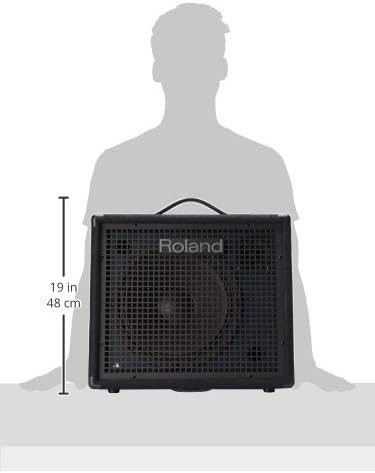
Figure 3: Roland KC-200 with key dimensions indicated.
7. Warranty and Support
7.1 User Manual (PDF)
A detailed PDF version of the user manual is available for download. This document provides comprehensive information on all features and functions of the Roland KC-200.
7.2 Product Warranty
Information regarding the product warranty for your Roland KC-200 amplifier can typically be found in the documentation included with your purchase or on the official Roland website. Please refer to these resources for specific terms and conditions.
7.3 Customer Support
For further assistance, technical support, or service inquiries, please visit the official Roland website or contact their customer support directly. Contact information and support resources are usually available on the manufacturer's website.