
XPOWER XD-85LH
XPOWER XD-85LH Commercial LGR Dehumidifier User Manual
Model: XD-85LH | Brand: XPOWER
Introduction
This manual provides essential information for the safe and efficient operation of your XPOWER XD-85LH Commercial LGR Dehumidifier. Please read it thoroughly before initial use and keep it for future reference.
Key Features
- Commercial Grade Dehumidification: Designed for robust humidity control and water removal in indoor spaces.
- Maximum Humidity Control: Capable of reducing humidity levels to 25% or lower.
- Efficient Water Removal: Removes 85 pints per day at AHAM (80°F, 60% RH).
- Adjustable Digital Control: Features a programmable digital control panel with dual intake technology for enhanced efficiency.
- Portability: Equipped with a built-in handle and wheels for easy transportation.

Image: The XPOWER XD-85LH LGR Dehumidifier showcasing its commercial grade, maximum humidity control, efficient water removal, and adjustable features.
Setup
Unpacking and Initial Placement
Upon receiving your dehumidifier, ensure it is placed upright for at least one hour before operation. This allows the refrigerant inside the machine to stabilize. If the unit was tilted during transportation, allow it to remain upright for four hours before turning it on.
Connecting the Drainage Hose
Locate the drainage hose connection point on the unit. Simply plug in the provided drainage hose until it snaps securely into place. The powerful water pump can discharge water up to 16 feet (approximately 5 meters) vertically.

Image: Close-up of the XPOWER XD-85LH LGR Dehumidifier highlighting the digital control panel, drainage system, and built-in handle and wheels.
Power Connection
Once the drainage hose is connected and the unit has been upright for the recommended time, plug the power cord into a suitable electrical outlet. The unit is now ready for operation.
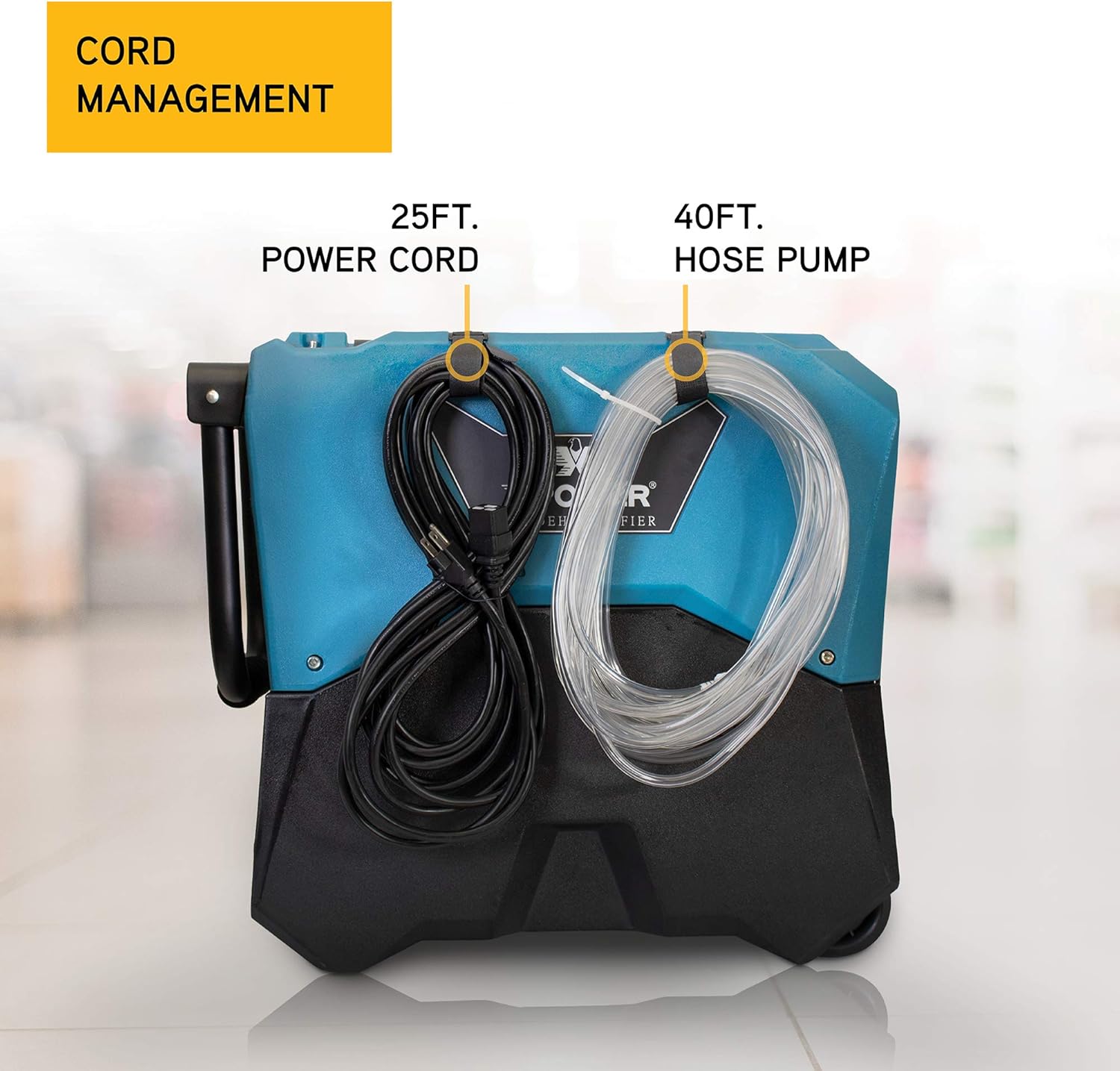
Image: The XPOWER XD-85LH LGR Dehumidifier demonstrating its integrated cord management system for both the 25ft power cord and 40ft hose pump.
Operating Instructions
Control Panel Overview
The digital control panel allows for easy programming and monitoring of the dehumidifier's operation. Below is a breakdown of the main buttons and indicators:
- Power Button (Top Left, Red): Turns the unit on or off.
- CT (Coil Temperature): Displays the temperature of the internal coil.
- F/C (Fahrenheit/Celsius): Toggles the temperature display between Fahrenheit and Celsius.
- Manual Drain Button (Top Right, Icon with water and arrow): Initiates a manual purge of collected water. The powerful pump can complete this in approximately 25 seconds.
- Plus (+) and Minus (-) Buttons: Used to adjust the desired relative humidity (RH) level.
Adjusting Humidity Settings
Use the Plus (+) and Minus (-) buttons to set your desired relative humidity. The unit allows for settings between 30% and 90% RH.
Understanding Display Indicators
- Raindrop Icon: Indicates that the dehumidifier is actively working and removing moisture from the air.
- Top Middle Icon (Water with lines): Signifies that the unit is currently purging and draining water.
- Circle with Fan Blades Icon: Represents the fan speed.
- % RH: Displays the current relative humidity.
- TOTAL TIME: Shows the total operating hours of the unit.
Maintenance
Automatic Defrost Function
The XPOWER XD-85LH is equipped with a smart automatic defrost function. This means the machine will automatically defrost itself as needed, eliminating the need for manual intervention or turning the unit off for defrosting.
General Care
Regularly inspect the unit for any debris or obstructions in the air intake and exhaust areas. Keep the exterior clean with a damp cloth. Ensure the drainage hose is free from kinks or blockages to maintain continuous operation.
Troubleshooting & FAQs
How to Confirm Machine Operation
If the raindrop icon is displayed on the control panel, it indicates that the dehumidifier is actively collecting water from the air and functioning correctly.
Ensuring Continuous Operation
To ensure the machine runs continuously, press the Minus (-) button until the display shows "30% RH". Then, press the Minus (-) button one more time. The display will show "CO", which stands for "Constant On" or "Constant Dehumidification", ensuring the unit operates without stopping based on humidity levels.
Water Pump Height Capability
The integrated water pump is very strong and can pump water up to approximately 16 feet (5 meters) vertically, allowing for flexible drainage options.
Specifications
| Brand | XPOWER |
| Model Name | XD-85LH |
| Color | Blue |
| Capacity | 85 Pints/Day (AHAM) |
| Product Dimensions | 22.2"D x 13.1"W x 29.9"H |
| Item Weight | 67.2 Pounds |
| Material | Roto-Mold PE |
| Wattage | 770 watts |
| Air Flow Capacity | 180 Cubic Feet Per Minute |
| Recommended Uses | Commercial, Basements, Crawlspaces |
Warranty and Support
For warranty information, technical support, or service inquiries, please refer to the warranty card included with your product or visit the official XPOWER website. Keep your purchase receipt as proof of purchase for any warranty claims.
Related documentsXD-85LH


Ask a question about this manual
Ask about setup, troubleshooting, compatibility, parts, safety, or missing instructions. Manuals+ will review the question and use this page’s manual context to help answer it.