Introduction
This manual provides essential instructions for the safe and effective installation, operation, and maintenance of your PIONEER TS-WX130EA Active Subwoofer. Please read this manual thoroughly before using the product to ensure proper understanding and to prevent damage or injury. Keep this manual accessible for future reference.
The PIONEER TS-WX130EA is a compact active subwoofer designed to enhance the bass response in your vehicle's audio system. It features a built-in amplifier and is engineered for easy installation, often suitable for placement under a seat.
Safety Information
- Always disconnect the vehicle's negative battery terminal before beginning any installation work to prevent electrical shorts.
- Ensure all wiring connections are secure and properly insulated to avoid short circuits and potential fire hazards.
- Do not install the subwoofer in locations that obstruct the driver's view or interfere with the operation of safety devices (e.g., airbags).
- Avoid installing the unit in areas exposed to direct sunlight, excessive heat, humidity, or dust.
- Consult a qualified professional for installation if you are unsure about any steps.
Setup and Installation
Proper installation is crucial for optimal performance and safety. It is recommended to have this unit installed by a professional car audio technician.
1. Unpacking
Carefully remove the subwoofer and all accessories from the packaging. Verify that all components are present according to the packing list.
2. Placement Considerations
The TS-WX130EA is designed for compact spaces. Ideal locations include:
- Under a front seat (ensure sufficient clearance and no obstruction of seat movement).
- In the trunk (securely mounted to prevent movement).
Ensure the chosen location allows for adequate ventilation and does not expose the unit to direct moisture or extreme temperatures.
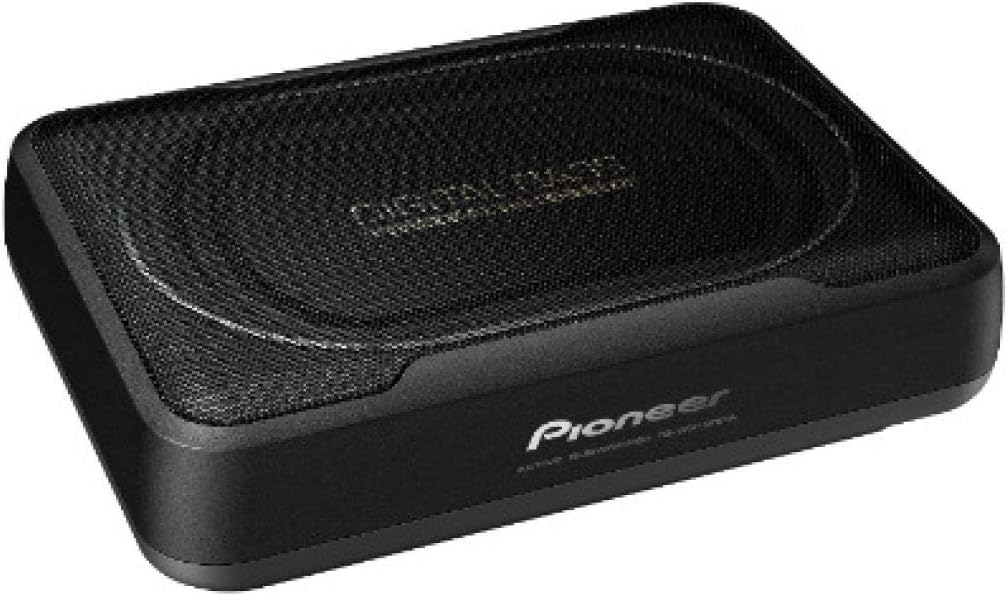
This image shows the compact design of the Pioneer TS-WX130EA active subwoofer, featuring a black enclosure and a protective grille over the speaker.

This image illustrates the compact dimensions of the Pioneer TS-WX130EA active subwoofer, showing its height of 8.3 inches (21 cm) relative to a human figure for scale, highlighting its suitability for under-seat installation.
3. Wiring Connections
The TS-WX130EA requires power, ground, remote turn-on, and audio input connections. Refer to your vehicle's wiring diagram and the subwoofer's specific wiring harness for detailed connections.
- Power (Yellow/Red wire): Connect directly to the vehicle's positive battery terminal via an inline fuse (not supplied, typically 10A-15A).
- Ground (Black wire): Connect securely to a clean, unpainted metal part of the vehicle chassis.
- Remote Turn-On (Blue/White wire): Connect to the remote output wire from your car stereo. This wire turns the subwoofer on and off with your stereo.
- Audio Input:
- RCA Input: If your car stereo has RCA pre-outs, connect them to the subwoofer's RCA input jacks.
- Speaker Level Input: If your car stereo does not have RCA pre-outs, use the supplied speaker level input harness to connect to your stereo's speaker wires.
Important: Ensure correct polarity for all speaker connections to avoid phase issues and poor sound quality.
Operating Instructions
Once installed, the TS-WX130EA offers several adjustments to fine-tune its performance to your vehicle's acoustics and personal preference.
1. Initial Power-On
After all connections are made and verified, reconnect the vehicle's negative battery terminal. Turn on your car stereo. The subwoofer should power on automatically via the remote turn-on wire.
2. Adjusting Controls
The subwoofer typically features the following controls:
- Gain Control: Adjusts the input sensitivity of the amplifier. Start with the gain set to minimum and slowly increase it until the subwoofer output blends smoothly with your main speakers without distortion.
- Low Pass Filter (LPF): This control sets the upper frequency limit for the subwoofer. Frequencies above this setting will be filtered out. A common starting point is 80 Hz, but adjust to blend with your main speakers.
- Phase Switch (0°/180°): This switch helps to ensure the subwoofer's output is in phase with your main speakers. Listen to music with strong bass and switch between 0° and 180°. Choose the setting that provides the most impactful and coherent bass.
- Bass Boost: (If available) Provides an adjustable boost at a specific low frequency. Use sparingly to avoid distortion.
Tip: Make small adjustments to one control at a time and re-evaluate the sound.
Maintenance
The PIONEER TS-WX130EA is designed for durability and requires minimal maintenance.
- Cleaning: Use a soft, dry cloth to wipe the exterior of the unit. Do not use harsh chemicals, solvents, or abrasive cleaners.
- Ventilation: Ensure that the subwoofer's ventilation openings are not blocked by debris or other objects to prevent overheating.
- Connections: Periodically check all wiring connections to ensure they remain secure and free from corrosion.
Troubleshooting
If you experience issues with your TS-WX130EA, refer to the following common problems and solutions before contacting support.
| Problem | Possible Cause | Solution |
|---|---|---|
| No sound from subwoofer |
|
|
| Distorted or unclear bass |
|
|
| Subwoofer turns on/off intermittently |
|
|
Specifications
The following are the technical specifications for the PIONEER TS-WX130EA Active Subwoofer:
| Feature | Specification |
|---|---|
| Brand | PIONEER |
| Model Name | TS-WX130EA |
| Speaker Type | Subwoofer |
| Maximum Speaker Power Output | 160 Watts |
| Input Rated Power | 50 Watts |
| Frequency Response | 40 to 200 Hz |
| Sensitivity | 98 dB |
| Connectivity Technology | Wired |
| Audio Output Mode | Mono |
| Mounting Type | Underseat Mount |
| Material | Plastic and metal |
| Special Features | Bass Boost |
Warranty Information
PIONEER products are manufactured to high-quality standards and are covered by a limited warranty. The specific terms and duration of the warranty may vary by region and retailer. Please refer to the warranty card included with your product or visit the official PIONEER website for detailed warranty information applicable to your purchase.
Keep your proof of purchase (receipt) as it will be required for any warranty claims.
Customer Support
For further assistance, technical support, or inquiries regarding your PIONEER TS-WX130EA Active Subwoofer, please contact PIONEER customer support or your authorized dealer. Contact information can typically be found on the official PIONEER website or in the documentation provided with your product.
When contacting support, please have your product model number (TS-WX130EA) and purchase details readily available.