
Project Source 11-Inch Flush Mount Light (2-Pack)
Project Source 11-Inch Flush Mount Light User Manual
Model: 11-Inch Flush Mount Light (2-Pack)
Introduction
This manual provides detailed instructions for the safe installation, operation, and maintenance of your Project Source 11-Inch Flush Mount Light fixture. Please read this manual thoroughly before beginning installation and retain it for future reference. This product is designed for indoor use only.
Safety Information
WARNING: Risk of Electric Shock. Disconnect power at the fuse or circuit breaker before installing or servicing.
- All electrical connections must be in accordance with local codes, ordinances, or the National Electric Code (NEC).
- Consult a qualified electrician if you are unsure about the installation process.
- Do not install this fixture in wet or damp locations.
- Ensure all wires are properly connected and secured to prevent short circuits.
- Do not exceed the maximum wattage specified for this fixture.
- Handle glass components with care to prevent breakage.
Package Contents
Verify that all components are present before beginning installation:
- Project Source 11-Inch Flush Mount Light Fixture (2 units)
- Mounting Hardware Kit (screws, wire nuts)
- Instruction Manual (this document)
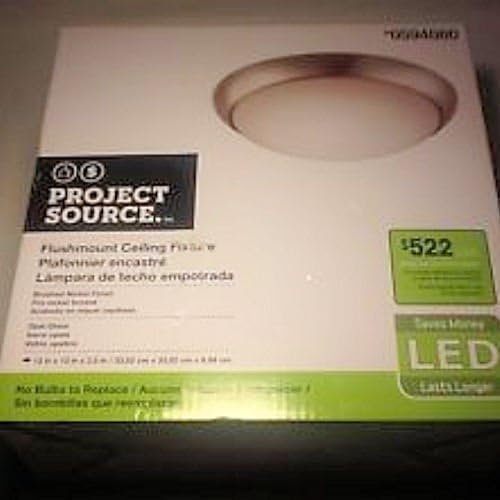
Image: The retail packaging box for the Project Source 11-Inch Flush Mount Light. The box is white with green accents, featuring an image of the light fixture and "PROJECT SOURCE" branding.
Setup and Installation
Tools Required (Not Included):
- Phillips Head Screwdriver
- Wire Strippers
- Electrical Tape (optional)
- Safety Glasses
Installation Steps:
- Turn Off Power: Locate the circuit breaker or fuse box that controls the power to the light fixture location. Turn off the power completely before proceeding.
- Remove Old Fixture (if applicable): Carefully remove any existing light fixture, noting the wiring connections.
- Prepare Wiring: If necessary, strip approximately 1/2 inch of insulation from the ends of the house supply wires.
- Connect Wires:
- Connect the black wire from the fixture to the black (hot) wire from the ceiling box using a wire nut.
- Connect the white wire from the fixture to the white (neutral) wire from the ceiling box using a wire nut.
- Connect the green or bare copper ground wire from the fixture to the green or bare copper ground wire from the ceiling box using a wire nut.
Ensure all wire nuts are securely tightened. Wrap electrical tape around wire nuts for added security if desired.
- Mount Fixture: Carefully tuck all wires into the junction box. Align the fixture's mounting holes with the screws on the junction box or mounting bracket. Secure the fixture to the ceiling using the provided screws.
- Install Glass Diffuser: Gently place the glass diffuser into the fixture and secure it according to the fixture's design (e.g., twist-lock, spring clips, or decorative nuts).
- Restore Power: Turn the power back on at the circuit breaker or fuse box. Test the light fixture to ensure it functions correctly.

Image: A pair of Project Source 11-Inch Flush Mount Light fixtures. Each fixture features a brushed nickel base and a domed, frosted white glass diffuser, designed to provide soft, diffused light.
Operating Instructions
The Project Source 11-Inch Flush Mount Light is designed for simple operation. Once properly installed and wired, the light fixture is controlled by a standard wall switch connected to the circuit. Flip the wall switch to the "ON" position to illuminate the fixture, and to the "OFF" position to turn it off.
Note: This fixture uses integrated LED technology and does not require bulb replacement.
Maintenance
To ensure the longevity and appearance of your light fixture, follow these simple maintenance guidelines:
- Cleaning: Before cleaning, ensure the power to the fixture is turned off at the circuit breaker. Use a soft, dry, or slightly damp cloth to wipe down the exterior surfaces. Do not use abrasive cleaners, solvents, or polishes as they may damage the finish or glass.
- Glass Care: The frosted glass diffuser can be carefully removed for cleaning if necessary. Wash with mild soap and water, rinse thoroughly, and dry completely before reattaching.
- No Bulb Replacement: This fixture features integrated LED components. There are no bulbs to replace. If the light stops working, refer to the Troubleshooting section.
Troubleshooting
If your light fixture is not functioning as expected, consult the following common issues and solutions:
| Problem | Possible Cause | Solution |
|---|---|---|
| Light does not turn on. |
|
|
| Light flickers or dims. |
|
|
| Glass diffuser is loose. |
|
|
If the problem persists after trying these solutions, contact a qualified electrician or customer support.
Specifications
| Feature | Detail |
|---|---|
| Brand | Project Source |
| Model | 11-Inch Flush Mount Light (2-Pack) |
| Product Dimensions | 11 x 11 x 3 inches |
| Item Weight | 4.1 pounds |
| Material | Glass |
| Maximum Compatible Wattage | 120 Watts |
| Type of Bulb | Integrated LED |
| Style | Classic |
Warranty and Support
This product is a refurbished item. Please refer to the seller's specific return and warranty policy at the point of purchase for details regarding coverage and support for refurbished products. General support for Project Source products may be available through their official channels.
For technical assistance or further inquiries, please contact the retailer or manufacturer directly.
Related documents11-Inch Flush Mount Light (2-Pack)


Ask a question about this manual
Ask about setup, troubleshooting, compatibility, parts, safety, or missing instructions. Manuals+ will review the question and use this page’s manual context to help answer it.