
1. Product Overview
The Balboa Spa Pak Bundle Kit, model VS510S, is a comprehensive control system designed for hot tubs. This bundle provides an advanced solution for upgrading or replacing existing spa control components, particularly suitable for older spas with obsolete or costly-to-replace parts. It integrates essential functions for managing various spa components, ensuring efficient and reliable operation.
This system is engineered with M7 temperature and flow sensor technology, which enhances reliability and simplifies installation and servicing. The unit features a durable plastic enclosure designed to prevent water intrusion, and its universal control platform offers significant feature flexibility.
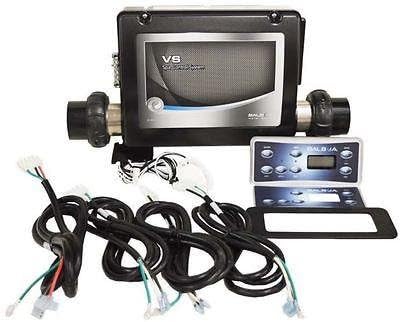
Figure 1: Balboa Spa Pak Bundle Kit VS510S, showing the main control unit, separate control panel, and various wiring harnesses.
2. Compatibility
The VS510S Spa Pak Bundle Kit is designed as a retrofit solution for various hot tub systems. It is particularly noted as a suitable upgrade for Master Spas. For proper operation, the system requires a pump with a minimum flow rate of 23 gallons per minute (GPM).
3. Key Features
- Advanced Control Capabilities: Capable of operating one circulation pump, one dual-speed pump, one blower, one single-speed pump, one ozonator, and one light.
- Power Specifications: Operates on a 240-volt power supply with a 4 kW heater, designed for 60 Hz electrical systems.
- Dual Voltage Operation: The circulation pump and ozonator can operate at 120 volts for flexibility.
- M7 Sensor Technology: Incorporates M7 temperature and flow sensor technology, eliminating the need for traditional pressure switches and enhancing system reliability.
- Durable Enclosure: Features a plastic enclosure designed to prevent water intrusion, protecting internal components.
- Universal Platform: Built on a common universal control platform, which allows for increased feature flexibility and simplifies installation and configuration.
4. Setup and Installation
Installation of the Balboa VS510S Spa Pak Bundle Kit involves electrical and plumbing connections. It is highly recommended that installation be performed by a qualified and certified hot tub technician or electrician to ensure safety, proper functionality, and compliance with local electrical codes.
The system's design minimizes wiring complexity, with connectors built directly onto the circuit board. Refer to the detailed wiring diagram provided with your unit for specific connection points and configurations.

Figure 2: Internal view of the Balboa VS510S Spa Pak, illustrating the circuit board and heater element within the protective casing.

Figure 3: Detailed view of the Balboa VS510S circuit board, showing various connections and components.

Figure 4: Official wiring diagram and switchbank settings for the Balboa VS510S, crucial for correct installation and configuration.
5. Operating Instructions
Once installed, the Balboa VS510S system is controlled via the external control panel (typically sold separately or included in the bundle). General operation includes:
- Temperature Adjustment: Use the up/down arrows on the control panel to set the desired water temperature.
- Pump Activation: Press the "Jets" or "Pump" buttons to cycle through pump speeds (if applicable) or turn pumps on/off.
- Blower Control: Activate the air blower for hydrotherapy effects.
- Light Control: Turn the spa light on or off.
- Ozonator Operation: The ozonator typically operates automatically during filtration cycles to sanitize the water.
Refer to the specific user manual for your Balboa control panel for detailed instructions on programming and advanced features.
6. Maintenance
Regular maintenance of your hot tub system, including the Balboa VS510S Spa Pak, is essential for longevity and optimal performance. Key maintenance practices include:
- Periodic Inspection: Regularly inspect all visible wiring and connections for signs of wear, corrosion, or loose fittings.
- Keep Dry: Ensure the control system's enclosure remains sealed and dry to prevent water intrusion, which can damage electronic components.
- Water Chemistry: Maintain proper hot tub water chemistry to prevent scale buildup on the heater element and other components.
- Professional Check-ups: Consider annual professional inspections to ensure all components are functioning correctly and safely.
7. Troubleshooting
If you encounter issues with your Balboa VS510S Spa Pak, consider the following basic troubleshooting steps. For complex problems, always consult a qualified technician.
| Problem | Possible Cause | Solution |
|---|---|---|
| System not powering on | No power supply, tripped breaker, loose connection. | Check main power supply, reset circuit breaker, ensure all connections are secure. |
| Heater not working | Low water flow, air lock, faulty heater element, sensor issue. | Ensure adequate water level and flow, bleed air from system, consult technician for component checks. |
| Pump not operating | Power issue, motor fault, blockage, control panel error. | Check power to pump, clear any blockages, consult technician for motor or control panel diagnosis. |
| Error codes on control panel | Specific system fault (e.g., flow error, temperature sensor error). | Refer to your Balboa control panel manual for specific error code definitions and troubleshooting steps. |
8. Specifications
| Attribute | Detail |
|---|---|
| Model Name | Balboa Spa Pak Bundle Kit |
| Part Number | VS510S |
| Brand | Balboa Water Group |
| Manufacturer | Balboa |
| Product Dimensions | 30.48 x 10.16 x 26.67 cm (12 x 4 x 10.5 inches) |
| Heater Power | 4 kW |
| Voltage | 240V (main pack), 120V (circ pump, ozone) |
| Frequency | 60 Hz |
| Material | Plastic (enclosure) |
| Color | Grey |
| Number of Jets Controlled | Up to 2 (via pumps) |
| Assembly Required | No (for the unit itself, but installation into spa requires assembly) |
| UPC | 663481296241 |
| First Available Date | December 4, 2017 |

Figure 5: Approximate width measurement of the Balboa VS510S Spa Pak.

Figure 6: Approximate length measurement of the Balboa VS510S Spa Pak, including pipe unions.

Figure 7: Approximate height measurement of the Balboa VS510S Spa Pak.

Figure 8: Approximate depth measurement of the Balboa VS510S Spa Pak.

Figure 9: Approximate diameter measurement of the pipe union opening on the Balboa VS510S Spa Pak.
9. Warranty and Support
For information regarding the warranty coverage for your Balboa Spa Pak Bundle Kit VS510S, please refer to the warranty documentation included with your purchase or contact Balboa Water Group directly. Warranty terms typically cover manufacturing defects for a specified period.
For technical support, troubleshooting assistance beyond this manual, or to inquire about replacement parts, please contact Balboa Water Group customer service or your authorized dealer. Always provide your model number (VS510S) and purchase date when seeking support.
Note: This manual provides general information. Specific installation and operational details may vary. Always consult a qualified professional for installation and complex repairs.


