1. Introduction
This manual provides instructions for the NewPowerGear TV Remote Control Replacement. This remote is designed to function as a direct replacement for the original remote controls of specific Hisense television models. It utilizes infrared (IR) technology for communication with your television.
Compatible Devices: Hisense Television models 50M7000UWG, 55M7000UWG, 65M7000UWG, 70M7000UWG.
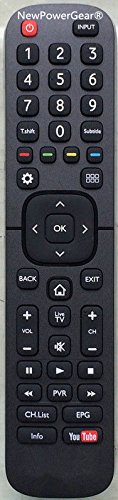
Image of the NewPowerGear TV remote control, showing its button layout and ergonomic design.
2. Setup
To begin using your new remote control, follow these simple steps:
- Install Batteries:
Locate the battery compartment on the back of the remote control. Slide the battery cover downwards or in the direction indicated by an arrow. Insert two new AAA batteries (not included), ensuring the positive (+) and negative (-) terminals align correctly with the markings inside the compartment. Replace the battery cover securely.
- Initial Use:
No programming or pairing is typically required for this replacement remote. Once batteries are installed, point the remote control directly at your Hisense television and press the Power button to test its functionality. If the TV turns on or off, the remote is ready for use.
3. Operating Instructions
This remote control features standard button controls for navigating your Hisense television. Familiarize yourself with the button layout for optimal use.
- Power Button: Turns the television on or off.
- Number Buttons (0-9): For direct channel input.
- Channel Up/Down: Changes the television channel sequentially.
- Volume Up/Down: Adjusts the television's audio volume.
- Mute Button: Silences the television's audio.
- Input/Source Button: Cycles through available input sources (HDMI, AV, etc.).
- Menu/Settings Button: Accesses the television's main menu or settings.
- Navigation Buttons (Up, Down, Left, Right, OK/Enter): Used to navigate menus and select options.
- Back/Exit Button: Returns to the previous screen or exits a menu.
For specific functions of advanced buttons, refer to your Hisense television's original user manual.
4. Maintenance
Proper care will extend the life of your remote control.
- Cleaning:
Wipe the remote control with a soft, dry cloth. For stubborn dirt, lightly dampen the cloth with water or a mild, non-abrasive cleaner. Avoid using harsh chemicals or excessive moisture, as these can damage the remote's electronics.
- Battery Replacement:
Replace batteries when the remote's response becomes sluggish or stops working. Always replace both batteries at the same time with new ones of the same type (AAA). Do not mix old and new batteries, or different types of batteries.
- Storage:
Store the remote control in a cool, dry place away from direct sunlight, extreme temperatures, and high humidity. If the remote will not be used for an extended period, remove the batteries to prevent leakage.
5. Troubleshooting
If you encounter issues with your remote control, try the following solutions:
- Remote Not Responding:
- Check if the batteries are installed correctly with the correct polarity (+/-).
- Replace the batteries with fresh ones.
- Ensure there are no obstructions between the remote control and the television's IR receiver.
- Make sure you are within the effective range and pointing the remote directly at the TV.
- Some Buttons Not Working:
- This may indicate low battery power. Replace the batteries.
- Ensure the remote is clean and free of debris that might obstruct button presses.
If problems persist after trying these steps, contact the manufacturer for further assistance.
6. Specifications
| Feature | Detail |
|---|---|
| Brand | NewPowerGear |
| Compatible Devices | Hisense Television (Models: 50M7000UWG, 55M7000UWG, 65M7000UWG, 70M7000UWG) |
| Connectivity Technology | Infrared (IR) |
| Controller Type | Button Control |
| Special Feature | Ergonomic |
| Manufacturer | NewPowerGear |
| ASIN | B077X6FLNM |
| Date First Available | December 4, 2017 |
7. Warranty and Support
This NewPowerGear product is offered with a 30-day money-back guarantee. For warranty claims or technical support, please contact NewPowerGear directly or the retailer from whom the product was purchased.
Please retain your proof of purchase for any warranty or support inquiries.

