1. Product Overview
The Groz 55016 is a robust 15W LED floodlight designed for various applications requiring powerful and durable illumination. This square floodlight features 5 LEDs, each rated at 3W, delivering a total light output of 900 lumens. Constructed with an aluminum die-cast housing, it ensures durability and efficient heat dissipation. It operates on a wide voltage range of 12V DC to 36V DC and boasts an IP67 water and dustproof rating, making it suitable for demanding environments.
This floodlight is ideal for use on construction equipment, farm machinery, emergency vehicles, service vans, and tractors, providing reliable lighting in challenging conditions.

Figure 1: Groz 55016 LED Floodlight (Side View)
2. Safety Information
Please read all safety instructions carefully before installing or operating the Groz 55016 LED Floodlight. Failure to follow these instructions may result in electric shock, fire, or serious injury.
- Electrical Safety: Ensure the power source matches the specified voltage range (12V DC - 36V DC). Incorrect voltage can damage the unit and pose a safety hazard.
- Wiring: All wiring should be performed by a qualified professional in accordance with local electrical codes. Ensure proper polarity when connecting DC power (red wire for positive, black wire for negative).
- Mounting: Mount the floodlight securely to a stable surface capable of supporting its weight. Avoid mounting in locations where it could obstruct vision or interfere with vehicle operation.
- Operating Temperature: Do not operate the floodlight outside its recommended temperature range.
- Water and Dust Resistance: The floodlight has an IP67 rating, indicating protection against dust ingress and temporary immersion in water. However, avoid prolonged submersion or high-pressure water jets.
- Eye Protection: Do not stare directly into the LED light source when it is illuminated, as this may cause eye strain or damage.
- Maintenance: Disconnect power before performing any maintenance or cleaning.
3. Package Contents
Verify that all items listed below are included in your package:
- Groz 55016 LED Floodlight
- Mounting Bracket
- Hardware (nuts, bolts, washers)
- 20" (DC) Power Cord

Figure 2: Groz 55016 LED Floodlight Packaging
4. Specifications
| Feature | Specification |
|---|---|
| Model Number | 55016 |
| Light Source | 5 x 3W LEDs |
| Wattage | 15 Watts |
| Brightness | 900 Lumens |
| Voltage | 12V DC - 36V DC |
| Housing Material | Aluminum Die Cast |
| Finish Type | Powder Coated |
| Shade Material | Stainless Steel |
| IP Rating | IP67 (Water & Dust Proof) |
| Power Cord Length | 20 inches (DC) |
| Mounting Type | Wall Mount (with included bracket) |
| Item Weight | 14 ounces |
| Dimensions (approx.) | 4.61 x 3.82 x 2.28 inches (Package Dimensions) |
5. Setup and Installation
Follow these steps to properly install your Groz 55016 LED Floodlight:
- Choose a Mounting Location: Select a secure and stable surface that can safely support the floodlight's weight and provide the desired illumination angle. Ensure the location allows for proper cable routing and does not interfere with other equipment.
- Attach Mounting Bracket: Secure the provided mounting bracket to the floodlight using the included hardware. The bracket allows for angle adjustment.
- Mount the Floodlight: Fasten the floodlight, with its attached bracket, to your chosen surface using appropriate fasteners (not always included, depending on surface type). Ensure it is firmly secured to prevent vibration or detachment during operation.
- Wiring: Connect the 20-inch DC power cord to your 12V DC - 36V DC power source. The red wire is for the positive (+) terminal, and the black wire is for the negative (-) terminal. Ensure connections are secure and insulated to prevent short circuits.
- Adjust Angle: Once mounted and wired, adjust the floodlight's angle to direct the light as needed. Tighten the bracket bolts to secure the desired position.

Figure 3: Rear view showing mounting bracket attachment
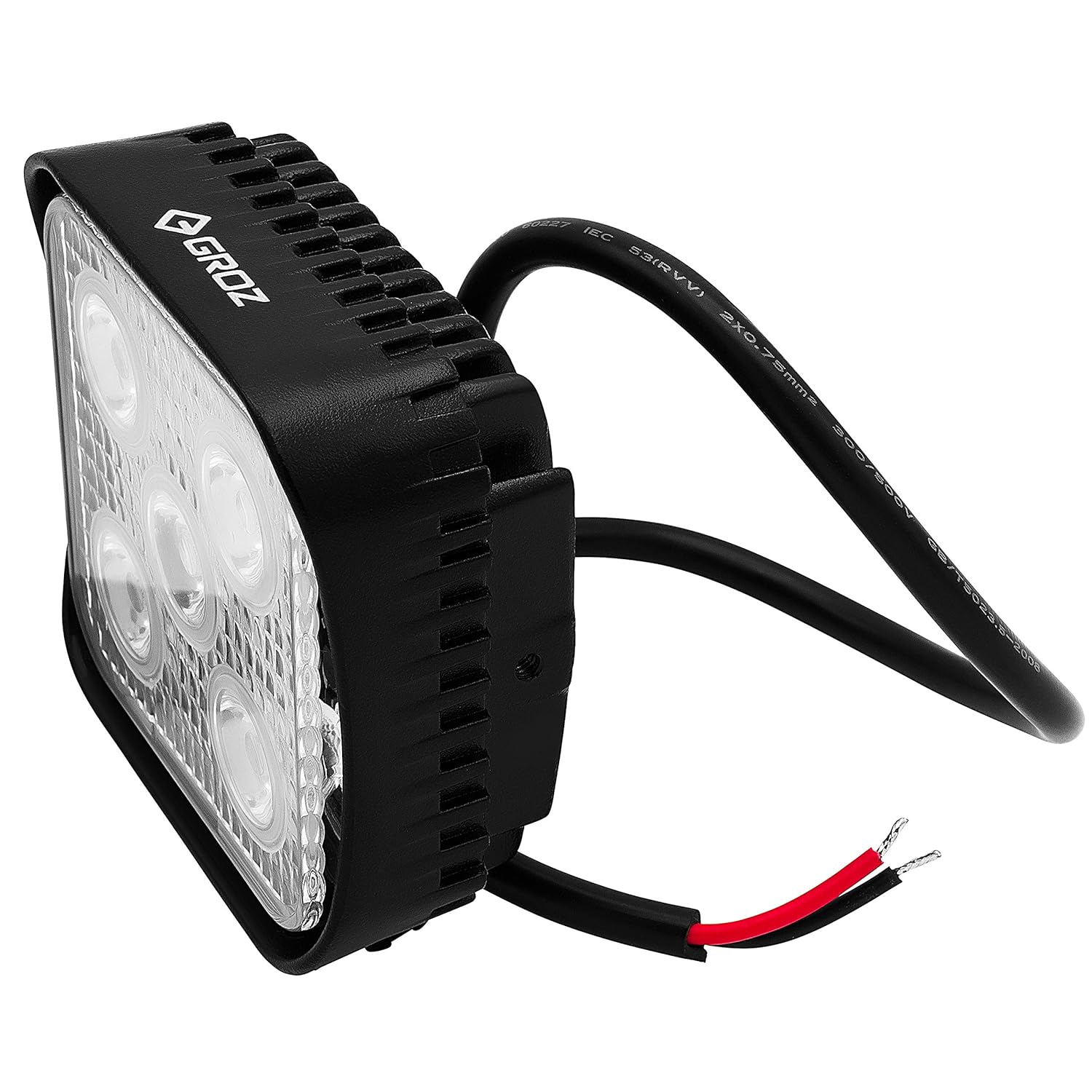
Figure 4: Front view showing power cord connections
6. Operation
Operating the Groz 55016 LED Floodlight is straightforward:
- Ensure the floodlight is correctly installed and wired to a compatible 12V DC - 36V DC power source as described in the "Setup and Installation" section.
- Apply power to the connected circuit. The LED floodlight will illuminate instantly.
- To turn off the floodlight, disconnect power from the circuit.
7. Maintenance
Regular maintenance helps ensure the longevity and optimal performance of your floodlight:
- Cleaning: Periodically clean the lens and housing with a soft, damp cloth. Avoid abrasive cleaners or solvents that could damage the finish or lens. Ensure the unit is powered off and cool before cleaning.
- Inspection: Regularly inspect the power cord for any signs of damage, fraying, or wear. Check the mounting bracket and hardware for tightness and corrosion. Tighten any loose fasteners.
- Environmental Protection: While the floodlight is IP67 rated, extreme environmental conditions (e.g., prolonged exposure to corrosive chemicals, extreme temperatures) can affect its lifespan. Protect the unit from unnecessary harsh conditions.
8. Troubleshooting
If you encounter issues with your Groz 55016 LED Floodlight, refer to the following troubleshooting guide:
| Problem | Possible Cause | Solution |
|---|---|---|
| Light does not turn on. | No power supply. Incorrect wiring (polarity). Damaged power cord/connections. | Check power source and ensure it is active. Verify red wire is connected to positive (+), black to negative (-). Inspect power cord and connections for damage. Replace if necessary. |
| Light is dim or flickers. | Insufficient voltage. Loose connection. Internal component failure. | Ensure power supply is within 12V DC - 36V DC range. Check all wiring connections for tightness. If problem persists, contact customer support. |
| Water inside the housing. | Seal damage. Improper installation. | Discontinue use immediately. Contact customer support. |
9. Warranty and Support
Groz products are manufactured to high-quality standards. This product comes with a standard manufacturer's warranty against defects in materials and workmanship. For specific warranty terms and conditions, please refer to the documentation provided with your purchase or visit the official Groz website.
For technical support, troubleshooting assistance, or warranty claims, please contact Groz customer service through their official website or the retailer from whom the product was purchased. Please have your model number (55016) and purchase date available when contacting support.


