
Asustor AS-RC13
ASUSTOR AS-RC13 IR Remote Control User Manual
Model: AS-RC13 | Brand: Asustor
Product Overview
The ASUSTOR AS-RC13 is a 13-key infrared (IR) remote control designed for use with compatible ASUSTOR Network Attached Storage (NAS) devices. This remote allows users to conveniently control media playback and navigate the ASUSTOR Portal interface on their NAS, enhancing the home theater experience.
It is compatible with a wide range of ASUSTOR NAS models, including but not limited to: AS5202T, AS5304T, AS6102T, AS6104T, AS6202T, AS6204T, AS6208T, AS6210T, AS3102T, AS3104T, AS3202T, AS3204T, AS6302T, AS6404T, AS6602T, AS6604T, AS6702T, AS6704T, and AS6706T. Ensure your ADM firmware is version 3.0 or above for optimal compatibility.
Package Contents
- ASUSTOR AS-RC13 IR Remote Control
- Note: AAA batteries are not included and must be purchased separately.
Setup
1. Battery Installation
The AS-RC13 remote control requires two (2) AAA batteries for operation. Follow these steps to install the batteries:
- Locate the battery compartment cover on the back of the remote control.
- Slide the cover downwards or in the direction indicated by an arrow to open it.
- Insert two AAA batteries, ensuring the positive (+) and negative (-) terminals align correctly with the markings inside the compartment.
- Slide the battery compartment cover back into place until it clicks securely.
2. Initial Connection and Pairing
Once batteries are installed, the remote is ready for use. For detailed instructions on pairing the remote with your specific ASUSTOR NAS model and configuring its functions within the ASUSTOR ADM (ASUSTOR Data Master) operating system, please refer to the official ASUSTOR website. Specific guidance can often be found under "College Course 136" or in the support documentation for your NAS model.

Figure 1: Front view of the ASUSTOR AS-RC13 remote control.
Operating the Remote Control
The AS-RC13 remote control features 13 keys designed for intuitive navigation and control of your ASUSTOR NAS when connected to a display via HDMI and using the ASUSTOR Portal.
Key Functions:
- Power Button: Typically used to power on/off or put the NAS into sleep mode.
- Navigation Pad (Up, Down, Left, Right, OK/Enter): For navigating menus, selecting items, and confirming actions.
- Home Button: Returns to the main ASUSTOR Portal screen.
- Settings/Menu Button: Accesses settings or context menus within applications.
- Volume Up/Down: Controls audio output volume.
- Mute Button: Mutes or unmutes audio.
- Back/Return Button: Navigates back to the previous screen or menu.
- Play/Pause Button: Controls media playback (play, pause).
For specific application controls and advanced functionalities, refer to the user interface of the ASUSTOR Portal and the respective applications running on your NAS. The remote's functionality is highly integrated with the ADM operating system and its installed apps.
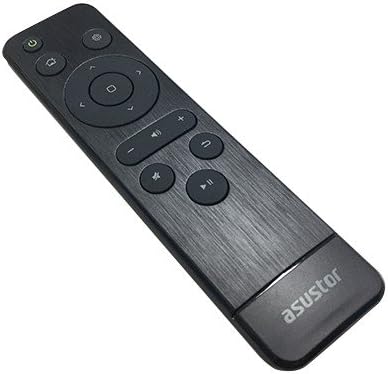
Figure 2: Angled view of the ASUSTOR AS-RC13 remote control.
Maintenance
Battery Replacement:
When the remote control's responsiveness decreases or it stops functioning, it is likely time to replace the batteries. Follow the battery installation steps outlined in the "Setup" section to replace the two AAA batteries. Always use fresh, high-quality batteries for optimal performance.
Cleaning:
To clean the remote control, use a soft, dry cloth. For stubborn dirt or grime, slightly dampen the cloth with water or a mild, non-abrasive cleaner. Avoid using harsh chemicals, solvents, or abrasive materials, as these can damage the remote's surface or internal components.
Troubleshooting
- Remote not responding:
- Check if the batteries are correctly installed and have sufficient charge. Replace them if necessary.
- Ensure there are no obstructions between the remote control and the NAS's IR receiver.
- Verify that your NAS model is listed as compatible and that its ADM firmware is up to date (version 3.0 or above).
- Limited functionality:
- Some functions may require specific applications or configurations within the ASUSTOR Portal. Consult the ASUSTOR website or NAS documentation for detailed usage guides.
For further assistance, refer to the official ASUSTOR support resources, including their online knowledge base and forums.
Specifications
| Feature | Detail |
|---|---|
| Brand | Asustor |
| Model Number | AS-RC13 |
| Control Type | Infrared (IR) |
| Number of Keys | 13 |
| Power Source | 2 x AAA Batteries (not included) |
| Dimensions (LxWxH) | 6.1 x 1.77 x 0.98 inches (15.5 x 4.5 x 2.5 cm) |
| Weight | 0.32 ounces (9 grams) |
| Color | Black |
| Compatible Devices | ASUSTOR NAS models including AS-302T, AS-304T, AS-202TE, AS-204TE, AS7004T, AS7008T, AS7010T, AS5002T, AS5004T, AS5102T, AS5104T, AS5008T, AS5010T, AS5108T, AS5110T, AS6102T, AS6104T, AS6202T, AS6204T, AS6208T, AS6210T, AS3102, AS3102T v2, AS3104T, AS3202T, AS3204T, AS3204T v2, AS6302T, AS6404T, AS5202T, AS5304T, AS6602T, AS6604T, AS6702T, AS6704T, AS6706T, AS5402T, AS5404T. (ADM firmware 3.0 or above required). |
Warranty and Support
Information regarding the specific warranty terms and conditions for the ASUSTOR AS-RC13 remote control is not provided within this manual. For warranty details, technical support, and service inquiries, please visit the official ASUSTOR website or contact ASUSTOR customer service directly.
Official ASUSTOR Website: www.asustor.com
Ask a question about this manual
Ask about setup, troubleshooting, compatibility, parts, safety, or missing instructions. Manuals+ will review the question and use this page’s manual context to help answer it.