
1. Introduction
The HM Digital HM-200 Hydromaster Portable Meter is a versatile handheld instrument designed for monitoring key water quality parameters. It accurately measures pH, Electrical Conductivity (EC), Total Dissolved Solids (TDS), and temperature. This device offers selectable conductivity conversion factors (0.5 for NaCl and 0.7 for 442TM) and supports measurements in S, mS, and ppm scales. Equipped with automatic buffer recognition, the HM-200 simplifies the calibration process. It also features data storage for up to 20 measurements, enhancing its utility for various applications.
This manual provides essential information for the proper setup, operation, maintenance, and troubleshooting of your HM-200 meter to ensure accurate and reliable performance.
2. Package Contents
Upon opening the package, verify that all components are present and undamaged:
- HM-200 Hydromaster Portable Meter Unit
- pH Probe
- EC/TDS Probe
- pH Calibration Solutions
- Durable Protective Rubber Boot
- User Manual (this document)
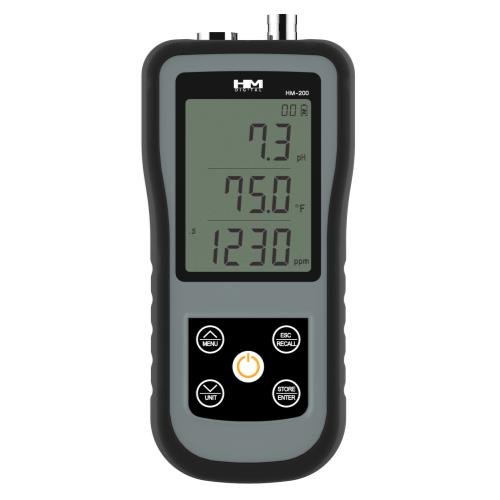
Figure 1: HM Digital HM-200 Hydromaster Portable Meter with included probes and accessories.
3. Setup
3.1. Battery Installation
The HM-200 meter typically uses standard batteries (e.g., AA or AAA, refer to the battery compartment for specific type). To install or replace batteries:
- Locate the battery compartment cover on the back of the meter.
- Carefully slide or unclip the cover to open it.
- Insert new batteries, ensuring correct polarity (+/-) as indicated inside the compartment.
- Replace the battery compartment cover securely.
3.2. Probe Connection
Connect the pH and EC/TDS probes to their respective ports on the meter. Ensure the connections are firm to prevent signal loss or inaccurate readings.
- pH Probe: Connect to the port labeled "pH".
- EC/TDS Probe: Connect to the port labeled "EC/TDS".
Always handle probes with care to avoid damage to the sensitive sensors.
4. Operation
4.1. Powering On/Off
Press the POWER button to turn the meter on. Press and hold the POWER button for a few seconds to turn it off.
4.2. Taking Measurements
- Ensure probes are clean and properly connected.
- Immerse the pH and EC/TDS probes into the sample solution. Ensure the sensors are fully submerged.
- Allow a few moments for the readings to stabilize on the display.
- The meter will simultaneously display pH, EC/TDS, and temperature readings.
4.3. Selecting Measurement Modes and Conversion Factors
The HM-200 allows selection of different conductivity conversion factors and measurement scales:
- Conductivity Conversion Factors: The meter supports two factors to convert EC to TDS:
- 0.5 (NaCl): Standard for sodium chloride solutions.
- 0.7 (442TM): For specific industrial applications.
- Measurement Scales: Selectable modes for measurements in S (Siemens), mS (milliSiemens), and ppm (parts per million). Consult the user interface for scale selection.
5. Calibration
Regular calibration is crucial for maintaining the accuracy of your HM-200 meter. The meter features automatic buffer recognition for pH calibration.
5.1. pH Calibration
- Prepare fresh pH buffer solutions (e.g., pH 4.01, 7.00, 10.01).
- Rinse the pH probe with distilled water and gently blot dry.
- Immerse the pH probe into the first buffer solution (e.g., pH 7.00).
- Enter calibration mode on the meter (refer to specific button or menu option).
- The meter will automatically recognize the buffer and calibrate.
- Repeat with other buffer solutions as needed for multi-point calibration.
- Rinse the probe thoroughly with distilled water after each calibration point.
5.2. EC/TDS Calibration
EC/TDS calibration typically involves using a standard conductivity solution. Follow the meter's specific instructions for entering EC/TDS calibration mode and adjusting the reading to match the standard solution's value.
6. Data Storage and Recall
The HM-200 meter can store up to 20 measurements. This feature allows users to record and review data over time.
- Storing Data: After a stable reading, press the SAVE or HOLD button (button name may vary) to save the current measurement.
- Recalling Data: Access the data recall function through the meter's menu or a dedicated RECALL button. You can then scroll through the stored measurements.
7. Maintenance
7.1. Probe Cleaning and Storage
- After Each Use: Rinse both pH and EC/TDS probes thoroughly with distilled or deionized water to remove any sample residue.
- pH Probe Storage: Store the pH probe in a suitable storage solution (e.g., KCL solution) or a pH 4 buffer solution. Never store dry.
- EC/TDS Probe Storage: The EC/TDS probe can typically be stored dry after rinsing.
- Deep Cleaning: If probes become contaminated or readings are erratic, consult the manufacturer's guidelines for specific cleaning solutions and procedures.
7.2. Battery Replacement
Replace batteries when the low battery indicator appears on the display or if the meter fails to power on. Refer to Section 3.1 for battery installation instructions.
7.3. General Care
- Keep the meter and probes clean and dry when not in use.
- Utilize the durable protective rubber boot to shield the meter from impacts and splashes.
- Avoid exposing the meter to extreme temperatures, direct sunlight, or corrosive chemicals.
8. Troubleshooting
| Problem | Possible Cause | Solution |
|---|---|---|
| Meter does not power on. | Dead or incorrectly installed batteries. | Replace batteries, ensuring correct polarity. |
| Inaccurate or unstable readings. |
|
|
| Display shows "Error" or blank. |
|
|
9. Specifications
- Model: HM-200 (716137)
- Parameters Measured: pH, Electrical Conductivity (EC), Total Dissolved Solids (TDS), Temperature
- EC to TDS Conversion Factors: 0.5 (NaCl), 0.7 (442TM)
- Measurement Scales: S, mS, ppm
- Data Storage: Up to 20 measurements
- Product Dimensions: 5.1 x 3.3 x 7.5 inches
- Item Weight: 1.19 pounds
- Manufacturer: HM Digital
- Additional Features: Automatic buffer recognition for pH calibration, durable protective rubber boot.
10. Warranty Information
HM Digital products are typically covered by a limited warranty against defects in materials and workmanship. For specific warranty terms, duration, and conditions applicable to your HM-200 meter, please refer to the warranty card included with your product or visit the official HM Digital website. Keep your purchase receipt as proof of purchase for warranty claims.
11. Customer Support
If you encounter any issues not covered in this manual or require further assistance, please contact HM Digital customer support. Contact information, including phone numbers and email addresses, can typically be found on the HM Digital website or on the product packaging.
Website: www.hmdigital.com (Note: This is a placeholder URL. Please refer to official documentation for the correct website.)