
Introduction
This manual provides comprehensive instructions for the setup, operation, and maintenance of your Memorex AV4-02036266 Universal Remote Control. This remote is designed to control various audio/video devices, including televisions, VCRs, and cable boxes. Please read this manual thoroughly before use to ensure proper functionality and to maximize your remote's capabilities.
Setup
Battery Installation
To install batteries:
- Locate the battery compartment cover on the back of the remote control.
- Slide the cover downwards or press the latch to open it.
- Insert two new AAA batteries, ensuring the positive (+) and negative (-) terminals align with the markings inside the compartment.
- Replace the battery compartment cover, ensuring it clicks securely into place.
Programming the Remote
The Memorex AV4-02036266 remote requires programming to control your specific devices. Follow these steps to set up your remote:
- Identify Device Code: Find the three-digit code for your TV, VCR, Cable box, or Audio device in the owner's manual of the respective product or from the manufacturer's website.
- Enter the Code:
- Press the desired device button on the remote (e.g., TV, VCR, CABLE, or AUDIO).
- Press the SET button, then immediately press the POWER button.
- Enter the three-digit code you found for your device.
- Test Functionality: After entering the code, test the remote's functions (e.g., Power, Channel, Volume) to ensure it controls your device correctly. If not, try another code for your device or repeat the programming steps.
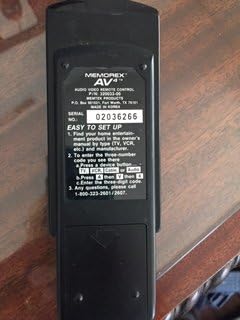
Image: Back view of the Memorex AV4-02036266 remote control, displaying the battery compartment and a label with "EASY TO SET UP" instructions, including steps for finding and entering three-digit device codes.
Operating Your Remote
The Memorex AV4-02036266 remote features a standard layout for easy control of your entertainment system. Below are the primary functions of the buttons:
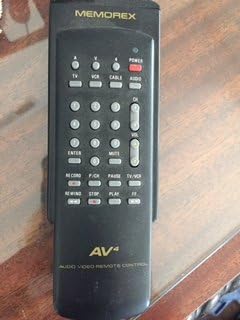
Image: Front view of the Memorex AV4-02036266 remote control, showcasing its ergonomic design and the arrangement of various control buttons, including device selection, power, channel, volume, and VCR playback functions.
- POWER: Turns the selected device on or off.
- TV/VCR/CABLE/AUDIO: Selects the device you wish to control. Press the corresponding button before issuing commands.
- CH+/CH-: Changes channels up or down on the TV or cable box.
- VOL+/VOL-: Adjusts the volume up or down.
- MUTE: Silences the audio output. Press again to restore sound.
- NUMBER PAD (0-9): Used for direct channel entry or programming codes.
- ENTER/OK: Confirms selections or enters channel numbers.
- MENU: Accesses the on-screen menu of the selected device.
- GUIDE: Displays the program guide (if supported by your device).
- PLAY/PAUSE/STOP/REWIND/FF/RECORD: Controls VCR playback functions.
- TV/VCR: Toggles between TV and VCR input modes.
Maintenance
Cleaning the Remote
To maintain the appearance and functionality of your remote control:
- Wipe the surface with a soft, slightly damp cloth.
- Do not use abrasive cleaners, solvents, or alcohol, as these can damage the finish or internal components.
- Ensure no liquid enters the remote's interior.
Battery Care and Replacement
- Replace batteries when the remote's performance degrades or if it stops responding.
- Remove batteries if the remote will not be used for an extended period to prevent leakage.
- Dispose of used batteries according to local regulations.
Troubleshooting
If you experience issues with your Memorex remote, refer to the following common problems and solutions:
| Problem | Possible Cause | Solution |
|---|---|---|
| Remote not working at all. | Dead or incorrectly installed batteries. | Replace batteries with new ones, ensuring correct polarity. |
| Remote controls some functions but not others. | Incorrect device code or partial programming. | Re-program the remote using the correct three-digit code for your device. Try alternative codes if available. |
| Device not responding to remote commands. | Obstruction between remote and device; remote not pointed correctly; infrared sensor blocked. | Ensure a clear line of sight. Point the remote directly at the device's infrared sensor. Check if the device's sensor is obstructed. |
| Buttons are sticky or unresponsive. | Dirt or debris under the buttons. | Clean the remote as described in the Maintenance section. Avoid spilling liquids on the remote. |
Specifications
| Feature | Detail |
|---|---|
| Model Number | AV4-02036266 |
| Brand | Memorex |
| Compatible Devices | TV, VCR, Cable Box, Audio Devices |
| Connectivity Technology | Infrared (IR) |
| Controller Type | Button Control |
| Special Feature | Ergonomic Design |
| Package Dimensions | 7.8 x 3.35 x 1.65 inches |
| Item Weight | 3.17 ounces |
| Date First Available | December 1, 2017 |
Warranty and Support
For specific warranty information regarding your Memorex AV4-02036266 remote control, please refer to the documentation included with your purchase or contact Memorex customer support directly. Warranty terms and conditions may vary.
For technical assistance or any questions not covered in this manual, please contact Memorex customer support:
- Customer Support Phone: 1-800-323-2001 or 1-800-323-2007
Please have your product model number (AV4-02036266) ready when contacting support.