1. Introduction
The ENTTEC DMX USB Pro is a robust and versatile interface designed to connect your computer to DMX lighting systems. It enables control of lighting fixtures directly from your computer, supporting a full universe of 512 DMX channels. Known for its high-speed performance, it can achieve up to 850 frames per second, ensuring smooth and responsive lighting control. This device is compatible with various operating systems including Windows, macOS, and Linux, and integrates seamlessly with numerous third-party lighting software applications.

Figure 1: The ENTTEC DMX USB Pro 512-Ch USB DMX Interface, a compact black unit with USB and DMX input/output ports.
2. Setup
Setting up your DMX USB Pro is straightforward. Follow these steps to get started:
- Connect to Computer: Use a standard USB 2.0 Type B cable to connect the DMX USB Pro to an available USB port on your computer. The device is powered via USB (5V DC).
- Connect to DMX Fixtures:
- For DMX output, connect a 5-pin XLR DMX cable from the "DMX OUT" port on the interface to the first DMX fixture in your chain.
- For DMX input (if applicable for your software/setup), connect a 5-pin XLR DMX cable from your DMX source to the "DMX IN" port.
- Software Installation: The DMX USB Pro is designed for plug-and-play compatibility with many lighting control software packages. While specific drivers are often not required, it is recommended to visit the official Enttec website for the latest software, firmware updates, and compatibility information for your chosen lighting control application (e.g., ENTTEC EMU). The device supports Windows, macOS, and Linux operating systems.
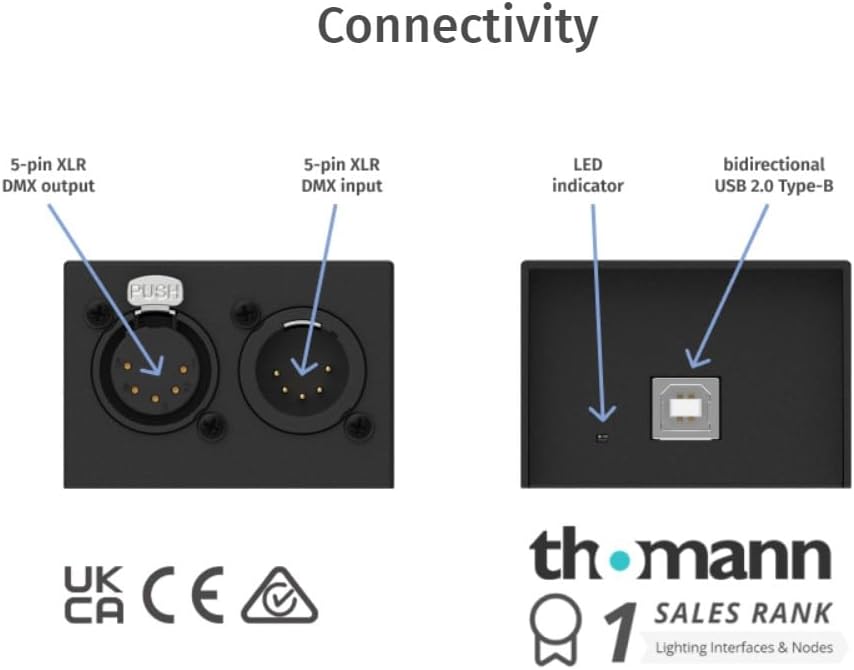
Figure 2: Diagram illustrating the connectivity ports of the DMX USB Pro, including 5-pin XLR DMX output, 5-pin XLR DMX input, LED indicator, and bidirectional USB 2.0 Type-B port.
3. Operating Instructions
The DMX USB Pro acts as a bridge between your computer's software and your DMX lighting fixtures. Its operation is primarily controlled by the software you choose to use.
- DMX Channel Control: The device supports a full 512 DMX channels, often referred to as one DMX universe. Your lighting software will allow you to assign and control individual DMX channels for various parameters of your lighting fixtures (e.g., intensity, color, pan, tilt).
- Refresh Rate: The output refresh rate is configurable, typically ranging from 1 to 40 Frames Per Second (FPS). A higher refresh rate provides smoother lighting transitions. This setting is usually managed within your lighting control software.
- Software Compatibility: The DMX USB Pro is compatible with a wide range of commercial and free lighting software packages, including those that support USITT DMX512-A and ANSI E1.20 RDM1. It also offers a Developer API for integration into custom software solutions.
- LED Indicator: A small LED indicator on the unit provides status feedback, typically indicating power and DMX activity. Refer to your software's documentation for specific LED behavior interpretations.

Figure 3: An overview of the DMX USB Pro's features, highlighting full 512 DMX channels, USITT DMX512-A compliance, configurable output refresh rate, Developer API, and compatibility with various lighting programs.

Figure 4: Visual representation of key product attributes: 1 DMX Universe, USB 5V DC power, IP20 ingress protection, and a 3-year warranty.
4. Maintenance
The ENTTEC DMX USB Pro is designed for durability, but proper care will ensure its longevity and reliable performance.
- Cleaning: Use a soft, dry cloth to clean the exterior of the device. Avoid using abrasive cleaners, solvents, or excessive moisture, as these can damage the ABS plastic casing and internal components.
- Environmental Conditions: Operate and store the device within the specified temperature range of 0°-50°C (32°-122°F) and humidity range of 5-95% (non-condensing). Protect the unit from direct sunlight, extreme temperatures, and high humidity.
- Physical Protection: While designed for professional use, the unit's ABS plastic casing should be protected from physical impact or excessive pressure to prevent damage. Ensure cables are connected and disconnected carefully to avoid stressing the ports.
5. Troubleshooting
If you encounter issues with your DMX USB Pro, consider the following common troubleshooting steps:
- No DMX Output/Flickering Lights:
- Verify all DMX cables are securely connected and are the correct type (5-pin XLR).
- Ensure your lighting software is correctly configured to output DMX through the ENTTEC DMX USB Pro.
- Check the DMX chain for proper termination (often a 120-ohm resistor at the end of the DMX line).
- Some users report improved stability and reduced flickering compared to other interfaces, especially due to the DMX USB Pro's ability to maintain the last DMX buffer even if the PC reboots, as long as USB power is maintained.
- Device Not Recognized by Computer:
- Try connecting the device to a different USB port on your computer.
- Ensure the USB cable is not damaged.
- Restart your computer.
- Check the device manager (Windows) or System Information (macOS) to see if the device is listed. If not, you may need to manually install drivers if your operating system doesn't automatically provide them (though typically not required for this device).
- Software Not Detecting Device:
- Confirm that your lighting software is up-to-date and officially supports the ENTTEC DMX USB Pro.
- Check the software's preferences or settings for DMX output device selection and ensure the DMX USB Pro is selected.
- Close and reopen the lighting software.
- Power LED Not Lit:
- Ensure the USB cable is firmly connected to both the DMX USB Pro and your computer.
- Try a different USB port or a powered USB hub if available, to ensure sufficient power delivery.
6. Specifications

Figure 5: A detailed table outlining the technical specifications of the DMX USB Pro, including input voltage, current, power, connectors, protocols, maximum output channels, refresh rate, and more.
| Feature | Detail |
|---|---|
| Item Weight | 3.49 ounces (80 grams) |
| Product Dimensions (L x W x H) | 3 x 2.25 x 1.6 inches (80mm x 58mm x 40mm) |
| Item Model Number | 70304 |
| Color Name | Black |
| Connector Type | XLR (5-pin DMX In/Out) |
| Hardware Interface | USB 2.0 Type B |
| Material Type | ABS Plastic |
| Input Voltage | 5 Volts (DC) via USB |
| Input Current | 300mA |
| Power Draw | 1.5 watts |
| Protocols | USITT DMX512-A, ANSI E1.20 RDM1 |
| Maximum Output Channels | 1 universe (512 channels) |
| Max. Output Refresh Rate | 40 FPS |
| IP Rating | IP20 |
| Operating Temperature | 0°-50°C (32°-122°F) |
| Operating Humidity | 5-95% (non-condensing) |
| Date First Available | June 14, 2012 |

Figure 6: Diagram showing the physical dimensions (length, width, height) and weight of the DMX USB Pro unit.
7. Warranty and Support
The ENTTEC DMX USB Pro comes with a 3-year return to base manufacturer warranty. This warranty covers defects in materials and workmanship under normal use. For specific terms and conditions, please refer to the official Enttec warranty policy available on their website.
For technical support, troubleshooting assistance beyond this manual, or warranty claims, please contact Enttec customer support directly through their official website. Providing your product model number (70304) and purchase details will help expedite your support request.
You can find more information and resources on the official Enttec website: www.enttec.com


