
1. Introduction
This manual provides detailed instructions for the proper installation, operation, and maintenance of your Goobay 58975 Toslink Audio Splitter. This device is designed to distribute a single digital optical audio signal to four separate output devices without loss of quality. Please read this manual thoroughly before using the product to ensure optimal performance and safety.
2. Safety Information
- Do not expose the device to moisture, rain, or extreme temperatures.
- Ensure proper ventilation to prevent overheating.
- Use only the provided power adapter. Using an incorrect adapter may damage the device and void the warranty.
- Do not attempt to open or repair the device yourself. Refer all servicing to qualified personnel.
- Keep the device away from strong magnetic fields.
- Disconnect the power supply during lightning storms or when unused for long periods.
3. Package Contents
Please check the package contents upon unpacking. If any items are missing or damaged, contact your retailer.
- Goobay 58975 Toslink Audio Splitter
- Power Adapter (5V)
- User Manual (this document)

Figure 3.1: Product packaging showing the Goobay 58975 Toslink Audio Splitter and its branding.

Figure 3.2: The included 5V power adapter for the Goobay Toslink Audio Splitter.
4. Product Overview
The Goobay 58975 Toslink Audio Splitter features one optical input and four optical outputs, allowing for flexible audio distribution. It includes an LED status indicator and overvoltage protection.
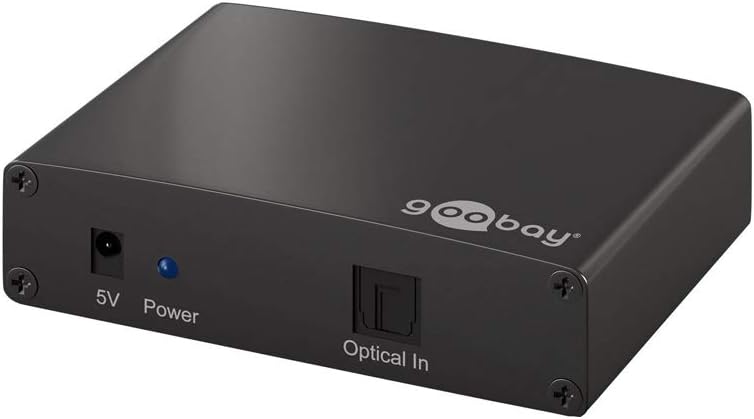
Figure 4.1: Front panel of the splitter showing the 5V power input, power LED, and Optical In port.

Figure 4.2: Rear panel of the splitter showing the four Optical Output ports (Output 1, Output 2, Output 3, Output 4).
4.1. Components
- 5V Power Input: Connects to the included power adapter.
- Power LED: Indicates the device's power status.
- Optical In: Connects to the digital optical audio source (e.g., TV, game console).
- Output 1-4: Connects to digital optical audio receiving devices (e.g., soundbar, AV receiver).
5. Setup
Follow these steps to set up your Goobay Toslink Audio Splitter:
- Placement: Place the splitter on a stable, flat surface, ensuring adequate ventilation.
- Connect Audio Source: Connect a Toslink optical cable (not included) from your audio source (e.g., TV, Blu-ray player, game console) to the Optical In port on the splitter.
- Connect Audio Receivers: Connect up to four Toslink optical cables (not included) from the Output 1-4 ports on the splitter to your audio receiving devices (e.g., soundbar, AV receiver, headphones amplifier).
- Connect Power: Plug the included 5V power adapter into the 5V Power Input port on the splitter, then plug the adapter into a wall outlet. The Power LED will illuminate.
- Power On Devices: Power on your audio source and all connected audio receiving devices.
- Audio Output Selection: Ensure your audio source is configured to output audio via Toslink (optical digital output).
The splitter will automatically distribute the incoming audio signal to all connected output devices. No further configuration is typically required on the splitter itself.
6. Operating Instructions
The Goobay 58975 Toslink Audio Splitter operates automatically once connected and powered on.
- Power On/Off: The device powers on automatically when connected to the power adapter and an electrical outlet. There is no manual power switch.
- Signal Distribution: The splitter continuously distributes the digital optical audio signal from the single input to all four outputs simultaneously.
- LED Indicator: The blue Power LED indicates that the device is receiving power.
- Audio Format Support: The splitter supports standard digital optical audio formats. Ensure your source and receiving devices are compatible.
7. Maintenance
The Goobay 58975 Toslink Audio Splitter requires minimal maintenance.
- Cleaning: Use a soft, dry cloth to clean the exterior of the device. Do not use liquid cleaners or abrasive materials.
- Port Care: Keep the optical ports free from dust and debris. Use protective caps when ports are not in use.
- Cable Management: Ensure optical cables are not bent sharply or subjected to excessive strain, as this can damage the fiber optic core.
- Storage: If storing the device for an extended period, disconnect it from power and store it in a cool, dry place.
8. Troubleshooting
If you encounter issues with your Toslink Audio Splitter, refer to the following common problems and solutions:
| Problem | Possible Cause | Solution |
|---|---|---|
| No power / Power LED off | Power adapter not connected or faulty; power outlet not working. | Ensure the power adapter is securely connected to the splitter and a working power outlet. Try a different outlet. |
| No audio output from any device | Incorrect cable connection; faulty optical cable; audio source not outputting via Toslink; incompatible audio format. |
|
| Audio from some outputs, but not others | Faulty optical cable to specific output device; issue with the receiving device. |
|
| Distorted or intermittent audio | Damaged optical cable; signal interference; loose connection. |
|
If the problem persists after trying these solutions, please contact Goobay customer support or your retailer.
9. Specifications
| Feature | Detail |
|---|---|
| Model Number | 58975 |
| Brand | Goobay |
| Input | 1x Toslink Optical |
| Output | 4x Toslink Optical |
| Interface Type | Optical |
| Power Supply | 5V DC (via included adapter) |
| Color | Black |
| Product Dimensions | 18 x 2 x 18 cm |
| Weight | 165.2 g |
| Key Features | Clear digital audio transmission without quality loss, LED status display, Overvoltage protection, Easy installation and operation. |
10. Warranty and Support
For warranty information and technical support, please refer to the documentation provided with your purchase or visit the official Goobay website. Keep your proof of purchase for warranty claims.
Goobay Official Website: www.goobay.de


