1. Introduction
Thank you for purchasing the LG MS 2336 GIB Microwave Oven. This manual provides essential information for the safe installation, operation, and maintenance of your appliance. Please read it thoroughly before use and keep it for future reference.
The LG MS 2336 GIB features Smart Inverter technology for precise power control, I-Wave for even heating, and an Easy Clean antibacterial coated interior for simplified maintenance.
2. Important Safety Instructions
To reduce the risk of fire, electric shock, injury to persons, or exposure to excessive microwave energy when using your appliance, follow basic precautions, including the following:
- Read all instructions before using the appliance.
- Do not attempt to operate this oven with the door open or tamper with the safety interlocks.
- Do not place metal objects, aluminum foil, or metal-trimmed dishes in the microwave.
- Ensure proper ventilation around the appliance.
- Always supervise children when the microwave is in use, especially when the Child Safety Lock is not activated.
- Do not heat liquids or other foods in sealed containers as they are liable to explode.
- Regularly clean the oven cavity and door seals to prevent food residue buildup.
3. Product Overview
Familiarize yourself with the main components of your LG MS 2336 GIB microwave oven.
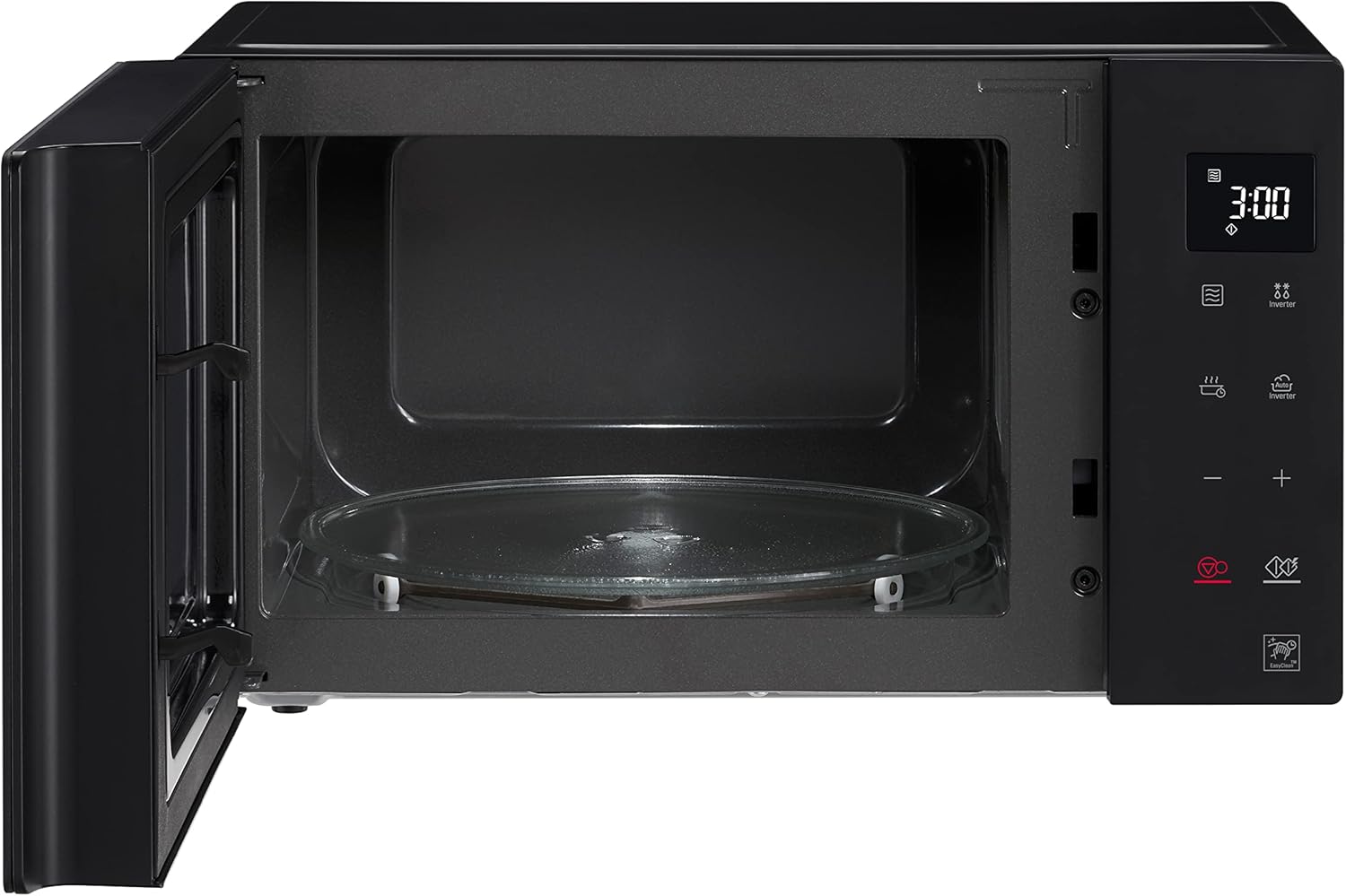
Figure 1: Front view of the LG MS 2336 GIB Microwave Oven with the door open, revealing the glass turntable and interior cavity. The control panel is visible on the right side.
Control Panel

Figure 2: Detailed view of the touch control panel, featuring a digital display, various function icons (e.g., Inverter, Auto Inverter, Easy Clean), and time/power adjustment buttons.
- Digital Display: Shows time, power level, and program indicators.
- Touch Control Panel: For selecting functions and adjusting settings.
- Oven Door: Equipped with a safety interlock system.
- Glass Turntable: Ensures even heating of food.
- Interior Cavity: Features an antibacterial Easy Clean coating.
4. Setup
Unpacking
- Remove all packaging materials from inside and outside the oven.
- Check the oven for any damage, such as a misaligned door or dents. Do not operate if damaged.
- Ensure all accessories, including the glass turntable and turntable ring, are present.
Placement
- Place the microwave on a flat, stable surface strong enough to support its weight.
- Ensure adequate ventilation by leaving at least 10 cm (4 inches) of space at the rear, 20 cm (8 inches) at the top, and 5 cm (2 inches) on each side.
- Keep the microwave away from heat sources, strong magnetic fields, and areas with high humidity.
Power Connection
Plug the power cord into a grounded electrical outlet. Do not use extension cords or adapters.
5. Operating Instructions
Basic Microwave Cooking
- Place food in a microwave-safe container on the glass turntable.
- Close the oven door securely.
- Use the touch control panel to set the desired cooking time and power level. The Smart Inverter technology allows for precise power adjustment.
- Press the Start button to begin cooking.
- To pause or stop cooking, open the door or press the Stop/Clear button.
Special Programs
The LG MS 2336 GIB offers a variety of automatic programs for convenience:
- Quick Defrost Function: For rapid thawing of various foods.
- Automatic Defrost Programs: 4 programs designed for different food types and weights.
- Automatic Cooking Programs: 8 programs with automatic weight sensing for optimal results.
- Automatic Reheat Programs: 8 programs for reheating various dishes.
- Automatic Melt Programs: 3 programs for melting ingredients like butter or chocolate.
- Keep Warm Programs: 2 programs to maintain food temperature after cooking.
Child Safety Lock
To prevent accidental operation by children, activate the Child Safety Lock. Refer to the control panel instructions for specific activation and deactivation steps, typically involving pressing and holding a designated button for a few seconds.
Eco On Energy Saving Mode
Activate the Eco On mode to reduce power consumption when the microwave is not in active use. This mode typically turns off the display after a period of inactivity.
Acoustic Signal
The microwave features an acoustic signal to indicate program completion or other alerts. This signal can usually be adjusted or turned off via the control panel settings.
6. Maintenance
Cleaning the Interior
The oven interior features an Easy Clean antibacterial coating for simplified cleaning.
- Wipe the interior with a damp cloth and mild detergent after each use.
- For stubborn stains, place a bowl of water with lemon slices inside and microwave for a few minutes to loosen food particles, then wipe clean.
- Do not use abrasive cleaners, steel wool, or harsh chemicals.
Cleaning the Exterior
Wipe the exterior surfaces with a soft, damp cloth. Avoid getting water into the ventilation openings.
Turntable Care
The glass turntable and turntable ring can be removed and washed in warm, soapy water or in a dishwasher.
7. Troubleshooting
If you encounter problems with your microwave, refer to the following table for common issues and solutions.
| Problem | Possible Cause | Solution |
|---|---|---|
| Oven does not start | Power cord unplugged; Door not closed properly; Child Safety Lock activated. | Check power connection; Close door firmly; Deactivate Child Safety Lock. |
| Food not heating | Incorrect cooking time/power set; Metal objects inside; Turntable not rotating. | Adjust settings; Remove metal; Ensure turntable is correctly placed. |
| Display shows error code | Internal malfunction. | Unplug the oven for 1 minute, then plug back in. If the error persists, contact service. |
If the problem persists after trying these solutions, please contact LG customer support.
8. Specifications

Figure 3: Dimensions of the LG MS 2336 GIB Microwave Oven.
| Feature | Detail |
|---|---|
| Model Number | MS 2336 GIB |
| Manufacturer | LG |
| Product Dimensions (W x D x H) | 47.6 x 34.6 x 27.2 cm |
| Weight | 9.36 kg |
| Capacity | 23 Liters |
| Wattage | 1000 watts |
| Special Features | Smart Inverter Technology, I-Wave, Easy Clean Coating, Child Lock, Eco On Energy Saving Mode, Acoustic Signal |
| Installation Type | Freestanding |
| Material | Glass (turntable) |
| Controller Type | Touch |
9. Warranty
Your LG MS 2336 GIB Microwave Oven comes with a standard manufacturer's warranty. Additionally, the Smart Inverter Magnetron component is covered by a 10-year warranty.
For detailed information regarding warranty terms, conditions, and how to make a claim, please refer to the warranty card included with your product or visit the official LG website for your region.
10. Support
For further assistance, technical support, or service inquiries, please contact LG Customer Service.
- Visit the official LG website for your country to find contact numbers, FAQs, and service center locations.
- Have your model number (MS 2336 GIB) and purchase date ready when contacting support.