1. Introduction
The Pyle PPHP1537UB is a versatile 15-inch powered PA loudspeaker system designed for robust sound reproduction. It features a built-in amplifier, Bluetooth wireless streaming, and multiple input options, making it suitable for various audio applications. This manual provides detailed instructions to ensure optimal performance and longevity of your device.
Key Features:
- High-Quality Sound Reproduction: Equipped with a 15-inch woofer and 1.75-inch tweeter for a full audio spectrum.
- Bluetooth Wireless Streaming: Seamlessly connect and stream audio from your Bluetooth-enabled devices.
- Multi-Source Playback: Supports USB flash drives, SD memory cards, AM/FM radio, and Aux-In (3.5mm).
- Integrated Mixer: Fully featured 3-channel mixer with adjustable Mic Level, Input Level, Volume, Treble, and Bass controls.
- Audio Recording Ability: Record audio directly to USB or SD card from streamed content or microphone input.
- Versatile Connectivity: Multiple input/output options including 1/4'' Microphone Input, 1/4'' Line Output, and XLR Input/Output jacks.
- Portable Design: Engineered with heavy-duty ABS housing, convenient carry handles, and a 35mm speaker stand mount.
2. Product Overview



Official Product Videos:
3. Setup Guide
3.1 Unpacking
Carefully remove all components from the packaging. Verify that all items listed in the 'What's in the Box' section are present. Keep the packaging for future storage or transport.
3.2 Power Connection
- Ensure the speaker's power switch is in the OFF position.
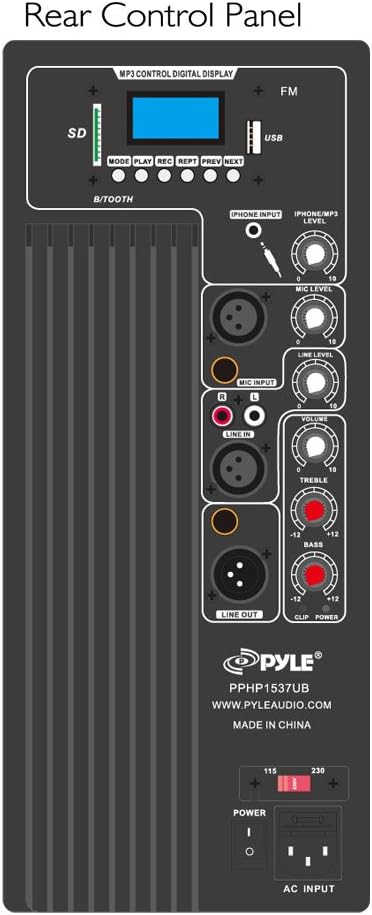
- Connect the included power cable to the AC INPUT port on the rear control panel.
- Plug the other end of the power cable into a standard wall outlet (110V/220V selectable, ensure correct voltage is selected on the unit).
3.3 Speaker Placement
- Place the speaker on a stable, flat surface.
- For optimal sound projection, utilize the built-in 35mm speaker stand mount to elevate the speaker on a compatible stand (sold separately).
- The speaker features convenient carry handles and wheels for easy transport.
3.4 Initial Power On
Once connected to power and placed appropriately, flip the POWER switch on the rear panel to the ON position. The digital display will illuminate, indicating the unit is ready for operation.
4. Operating Instructions
4.1 MP3 Control Digital Display
The top section of the rear control panel features a digital display and controls for various media playback options:
- MODE: Press to cycle through input sources (Bluetooth, USB, SD, FM Radio, Aux).
- PLAY/PAUSE: Start or pause playback.
- REC: Initiate audio recording (to USB/SD).
- REPT: Repeat current track or all tracks.
- PREV/NEXT: Navigate between tracks or radio stations.
- USB/SD Slots: Insert USB flash drives or SD memory cards for MP3 playback and recording.
4.2 Bluetooth Pairing
- Press the MODE button until 'Bluetooth' is selected on the digital display.
- Enable Bluetooth on your external device (smartphone, tablet, etc.).
- Search for the Bluetooth network name 'Pyle Speaker' and connect.
- Once paired, you can stream audio wirelessly to the speaker.
4.3 Audio Inputs
- Microphone Inputs (1/4'' & XLR): Connect wired microphones or instruments. Adjust MIC LEVEL for individual microphone volume.
- Aux-In (3.5mm): Connect external audio devices like MP3 players or smartphones using a 3.5mm audio cable.
- RCA (L/R) Stereo Line Input: Connect devices with RCA outputs. Adjust LINE LEVEL for input volume.
4.4 Audio Outputs
- 1/4'' Line Output & XLR Output: Use these to chain multiple speakers together or connect to other audio equipment.
4.5 Sound Adjustment
- VOLUME: Master volume control for overall output.
- TREBLE: Adjusts high-frequency sounds.
- BASS: Adjusts low-frequency sounds.
- ECHO: Adds an echo effect to microphone inputs.
4.6 Recording Function
The PPHP1537UB allows you to record audio directly to a connected USB flash drive or SD memory card.
- Insert a USB flash drive or SD card into the appropriate slot.
- Ensure your desired audio source (microphone, line-in, or Bluetooth stream) is active.
- Press the REC button on the MP3 control panel to start recording.
- Press REC again to stop recording. Audio files are saved in .WAV format.
5. Specifications
| Feature | Specification |
|---|---|
| Max Power Output | 1200 Watt |
| RMS Power Output | 600 Watt |
| Amplifier Class | AB |
| Woofer Size | 15'' -inch |
| Woofer Material | Stamped Steel Basket |
| Tweeter Size | 1.75'' -inch |
| Tweeter Material | Titanium |
| Frequency Response | 30Hz - 22kHz |
| Bluetooth Version | 2.1+EDR |
| Bluetooth Wireless Range | 100'+ Feet |
| Digital Audio File Compatibility | MP3, WMA |
| Maximum SD/USB Flash Memory Support | 32GB |
| T.H.D. | 1% |
| S/N Ratio | 76dB |
| Crossover Frequency | 2.2kHz |
| Voltage Selectable | 110/220V |
| Dimensions (L x W x H) | 19.0'' x 15.7'' x 29.1'' |
| Item Weight | 39.7 Pounds |
| Housing Material | Heavy Duty ABS |
6. Maintenance and Care
6.1 General Cleaning
To maintain the appearance and performance of your speaker, regularly wipe the exterior with a soft, dry cloth. Avoid using harsh chemicals or abrasive cleaners.
6.2 Battery Care
The PPHP1537UB uses a rechargeable battery. To maximize battery life:
- Avoid completely draining the battery before recharging.
- Charge the unit fully before extended storage.
- If the battery performance degrades significantly over time, it may need to be replaced. Refer to the warranty section or contact customer support for replacement options.
7. Troubleshooting
- No Power:
Ensure the power cable is securely connected to both the speaker and a working power outlet. Check the power switch position. Verify the correct voltage (110V/220V) is selected. - No Sound:
Check all volume controls (master, mic, line, MP3) and ensure they are not set to minimum. Verify the correct input source is selected (MODE button). Ensure audio cables are properly connected and functional. For Bluetooth, confirm successful pairing. - Bluetooth Connection Issues:
Ensure the speaker is in Bluetooth mode. Delete 'Pyle Speaker' from your device's Bluetooth list and attempt to re-pair. Move your device closer to the speaker (within 100 feet). - USB/SD Playback Problems:
Ensure the USB drive or SD card contains compatible audio files (MP3, WMA). Check that the media is inserted correctly. Try a different USB drive or SD card to rule out media issues. - Distorted Sound:
Reduce the volume levels of both the input source and the speaker. Check for damaged cables. Ensure microphone levels are not too high, causing feedback.
8. Warranty and Support
8.1 Warranty Information
This Pyle product typically comes with a 1-year limited warranty. Please refer to the warranty card included in your product packaging for specific terms and conditions. Keep your purchase receipt as proof of purchase.
8.2 Customer Support
For technical assistance, troubleshooting, or warranty claims, please visit the official Pyle website at www.pyleaudio.com or contact their customer service department. Have your model number (PPHP1537UB) and purchase details ready.


