
Vulcan 515-052-208V
Vulcan VC4ED-11D1 Electric Convection Oven
Model: 515-052-208V
User Instruction Manual
1. Introduction
This manual provides essential information for the safe and efficient operation, installation, and maintenance of your Vulcan VC4ED-11D1 Electric Convection Oven. Please read this manual thoroughly before operating the appliance and retain it for future reference. This oven is designed for commercial use in professional kitchen environments.
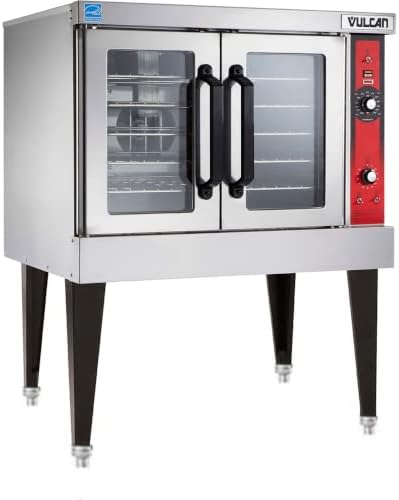
Figure 1: Front view of the Vulcan VC4ED-11D1 Electric Convection Oven with its stand.
2. Safety Information
Always observe basic safety precautions when using electrical appliances to reduce the risk of fire, electrical shock, and injury to persons. This appliance is intended for commercial use only by qualified personnel.
- Electrical Safety: Ensure the oven is connected to a properly grounded 208 Volt electrical supply as specified. Do not operate with a damaged cord or plug.
- Hot Surfaces: The oven surfaces become hot during operation. Use caution and wear protective gloves when handling hot items or cleaning.
- Ventilation: Ensure adequate ventilation around the oven to prevent overheating.
- Cleaning: Disconnect power before cleaning. Allow the oven to cool completely before cleaning.
- Maintenance: All servicing should be performed by authorized service personnel.
3. Unpacking and Installation (Setup)
3.1 Unpacking
Carefully remove the oven from its packaging. Inspect the unit for any shipping damage. Report any damage immediately to the carrier and your dealer. Retain all packaging materials for inspection.
3.2 Location and Clearance
Place the oven on a level, stable surface capable of supporting its weight. Ensure adequate clearance from combustible walls and materials as per local fire codes. Maintain sufficient space for air circulation and servicing.
3.3 Electrical Connection
The Vulcan VC4ED-11D1 oven requires a 208 Volt electrical supply. Connection must be performed by a qualified electrician in accordance with all applicable national and local electrical codes. Ensure the power supply matches the oven's specifications.
Figure 2: Side view of the convection oven, showing its compact design.
3.4 Initial Setup and Burn-Off
Before first use, it is recommended to perform a burn-off cycle to eliminate any manufacturing odors. Operate the oven empty at its maximum temperature for approximately 30-60 minutes with adequate ventilation. This process helps to cure internal components and remove residual oils.
Video: General 'Before First Use' guidelines from Vulcan. While this video specifically references 'EA Series Steamers', it provides useful general information applicable to initial setup and safety for various Vulcan commercial kitchen equipment, including considerations for electrical connections and initial cleaning.
4. Operation
4.1 Control Panel Overview
The control panel typically features a temperature control knob, a timer, and power switches. Familiarize yourself with the function of each control before operation.

Figure 3: Detailed view of the oven's control panel, featuring temperature and timer controls.
4.2 Preheating
Turn the oven on and set the desired temperature. Allow the oven to preheat fully before placing food inside. The preheat indicator light will typically turn off or change color when the set temperature is reached.
4.3 Cooking with Convection
Convection ovens use a fan to circulate hot air, resulting in faster and more even cooking. Adjust cooking times and temperatures accordingly, often reducing them compared to conventional ovens. Utilize the included grill racks for optimal air circulation around food items.

Figure 4: Interior view of the oven demonstrating multiple racks in use for various food items.
4.4 Using the Timer
Set the timer for the desired cooking duration. An audible alarm will sound when the timer expires. The timer may or may not automatically shut off the oven, depending on the model; always verify the oven's status.
5. Cleaning and Maintenance
Regular cleaning and maintenance are crucial for the longevity and performance of your oven.
5.1 Daily Cleaning
- Allow the oven to cool completely.
- Remove racks and interior components for separate cleaning.
- Wipe down interior surfaces with a mild detergent and a damp cloth. Avoid abrasive cleaners.
- Clean the exterior with a stainless steel cleaner or mild soap and water.
5.2 Regular Maintenance
- Inspect door gaskets for wear and tear; replace if damaged to maintain heat efficiency.
- Check the fan motor and fan blade for any obstructions or unusual noises.
- Ensure electrical connections are secure (to be checked by qualified personnel).
6. Troubleshooting
Before calling for service, review the following common issues and their potential solutions:
| Problem | Possible Cause | Solution |
|---|---|---|
| Oven not heating | No power supply; tripped circuit breaker; faulty heating element. | Check power connection and circuit breaker. If problem persists, contact service. |
| Uneven cooking | Improper rack placement; fan malfunction; dirty interior. | Ensure proper air circulation. Clean interior. Check fan for obstructions. |
| Excessive smoke/odor | Food spills; initial burn-off not completed; residue from cleaning agents. | Clean interior thoroughly. Ensure proper ventilation during burn-off. Rinse cleaning agents. |
7. Specifications
Key technical specifications for the Vulcan VC4ED-11D1 Electric Convection Oven:
- Brand: Vulcan
- Model Number: 515-052-208V
- Installation Type: Freestanding
- Oven Cooking Mode: Convection
- Voltage: 208 Volts
- Fuel Type: Electric
- Control Type: Knob
- Included Components: Grill
- Country of Origin: USA
8. Warranty and Support
For warranty information and technical support, please refer to the documentation provided with your purchase or contact Vulcan customer service directly. Keep your purchase receipt and model number readily available when contacting support.
Vulcan Customer Service: Refer to your product registration card or the official Vulcan website for contact details.
Ask a question about this manual
Ask about setup, troubleshooting, compatibility, parts, safety, or missing instructions. Manuals+ will review the question and use this page’s manual context to help answer it.