
Introduction
This manual provides instructions for the BOMAZ Replacement Remote Control, designed for seamless operation with various Sharp Aquos Smart LED TV models, including LC-40N3000U, LC-40N5000U, LC-43N5000U, and LC-43N6100U. This remote is a direct replacement and requires no programming; simply insert batteries for immediate use.
Product Overview
The BOMAZ Replacement Remote Control features a slim and ergonomic design for comfortable handling. It includes all essential functions for your Sharp Aquos Smart LED TV, along with dedicated quick-access buttons for popular streaming services.
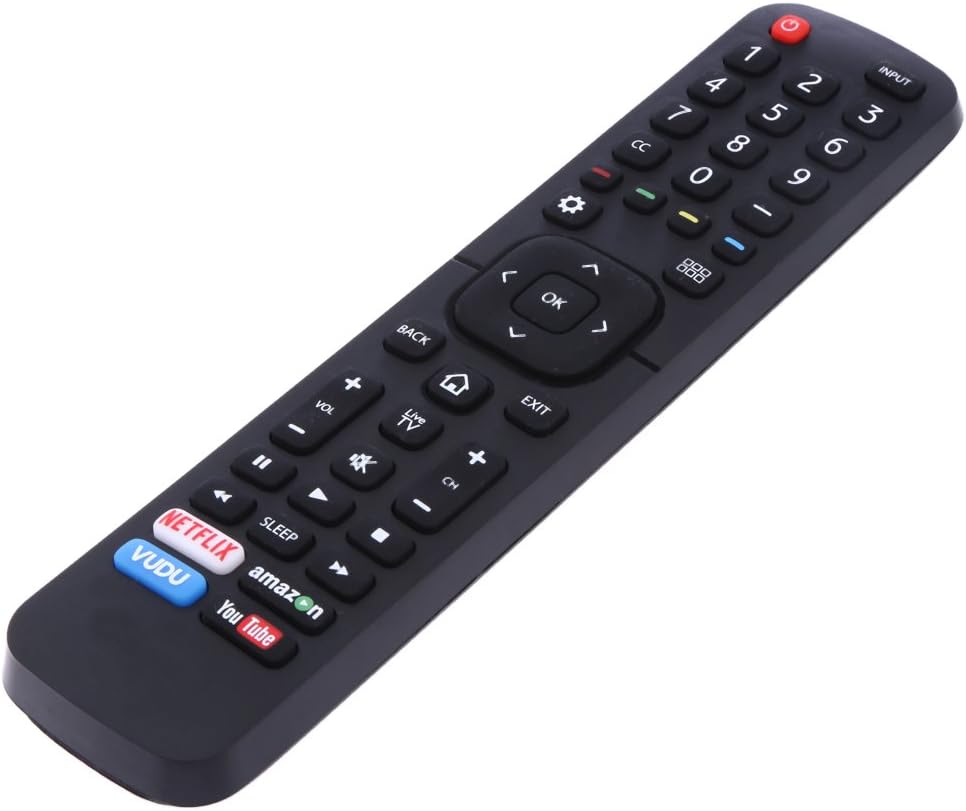
Figure 1: Front View of Remote Control. This image displays the front of the BOMAZ replacement remote control, showing its array of buttons including power, input, number pad, navigation, volume, channel, and dedicated buttons for Netflix, Vudu, Amazon, and YouTube.

Figure 2: Back View of Remote Control. This image shows the back of the BOMAZ replacement remote control, highlighting the battery compartment cover located at the bottom section.
Setup
Battery Installation
- Locate the battery compartment on the back of the remote control (refer to Figure 2).
- Slide the battery compartment cover downwards and remove it.
- Insert two (2) AAA batteries, ensuring the positive (+) and negative (-) terminals align correctly with the markings inside the compartment.
- Replace the battery compartment cover by sliding it back into position until it clicks securely.
Once batteries are installed, the remote control is ready for immediate use with compatible Sharp Aquos Smart LED TVs. No additional programming or setup is required.
Operating Instructions
This remote control provides full functionality for your Sharp Aquos Smart LED TV. Point the remote directly at the TV's infrared receiver for optimal performance.
Basic Functions
- Power (●): Turns the TV on or off.
- Input: Selects the video input source (e.g., HDMI 1, HDMI 2, TV).
- Number Pad (0-9): Directly enters channel numbers.
- VOL (+/-): Adjusts the volume level.
- CH (+/-): Changes TV channels.
- Mute: Silences the TV audio.
- Navigation (Up, Down, Left, Right, OK): Navigates menus and confirms selections.
- Back: Returns to the previous menu or screen.
- Exit: Exits the current menu or application.
- Home (⌂): Accesses the TV's main smart hub or home screen.
Quick Access Buttons
The remote includes dedicated buttons for instant access to popular streaming applications:
- Netflix: Launches the Netflix application.
- Vudu: Launches the Vudu application.
- Amazon: Launches the Amazon Prime Video application.
- YouTube: Launches the YouTube application.
Maintenance
Cleaning
To clean the remote control, gently wipe its surface with a soft, dry cloth. For stubborn dirt, slightly dampen the cloth with water. Avoid using harsh chemicals, abrasive cleaners, or excessive moisture, as these can damage the remote.
Battery Replacement
Replace batteries when the remote's responsiveness decreases or it stops functioning. Always replace both AAA batteries simultaneously with new ones. Do not mix old and new batteries, or different types of batteries, as this can lead to leakage or malfunction.
Troubleshooting
- Remote is not responding:
- Ensure the remote is pointed directly at the TV's infrared sensor.
- Check if the batteries are inserted correctly with the correct polarity (+/-).
- Replace the batteries with fresh AAA batteries.
- Verify that there are no obstructions between the remote and the TV.
- Specific buttons are not working:
- This may indicate a low battery level. Try replacing the batteries.
- Ensure the remote is clean and there is no debris obstructing the buttons.
- Remote does not control the TV:
- Confirm that your TV model is listed as compatible (Sharp LC-40N3000U, LC-40N5000U, LC-43N5000U, LC-43N6100U Aquos Smart LED TV).
- As this remote requires no programming, if it still does not work after checking batteries and compatibility, contact customer support.
Specifications
| Brand | BOMAZ |
| Compatible TV Models | Sharp LC-40N3000U, LC-40N5000U, LC-43N5000U, LC-43N6100U Aquos Smart LED TV |
| Power Source | 2 x AAA Batteries (not included) |
| Operable Distance | More than 8 meters |
| Material | ABS Material |
| Product Dimensions | 0.5 x 2 x 8 inches |
| Item Weight | 4.8 ounces |
| Connectivity Technology | Infrared |
Warranty and Support
This BOMAZ Replacement Remote Control comes with a 30-day warranty from the date of purchase. This warranty covers manufacturing defects and ensures the remote functions as described.
If you encounter any issues with your remote control, please do not hesitate to contact our customer support. We test every remote before shipment to ensure quality. For assistance, refer to the contact information provided with your purchase or on the retailer's website.