
MasterChef BA3001V/02
MasterChef Planetary Mixer
Model: BA3001V/02 - Instruction Manual
Your guide to safe and efficient use.
1. Important Safety Instructions
When using electrical appliances, basic safety precautions should always be followed, including the following:
- Read all instructions before operating the mixer.
- To protect against risk of electrical shock, do not immerse the mixer base, cord, or plug in water or other liquid.
- Close supervision is necessary when any appliance is used by or near children.
- Unplug from outlet when not in use, before putting on or taking off parts, and before cleaning.
- Avoid contact with moving parts. Keep hands, hair, clothing, as well as spatulas and other utensils away from beaters during operation to reduce the risk of injury to persons and/or damage to the mixer.
- Do not operate any appliance with a damaged cord or plug or after the appliance malfunctions, or has been dropped or damaged in any manner. Return appliance to the nearest authorized service facility for examination, repair, or electrical or mechanical adjustment.
- The use of attachments not recommended or sold by the manufacturer may cause fire, electric shock, or injury.
- Do not use outdoors.
- Do not let cord hang over edge of table or counter.
- Do not let cord contact hot surfaces, including the stove.
- Always ensure the mixer is placed on a stable, flat, and dry surface during operation.
- This appliance is for household use only.

Image: Safety certifications for the product, including INMETRO and Intertek ETL.
2. Product Overview and Components
The MasterChef Planetary Mixer BA3001V/02 is designed for versatile kitchen tasks, from mixing dough to whipping creams. Familiarize yourself with its main components:
- Mixer Head: Contains the motor and attachment hub.
- Attachment Hub: Located at the front of the mixer head, used for optional attachments like the meat grinder.
- Speed Control Dial: Adjusts the mixing speed from 1 to 8, plus a Pulse (P) function.
- Bowl: 4.3-liter stainless steel mixing bowl.
- Splash Guard: Transparent cover to prevent splattering during operation.
- Attachments: Includes whisk, dough hook, and flat beater. Optional meat grinder attachment may be included or sold separately.
- Non-slip Feet: For stability during operation.

Image: MasterChef Planetary Mixer BA3001V/02 with meat grinder attachment.

Image: MasterChef Planetary Mixer with stainless steel bowl and speed dial.
3. Setup
- Unpack: Carefully remove all components from the packaging. Retain packaging for future storage or transport.
- Initial Cleaning: Before first use, wash the mixing bowl, splash guard, and all attachments (whisk, dough hook, flat beater, meat grinder parts) in warm, soapy water. Rinse thoroughly and dry completely. Wipe the mixer base with a damp cloth. Do not immerse the base in water.
- Placement: Place the mixer on a clean, dry, flat, and stable surface, ensuring the non-slip feet are securely positioned.
- Attach Bowl: Place the 4.3-liter stainless steel bowl onto the base and turn it clockwise until it locks securely into place.

Image: Inserting or removing the 4.3-liter stainless steel mixing bowl.
- Attach Accessory: Select the desired attachment (whisk, dough hook, or flat beater). Align the top of the attachment with the shaft in the mixer head and push upwards, then turn slightly to lock it into place. Ensure it is firmly secured.
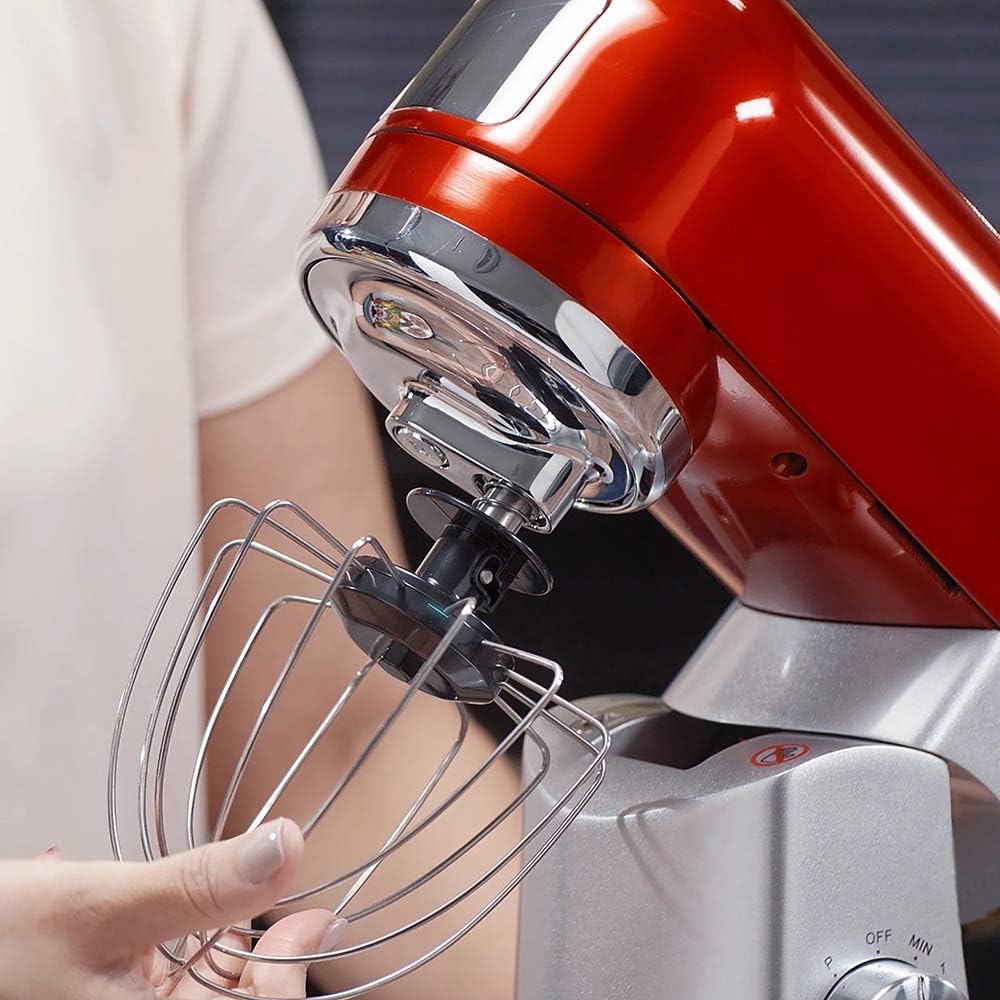
Image: Attaching the whisk accessory to the mixer head.
- Attach Splash Guard (Optional): If using, place the splash guard over the bowl, aligning its opening with the attachment.
- Connect Power: Plug the power cord into a 220V electrical outlet.
4. Operating Instructions
- Add Ingredients: Place your ingredients into the mixing bowl.
- Select Speed: Turn the speed control dial to the desired speed setting (1-8). Start with a lower speed and gradually increase as needed to prevent splattering.

Image: Adjusting the speed dial on the mixer base.
- Pulse Function (P): For short bursts of high power, turn the dial to 'P' and hold. Release to stop.
- Mixing: Allow the mixer to operate until ingredients are thoroughly combined or the desired consistency is achieved.

Image: Close-up of the whisk accessory mixing ingredients in the bowl.

Image: Close-up of the whisk accessory mixing liquid ingredients.
- Stopping: Turn the speed control dial to 'OFF' to stop the mixer.
- Remove Bowl/Attachment: Unplug the mixer. Carefully remove the attachment by turning it counter-clockwise and pulling down. Then, turn the bowl counter-clockwise and lift it off the base.
Using the Meat Grinder Attachment (Optional)
If your model includes the meat grinder attachment, follow these steps:
- Assemble Grinder: Assemble the meat grinder components as per the diagram in the separate meat grinder manual (if provided).
- Attach to Mixer: Ensure the mixer is unplugged. Remove the cover from the front attachment hub of the mixer head. Insert the assembled meat grinder into the hub and secure it by tightening the locking knob.
- Prepare Meat: Cut meat into small pieces that fit into the feeder tube.
- Operation: Place a bowl under the grinder output. Turn the mixer to a low-medium speed (e.g., 3-5). Feed meat into the grinder using the food pusher. Never use your fingers or other utensils to push food into the grinder.
- Disassembly: After use, turn off and unplug the mixer. Disassemble the meat grinder and clean immediately.

Image: Components of the meat grinder attachment, including the grinder body and tray.
5. Maintenance and Cleaning
Proper cleaning and maintenance will ensure the longevity and optimal performance of your MasterChef Planetary Mixer.
- Always unplug the mixer before cleaning.
- Mixer Base: Wipe the exterior of the mixer base with a soft, damp cloth. Do not use abrasive cleaners or scourers. Never immerse the mixer base in water or any other liquid.
- Mixing Bowl and Splash Guard: The stainless steel mixing bowl and plastic splash guard are dishwasher safe or can be washed by hand in warm, soapy water. Rinse thoroughly and dry completely.
- Attachments (Whisk, Dough Hook, Flat Beater): These attachments are generally dishwasher safe, but hand washing is recommended to preserve their finish. Wash in warm, soapy water, rinse, and dry immediately.
- Meat Grinder Attachment: Disassemble all parts immediately after use. Wash all metal parts in warm, soapy water and dry thoroughly to prevent rust. Plastic parts can also be washed in warm, soapy water. Do not wash metal parts in a dishwasher.
- Storage: Store the mixer and its accessories in a clean, dry place.
6. Troubleshooting
| Problem | Possible Cause | Solution |
|---|---|---|
| Mixer does not turn on. | Not plugged in; power outlet not working; speed dial not set to a speed. | Ensure the mixer is securely plugged into a working 220V outlet. Check the circuit breaker. Turn the speed dial to a numbered setting (1-8). |
| Attachment not mixing properly or hitting the bowl. | Attachment not properly installed; bowl not locked in place. | Ensure the attachment is fully pushed up and twisted to lock. Verify the bowl is securely locked onto the base. |
| Mixer makes unusual noise or vibrates excessively. | Overloaded; unstable surface; internal issue. | Reduce the amount of ingredients. Ensure the mixer is on a stable, flat surface. If the problem persists, discontinue use and contact customer support. |
| Splash guard does not fit. | Incorrect orientation. | Ensure the splash guard is oriented correctly with the opening aligned with the attachment. |
7. Specifications
| Brand | MasterChef |
| Model | BA3001V/02 |
| Color | Red |
| Voltage | 220 Volts |
| Power (Watts) | 1000W (1010W listed in specs) |
| Bowl Capacity | 4.3 Liters |
| Number of Speeds | 8 + Pulse (P) |
| Special Features | Multi-purpose, Removable bowl |
| Material | Aluminum and stainless steel |
| Product Dimensions | 18 x 32 x 35 cm |
| Product Weight | 6.27 kg |
| Manufacturer | Aquarius |
| Inmetro Registration | HOUS 0771/C 1226.17 |
8. Warranty and Support
For detailed warranty information, please refer to the warranty card included with your product or visit the official MasterChef website. Keep your purchase receipt as proof of purchase for warranty claims.
For technical support, spare parts, or service inquiries, please contact MasterChef customer service through their official channels. Contact information can typically be found on the product packaging or the brand's official website.
Related documentsBA3001V/02


Ask a question about this manual
Ask about setup, troubleshooting, compatibility, parts, safety, or missing instructions. Manuals+ will review the question and use this page’s manual context to help answer it.