
1. Introduction
This manual provides detailed instructions for the proper use and maintenance of your Godox TT685F Thinklite TTL Flash. The TT685F is designed for Fujifilm cameras, offering advanced lighting capabilities including TTL automatic flash, manual flash, and multi-flash modes. It integrates with the Godox 2.4GHz X System for wireless control and triggering. Please read this manual thoroughly before using the product to ensure safe operation and optimal performance.
2. Product Overview
2.1 Key Features
- Integrated Godox 2.4GHz X System for wireless master and slave functionality.
- Supports TTL, Manual (M), and Multi (Stroboscopic) flash modes.
- High-Speed Sync (HSS) up to 1/8000s, Front & Rear Curtain Sync.
- Flash Exposure Compensation (FEC), Flash Exposure Bracketing (FEB), FE Lock.
- Auto and Manual Zoom head (20-200mm).
- Guide Number of 197' (60m) at ISO 100 and 200mm.
- Swivel and Tilt head: -7 to 90° tilt, 360° rotation.
- Dot-matrix LCD panel for clear operation.
- 3.5mm Sync Port and USB Port for firmware updates.
- External power port for optional high-voltage battery packs.
2.2 What's in the Box
- Godox TT685F Flash for FUJIFILM Cameras
- Mini Stand
- Protective Case
2.3 Product Diagram

Image 1: Front and back view of the Godox TT685F flash unit. The front shows the flash head and sensor, while the back displays the LCD screen and control buttons.
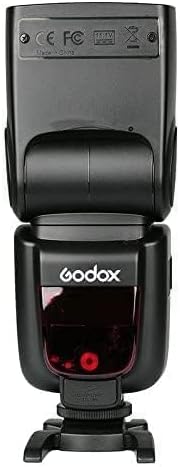
Image 2: Rear view of the Godox TT685F flash, highlighting the battery compartment and hot shoe.
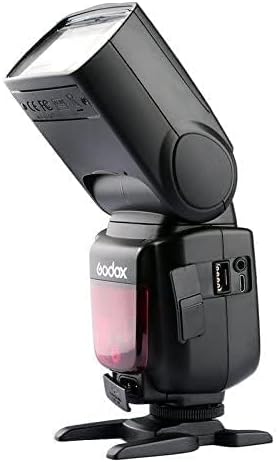
Image 3: Side view of the Godox TT685F flash, showing the USB port for firmware updates and the 3.5mm sync port.
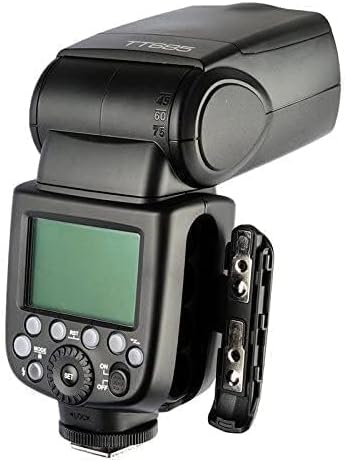
Image 4: Close-up view of the battery compartment on the Godox TT685F flash, indicating where four AA batteries are inserted.
3. Setup
3.1 Battery Installation
- Open the battery compartment cover located on the side of the flash unit.
- Insert four (4) AA batteries according to the polarity indicators inside the compartment.
- Close the battery compartment cover securely.
Note: Use high-quality alkaline or Ni-MH rechargeable batteries for optimal performance.
3.2 Mounting on Camera
- Slide the flash hot shoe into your Fujifilm camera's hot shoe mount.
- Rotate the locking ring on the flash hot shoe clockwise until it is securely tightened.
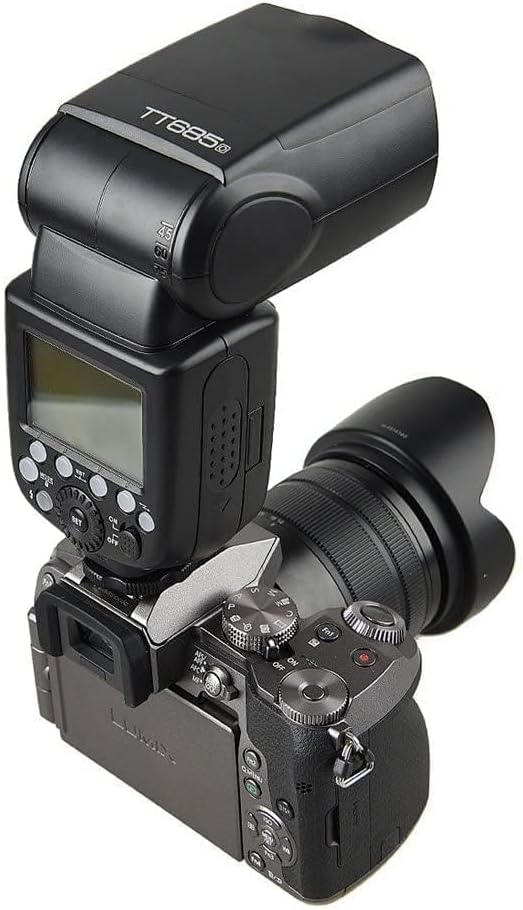
Image 5: The Godox TT685F flash unit securely mounted on a camera's hot shoe, ready for operation.
3.3 Powering On/Off
- To power on, slide the ON/OFF switch to the "ON" position. The LCD panel will illuminate.
- To power off, slide the ON/OFF switch to the "OFF" position.
4. Operating Instructions
4.1 Flash Modes
Press the MODE button to cycle through the available flash modes: TTL, Manual (M), and Multi.
- TTL (Through-The-Lens) Mode: The flash output is automatically adjusted by the camera to achieve correct exposure. This mode supports HSS, FEC, FEB, and FE Lock.
- Manual (M) Mode: You manually set the flash output power from 1/1 (full power) to 1/128 in 1/3 stop increments.
- Multi (Stroboscopic) Mode: The flash fires a series of rapid flashes during a single exposure to capture multiple images of a moving subject. You can set the flash frequency, flash count, and flash output.
4.2 Wireless 2.4G X System Operation
The TT685F can function as a master or slave unit within the Godox 2.4GHz X System.
- Master Mode: Mount the TT685F on your camera. Press the SYNC button (often labeled as a wireless icon) to enter wireless mode. Use the dial and buttons to set the group (A/B/C) and channel for slave units. The TT685F can control other Godox 2.4GHz slave flashes.
- Slave Mode: The TT685F can be triggered by a Godox 2.4GHz master unit (e.g., X1T-F, TT350F, or another TT685F). Set the TT685F to slave mode and match the group and channel settings with the master unit.
4.3 High-Speed Sync (HSS)
HSS allows you to use flash at shutter speeds faster than your camera's native flash sync speed, up to 1/8000s. This is useful for freezing fast motion or using wide apertures in bright conditions. HSS is typically activated automatically when the camera's shutter speed exceeds the sync speed in TTL mode, or can be manually selected in some camera menus.
4.4 Zoom Function
The flash head's zoom position can be set automatically or manually.
- Auto Zoom: The flash automatically adjusts its zoom position to match the focal length of your lens.
- Manual Zoom: Press the ZOOM button and use the select dial to manually adjust the zoom coverage from 20mm to 200mm.
4.5 Swivel and Tilt Head
The flash head can be tilted from -7 to 90 degrees vertically and rotated 360 degrees horizontally. This allows for bounce flash techniques, directing light off ceilings or walls for softer, more natural illumination.
5. Maintenance
- Keep the device dry. Do not handle with wet hands or immerse in water.
- Avoid strong impacts, as this may damage the flash unit.
- Do not disassemble the product. Repairs should only be performed by authorized service personnel.
- Clean the flash head and body with a soft, dry cloth. Avoid using harsh chemicals or solvents.
- Remove batteries when the flash is not in use for extended periods to prevent leakage.
- Store the device in a cool, dry place, away from direct sunlight and extreme temperatures.
6. Troubleshooting
6.1 Flash Not Firing
- Ensure the flash is securely mounted on the camera's hot shoe.
- Check battery levels. Replace or recharge batteries if low.
- Verify the flash is powered on.
- Confirm camera flash settings are enabled.
- If using wireless mode, ensure master and slave units are on the same channel and group.
6.2 Incorrect Exposure
- In TTL mode, check if Flash Exposure Compensation (FEC) is set incorrectly.
- In Manual mode, adjust the flash output power.
- Ensure the flash head zoom matches the lens focal length or is set appropriately for the scene.
- Check camera ISO and aperture settings.
6.3 Flash Overheating
Continuous rapid firing can cause the flash head to overheat. If an overheating warning appears, allow the flash to cool down for several minutes before resuming use. Reduce the frequency of flashes to prevent recurrence.
7. Specifications
| Model | TT685F |
| Compatible Mountings | Fujifilm |
| Guide Number | GN60 (m ISO 100, @200mm) |
| Flash Coverage | 20 to 200mm (Auto/Manual Zoom) |
| Flash Duration | 1/300 to 1/20000 seconds |
| Exposure Control System | TTL Autoflash, Manual Flash, Multi Flash |
| Flash Exposure Compensation (FEC) | Manual, FEB: ±3 stops in 1/3 stop increments |
| Sync Mode | High-Speed Sync (up to 1/8000s), First-Curtain Sync, Second-Curtain Sync |
| Wireless Flash Function | Master, Slave, Off |
| Controllable Slave Groups | 3 (A, B, C) |
| Transmission Range (approx.) | 100 meters |
| Channels | 32 (1-32) |
| Power Source | 4x AA batteries (Alkaline or Ni-MH) |
| Recycle Time | Approx. 0.1-2.6 seconds |
| Full Power Flashes | Approx. 230 (2500mA Ni-MH batteries) |
| Dimensions (W x H x D) | 7.9 x 3.6 x 3.2 inches (200 x 92 x 80mm) |
| Weight (without battery) | 1.14 pounds (517g) |
8. Warranty and Support
For warranty information and technical support, please refer to the warranty card included with your product or visit the official Godox website. Keep your purchase receipt as proof of purchase for any warranty claims.
Manufacturer: GODOX
For further assistance, you may contact the seller or manufacturer directly.