1. Introduction
This manual provides essential information for the safe and effective use of your T POWER 12V AC Adapter. This adapter is specifically designed to power various AeroGarden Harvest Elite, Harvest 360, and Harvest Slim indoor hydroponic garden systems. Please read these instructions carefully before connecting and operating the adapter.
2. Safety Information
- Input Voltage: The adapter is designed for an input voltage range of AC 100V - 240V. Ensure your power outlet provides voltage within this range.
- Output Voltage: This adapter provides a 12V DC output. Only use it with devices that require a 12V DC power supply.
- Compatibility: Verify that your AeroGarden model number and required adapter model (e.g., 6WWPC01, 6WWPC02) match the specifications of this T POWER adapter. Incorrect compatibility can damage your device.
- Environmental Conditions: Do not expose the adapter to moisture, extreme temperatures, or direct sunlight. Use indoors only.
- Damage: Do not use the adapter if the cord or plug is damaged. Contact support for a replacement.
- Ventilation: Ensure adequate ventilation around the adapter during use to prevent overheating.

3. Product Overview
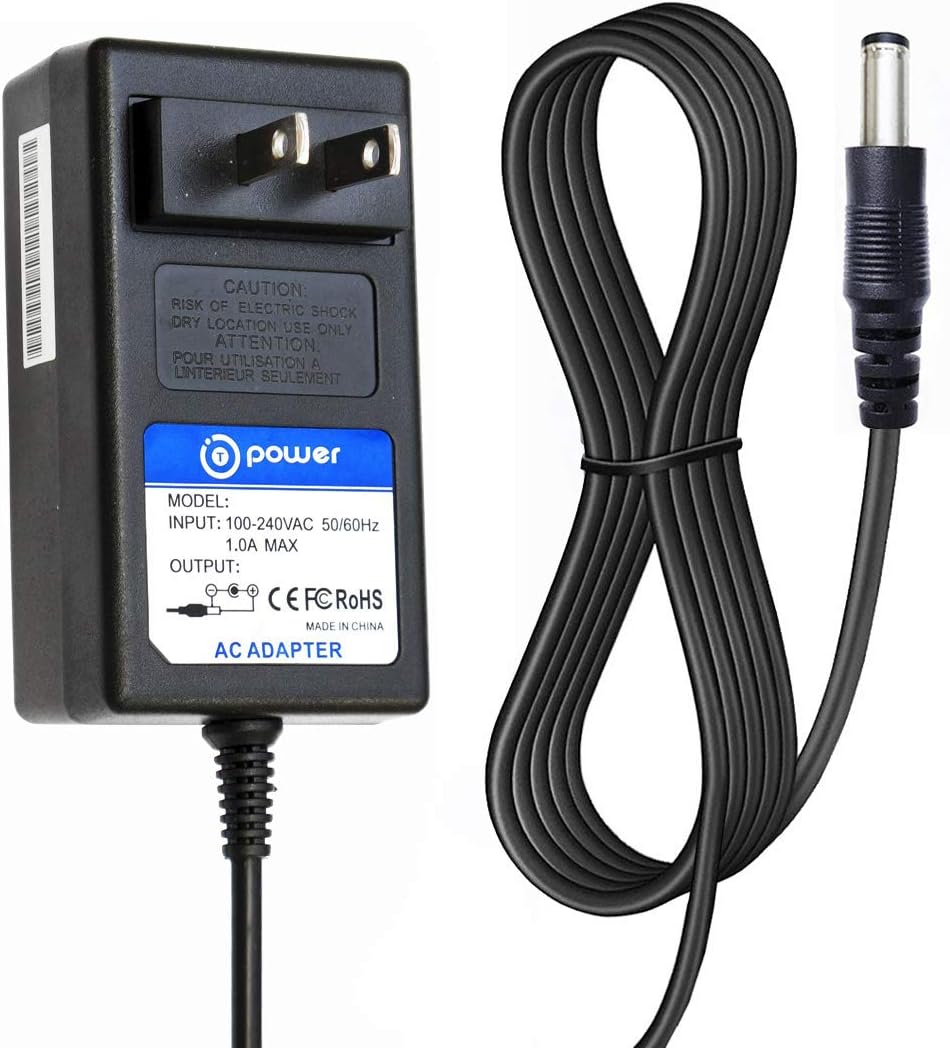
The T POWER 12V AC Adapter is a reliable power supply unit designed to replace or supplement the original adapter for compatible AeroGarden indoor gardening systems. It features a standard AC input plug and a DC output connector (barrel plug) to deliver stable power to your device.

Compatible AeroGarden Models:
- AeroGarden Harvest Elite Hydroponic System LED Grow Light Indoor Garden
- AeroGarden Harvest - Indoor Garden with LED Grow Light
- AeroGarden White Harvest Indoor Hydroponic Garden
- AeroGarden Harvest Elite / 360 / Slim (Models: 100690, 100691, 100692, 100693, 100694, 100695 series, and their color variants)


4. Setup
- Verify Compatibility: Before connecting, ensure the T POWER 12V AC Adapter is compatible with your specific AeroGarden model. Check the input requirements on your AeroGarden device and compare them with the adapter's specifications.
- Connect to Device: Insert the DC barrel connector of the T POWER adapter firmly into the power input port of your AeroGarden system.
- Connect to Power Outlet: Plug the AC end of the adapter into a standard AC 100V-240V electrical wall outlet.
- Power On: Once connected, your AeroGarden system should receive power. Follow your AeroGarden's specific instructions for initial setup and operation.
5. Operating Instructions
The T POWER 12V AC Adapter operates automatically once connected to a compatible device and a power source. It provides continuous 12V DC power to your AeroGarden system. No user intervention is required for its operation beyond proper connection.
- Ensure the adapter is not covered during operation to allow for proper heat dissipation.
- If the AeroGarden system does not power on, check all connections and the power outlet.
6. Maintenance
- Cleaning: Disconnect the adapter from the power outlet and the device before cleaning. Use a dry, soft cloth to wipe the adapter. Do not use liquid cleaners.
- Storage: When not in use, store the adapter in a cool, dry place, away from direct sunlight and moisture. Avoid tightly coiling the cable to prevent damage.
- Inspection: Periodically inspect the adapter and cable for any signs of wear, cuts, or damage. If damage is found, discontinue use and replace the adapter.
7. Troubleshooting
| Problem | Possible Cause | Solution |
|---|---|---|
| AeroGarden does not power on. | Adapter not properly connected. Power outlet is not active. Incompatible adapter/device. Damaged adapter. | Ensure both ends of the adapter are securely plugged in. Test the power outlet with another device. Double-check your AeroGarden's power requirements against the adapter's specifications. Inspect the adapter for visible damage; replace if necessary. |
| Adapter feels hot during use. | Normal operation (slight warmth). Poor ventilation. Overload or fault. | A slight warmth is normal. Ensure the adapter is in an open area with good airflow. If excessively hot, disconnect immediately and contact support. |
8. Specifications
- Model Number:
- PRO-aA7-5DD, 901104-1200
- Input Voltage:
- AC 100V - 240V
- Output Voltage:
- 12 Volts (DC)
- Item Weight:
- 4.8 ounces (0.14 Kilograms)
- Product Dimensions:
- 4 x 4 x 2 inches
- Certifications:
- UL, CE/FCC/RoHS certified
9. Warranty and Support
T POWER is committed to providing quality products and customer satisfaction.
- 30-Day Return Policy: You may return your undamaged product within 30 days of purchase to receive a full refund for any reason.
- 1-Year Limited Manufacturer Warranty: This product is covered by a 1-year limited manufacturer warranty, addressing quality-related issues. Easy exchange with a replacement is available.
- Technical Support: If you have received the wrong item, are looking for a charger for your device, or if the adapter tip doesn't fit your device, please contact T POWER customer support for assistance.
For inquiries, please refer to the contact information provided with your purchase or visit the official T POWER store online.