Introduction
The Marantz PM8006 integrated amplifier is designed for audiophiles seeking exceptional music quality and versatile operation. Featuring a fully discrete current feedback design, it delivers powerful and clear audio. Its symmetrical circuits ensure optimal imaging, while the Marantz-designed electric volume control and Musical Phono EQ preamp stage work to minimize noise and provide an immersive listening experience. New isolating feet enhance stability and further reduce interference. The PM8006 offers flexible configurations, including preamp outputs and a power amp direct input, allowing seamless integration into various audio setups, including multi-channel home theater systems. Precise sound tailoring is possible with its triple tone control system, offering separate adjustments for bass, midrange, and treble. The included remote control provides convenient operation of the amplifier and compatible source players.
Key Features
- Brilliant Music Quality & Flexible Operations: 6 audio inputs and 70 watts per channel (70 x 2) provide robust sound suitable for filling large rooms.
- Lower Audio Distortion & Improved Clarity: Enjoy superior playback from all music sources (digital or analog, CDs to turntables to streaming) with high volume control and Marantz’ Musical Phono EQ two-stage amplification for detailed sound.
- Endless Connection Possibilities: Includes a pre-amp output for connecting a larger power amplifier or using the power amp input for integration into a multi-channel home theater system. Ability to add two high-quality speakers in a second room.
- High Quality Components Inside Out: Features proprietary Marantz high-grade Hyper-Dynamic Amplifier Modules (HDAMs) and a newly designed electric volume circuit, matching Super Audio hi-res music for wide-bandwidth and high-speed reproduction.
- Included Headphone Output: Provides full control of the headphone unit, allowing enjoyment of high-quality music from demanding headphones without disturbing others.
Setup
1. Unpacking and Placement
Carefully remove the PM8006 amplifier from its packaging. Place the unit on a stable, flat surface with adequate ventilation around it. Ensure no objects block the ventilation grilles on the top or sides of the unit. Avoid placing the amplifier near heat sources or in direct sunlight.
2. Connecting Speakers
The PM8006 features two sets of speaker terminals (A and B) for connecting up to two pairs of speakers. Use high-quality speaker cables for optimal performance. Ensure correct polarity (+ to + and – to –) for all connections.
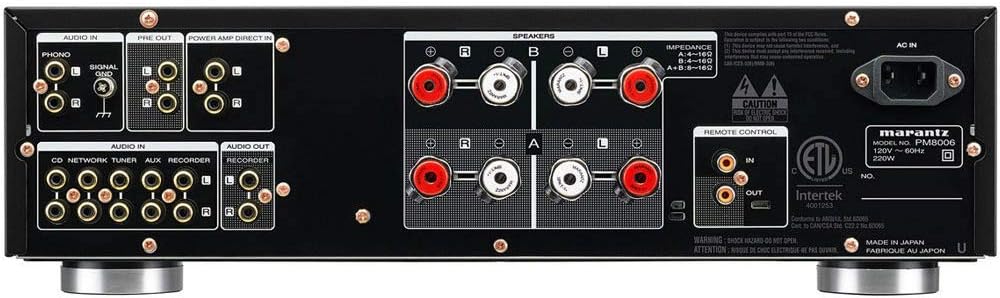
- Connect the left speaker to the "L" terminals and the right speaker to the "R" terminals for both A and B sets.
- For bi-wiring compatible speakers, use both A and B terminals for a single pair of speakers, connecting the high-frequency inputs to one set and low-frequency inputs to the other.
3. Connecting Audio Sources
The PM8006 provides multiple analog audio inputs. Use RCA cables to connect your source components.
- PHONO Input: Connect your turntable to the PHONO input. Ensure your turntable has a moving magnet (MM) cartridge, as the PM8006 features a Musical Phono EQ stage designed for MM cartridges. Connect the turntable's ground wire to the SIGNAL GND terminal on the amplifier.
- CD, NETWORK, TUNER, AUX, RECORDER Inputs: Connect other audio sources such as CD players, network streamers, tuners, or auxiliary devices to these respective inputs.
- PRE OUT: Use these outputs to connect to a larger external power amplifier if desired.
- POWER AMP DIRECT IN: This input allows the PM8006 to function as a standalone power amplifier, bypassing its preamplifier section. This is useful for integrating the unit into a multi-channel home theater system where a separate AV receiver handles pre-processing.
- RECORDER OUT: Connect to the input of a recording device.
4. Power Connection
After all audio and speaker connections are made, connect the supplied power cord to the AC IN terminal on the rear panel of the amplifier and then to a suitable wall outlet.
Operating Your Amplifier

- Power On/Off: Press the power button on the front panel to turn the unit on or off.
- Input Selection: Rotate the "INPUT SELECTOR" knob on the front panel or use the input selection buttons on the remote control to choose your desired audio source (e.g., CD, PHONO, NETWORK). The selected input will be indicated by an illuminated LED.
- Volume Control: Adjust the "VOLUME" knob on the front panel or use the volume buttons on the remote control to set the listening level.
- Speaker Selection: Use the "SPEAKERS" A/B buttons on the front panel to select which pair of speakers (A, B, or A+B) is active.
- Tone Controls: The PM8006 features separate knobs for "BASS", "MID", and "TREBLE" to fine-tune the sound to your preference.
- Balance Control: Adjust the "BALANCE" knob to equalize the sound output between the left and right channels.
- Source Direct: Press the "SOURCE DIRECT" button to bypass the tone and balance control circuits for the purest audio signal path.
- Headphone Output: Connect headphones to the "PHONES" jack on the front panel. When headphones are connected, speaker output is automatically muted.
Maintenance
- Cleaning: Wipe the unit with a soft, dry cloth. Do not use abrasive cleaners, waxes, or solvents.
- Ventilation: Ensure proper ventilation by keeping the top and side grilles clear of obstructions. Overheating can damage the amplifier.
- Power Cord: Periodically check the power cord for any damage.
- Storage: If storing the unit for an extended period, disconnect it from the power outlet and store it in a cool, dry place.
Troubleshooting
| Problem | Possible Cause | Solution |
|---|---|---|
| No power | Power cord not connected securely; power outlet not active. | Check power cord connection; try a different outlet. |
| No sound | Incorrect input selected; speaker cables disconnected; volume too low; headphones connected. | Select correct input; check speaker connections; increase volume; disconnect headphones. |
| Distorted sound | Speaker cables shorted; input level too high; tone controls set incorrectly. | Check speaker cable connections for stray strands; reduce input level; reset tone controls or engage Source Direct. |
| Remote control not working | Batteries depleted; obstruction between remote and unit; remote sensor blocked. | Replace batteries (2 AAA required); remove obstructions; ensure remote sensor is clear. |
Specifications
| Feature | Detail |
|---|---|
| Product Dimensions | 14.92 x 17.32 x 5.03 inches |
| Item Weight | 26.5 pounds |
| Manufacturer | Marantz |
| ASIN | B077NBXQLT |
| Model Number | PM8006 |
| Batteries Required | 2 AAA batteries (for remote) |
| Date First Available | November 21, 2017 |
Warranty and Support
For detailed warranty information, please refer to the warranty card included with your product or visit the official Marantz website. For technical support, troubleshooting beyond this manual, or service inquiries, please contact Marantz customer support. A comprehensive User Guide in PDF format is also available for download from the product's Amazon page or the Marantz support website.
You can access the official User Guide (PDF) here.


