
Air Innovations MH-901DA
Air Innovations 1.6 Gallon Mist Humidifier User Manual
Model: MH-901DA | Brand: Air Innovations
Introduction
This manual provides comprehensive instructions for the safe and efficient operation, setup, maintenance, and troubleshooting of your Air Innovations 1.6 Gallon Mist Humidifier, Model MH-901DA. This ultrasonic cool mist humidifier is designed to add moisture to the air in your home or office, improving air quality and comfort. Please read this manual thoroughly before first use and retain it for future reference.

Image: The Air Innovations 1.6 Gallon Mist Humidifier in black, showcasing its sleek design and tall mist nozzle.
Important Safety Instructions
To reduce the risk of fire, electric shock, or injury, always follow these basic safety precautions:
- Do not operate the humidifier if the cord or plug is damaged.
- Keep the humidifier away from heat sources and direct sunlight.
- Always place the humidifier on a firm, flat, level surface.
- Do not block air vents.
- Unplug the humidifier before filling, cleaning, or moving it.
- Do not immerse the base in water or other liquids.
- Use only clean, cool tap water. Distilled water is recommended to prevent mineral buildup.
- Keep out of reach of children and pets.
Package Contents
Verify that all items are present in the packaging:
- Ultrasonic Humidifier Base with Water Tank
- Extension Nozzle
- Dual Directional Mist Nozzle
- Permanent Ceramic Filter (pre-installed)
Parts Identification
Familiarize yourself with the components of your humidifier:
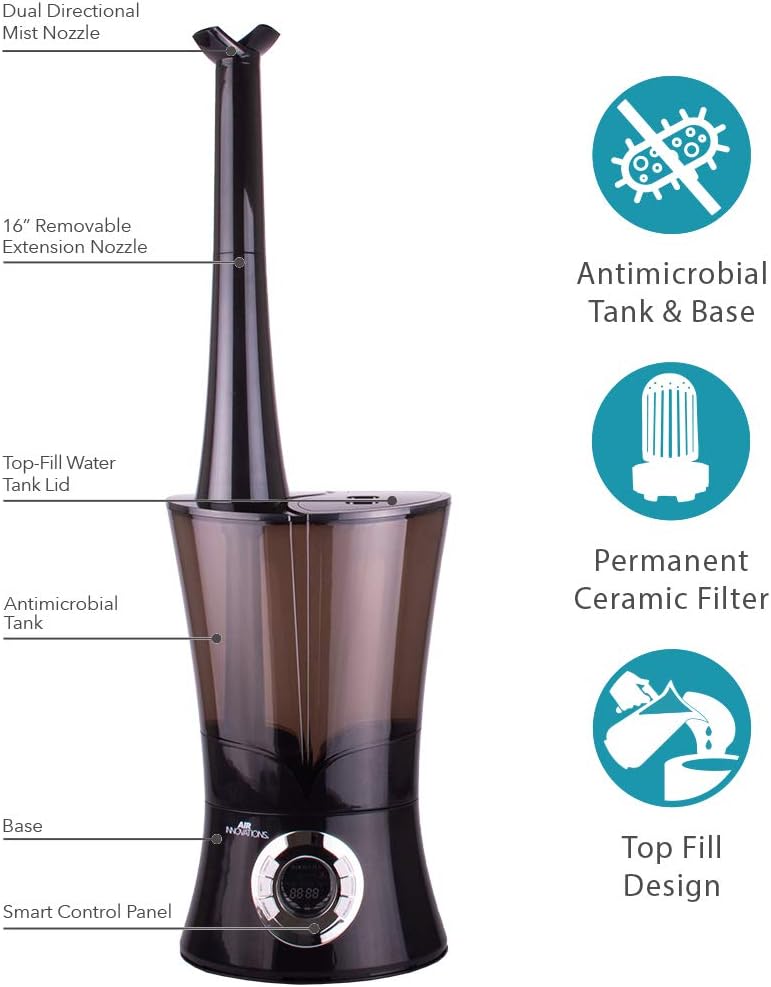
Image: Labeled diagram of the humidifier components, including the Dual Directional Mist Nozzle, 16" Removable Extension Nozzle, Top-Fill Water Tank Lid, Antimicrobial Tank, Base, and Smart Control Panel. Also highlights Antimicrobial Tank & Base, Permanent Ceramic Filter, and Top Fill Design features.
- A. Dual Directional Mist Nozzle: Directs mist in two directions.
- B. 16" Removable Extension Nozzle: Extends the mist output height.
- C. Top-Fill Water Tank Lid: Cover for the water tank opening.
- D. Antimicrobial Tank: Water reservoir with antimicrobial properties.
- E. Base: Contains the ultrasonic transducer and control panel.
- F. Smart Control Panel: Digital display and touch controls.
- G. Permanent Ceramic Filter: Filters water to reduce mineral dust.
- H. Aromatherapy Tray: (Located on the side/back of the base) For essential oil pads.

Image: A detailed diagram showing the humidifier's dimensions (Length - 12.30 in., Width - 10.60 in., Height - 18.40 in., Weight - 5.65 lbs.) and key features like the Directional Mist Nozzle, Patented Pending 16" Removable Extension Nozzle, Anti-microbial Tank & Base, Permanent Ceramic Filter, Top Fill Design, Antimicrobial Water Tank, Antimicrobial Base, and SMART Control Panel.
Setup
- Unpack: Carefully remove all contents from the packaging.
- Placement: Place the humidifier on a flat, waterproof surface at least 6 inches away from walls and furniture. Ensure the mist output is not directed at walls or electronics.
- Assemble Nozzle: Attach the 16" Extension Nozzle to the top of the water tank, then place the Dual Directional Mist Nozzle on top of the Extension Nozzle. You can also use the Dual Directional Mist Nozzle directly on the tank without the extension.
- Fill Water Tank:
The humidifier features a convenient top-fill design. Open the Top-Fill Water Tank Lid. Pour clean, cool tap water directly into the tank. Fill up to the "MAX" line indicated on the tank. Distilled water is recommended to minimize mineral dust and extend filter life.

Image: A hand pouring water from a pitcher into the top-fill opening of the humidifier's water tank.
- Close Lid: Securely close the Top-Fill Water Tank Lid.
- Plug In: Plug the power cord into a standard electrical outlet. The display will illuminate.
Operating Instructions
Your Air Innovations humidifier features a Smart Control Panel for easy operation.

Image: Close-up of the humidifier's digital control panel with labeled buttons for On/Off, Mist Level, Humidity Level, Auto On, Auto Off, Display Dim, and Beep On/Off.
- 1. Power On/Off: Press the ON/OFF button to turn the humidifier on or off. The display will show the current humidity level when on.
- 2. Mist Level Adjustment: Press the MIST button repeatedly to cycle through the mist output levels (Low, Medium, High, Turbo).
- 3. Humidity Level (Humidistat): Press the HUMIDISTAT button to set your desired humidity level. The setting ranges from 30% to 90% relative humidity (RH) in 5% increments. The humidifier will automatically turn on and off to maintain the set humidity. If no humidity level is set, it will run continuously.
- 4. Auto On/Off Timer:
- Auto On (Delay Start): Press the AUTO ON button to set a delay start timer. The humidifier will turn on after the set number of hours (up to 24 hours).
- Auto Off: Press the AUTO OFF button to set a shut-off timer. The humidifier will turn off after the set number of hours (up to 24 hours).
- 5. Display Dim: Press the BEEP/DIM button once to dim the display. Press again to turn the display off. Press a third time to restore full brightness.
- 6. Beep On/Off: Press and hold the BEEP/DIM button for 3 seconds to turn the button beep sound on or off.
- 7. Aromatherapy Feature:
Locate the small aromatherapy tray on the side or back of the humidifier base. Pull out the tray and place a few drops of essential oil onto an aromatherapy pad (sold separately). Slide the tray back into place. The mist will diffuse the aroma into the air.

Image: Close-up of the aromatherapy tray pulled out from the humidifier base, showing a white pad inside where essential oils can be added.
Maintenance
Regular cleaning is essential for optimal performance and hygiene. Always unplug the unit before cleaning.
Daily Maintenance:
- Empty any remaining water from the tank and base.
- Rinse the water tank and base with fresh water.
- Wipe down all surfaces with a clean, dry cloth.
Weekly Maintenance (Mineral Removal):
Mineral deposits from tap water can build up on the transducer and in the water tank. This can affect performance.
- Unplug the unit and remove the mist nozzle and extension.
- Carefully remove the water tank from the base.
- Pour 1 cup of white vinegar into the water tank and into the base reservoir (avoid pouring directly onto the transducer).
- Let it soak for 20 minutes.
- Use a soft brush (like the included cleaning brush) to gently clean the transducer and the inside of the tank.
- Rinse the tank and base thoroughly with clean water until the smell of vinegar is gone.
- Wipe all surfaces dry before reassembling.

Image: Top-down view of the humidifier's base, showing the internal components including the transducer and water channels, indicating areas that require cleaning.

Image: The humidifier's water tank separated from the base, illustrating how it can be removed for thorough cleaning.
Permanent Ceramic Filter:
The permanent ceramic filter does not require replacement. It should be cleaned periodically by rinsing under running water. If heavy mineral buildup occurs, soak it in white vinegar for 10 minutes, then rinse thoroughly.
Storage:
When storing the humidifier, ensure all parts are clean and dry. Store in a cool, dry place away from direct sunlight.
Troubleshooting
| Problem | Possible Cause | Solution |
|---|---|---|
| No mist or low mist output. |
|
|
| White dust around humidifier. |
|
|
| Unusual odor. |
|
|
| Humidifier leaks. |
|
|
Specifications
- Model: MH-901DA
- Brand: Air Innovations
- Operation Mode: Ultrasonic Cool Mist
- Water Tank Capacity: 1.6 Gallons (approx. 6 Liters)
- Run Time: Up to 100 hours (on lowest setting)
- Coverage Area: Up to 700 Square Feet
- Filter Type: Permanent Ceramic Filter
- Product Dimensions: 7.8"D x 10.4"W x 34.1"H
- Item Weight: 4.4 Pounds
- Control Method: Touch Control Panel
- Included Components: Humidifier, Extension Nozzle, Dual Directional Mist Nozzle
- UPC: 180104004101
- Manufacturer: Great Innovations, LLC
Warranty and Support
For detailed warranty information, please refer to the official documentation provided with your purchase. For further assistance or to download the official PDF user guide, please visit the Air Innovations website or contact their customer support. A digital version of the user manual is available at: Air Innovations Humidifier User Manual (PDF).
Related documentsMH-901DA


Ask a question about this manual
Ask about setup, troubleshooting, compatibility, parts, safety, or missing instructions. Manuals+ will review the question and use this page’s manual context to help answer it.