
1. Introduction
The QYT KT-8900 is a compact and powerful dual-band mobile radio designed for amateur radio enthusiasts. It operates on both VHF (2m) and UHF (70cm) bands, offering reliable communication with a maximum output power of 25W on VHF and 20W on UHF. This manual provides essential information for the proper installation, operation, and maintenance of your KT-8900 mobile radio.

Figure 1.1: QYT KT-8900 Mobile Radio with Speaker Microphone and Programming Cable.
2. Package Contents
Upon opening the package, please verify that all items listed below are present and in good condition:
- 1 x QYT KT-8900 Mobile Radio Unit
- 1 x Speaker Microphone (with DTMF function)
- 1 x Mounting Brackets & Screws
- 1 x 13.8V DC Power Cable with Cigarette Plug Connector
- 1 x Programming Cable (USB to RJ45)
- 1 x User Manual (this document)

Figure 2.1: Complete Package Contents of the QYT KT-8900.
3. Features and Functions
The QYT KT-8900 is equipped with a range of features to enhance your communication experience:
- Frequency Range: VHF (136-174MHz) and UHF (400-480MHz)
- Output Power: VHF 25 Watt, UHF 20 Watt
- Signaling: MSK/5Tone/2Tone/DTMF/CTCSS/DCS
- Channels: 200 programmable memory channels
- Dual Band & Quad Watch: Simultaneous monitoring of multiple frequencies
- FM Radio Function: Built-in FM broadcast receiver
- PTT ID: Transmit a unique identification code
- Auto Lock: Automatic keypad lock function
- Remote Stun/Kill: Ability to remotely disable a lost or stolen radio
- Channel Name Setting: Customize channel names for easy identification
- Cooling Fan: Integrated cooling fan for improved thermal management
4. Setup and Installation
4.1 Mounting the Radio
The KT-8900 comes with a mounting bracket for secure installation in a vehicle or fixed location. Choose a location that allows for proper ventilation and easy access to controls. Ensure the mounting surface is stable and can support the radio's weight.
- Attach the mounting bracket to your desired surface using the provided screws.
- Slide the radio into the bracket until it clicks securely into place.
- Adjust the angle of the radio for optimal viewing and operation.
4.2 Electrical Connections
Connect the radio to a 13.8V DC power source. The included power cable has a cigarette plug connector for vehicle use. For fixed installations, ensure a stable 13.8V DC power supply capable of providing sufficient current (at least 5A recommended).
- Connect the red wire to the positive (+) terminal of the power source.
- Connect the black wire to the negative (-) terminal of the power source.
- Ensure all connections are secure to prevent power loss or damage.
4.3 Antenna Connection
Connect a suitable dual-band VHF/UHF antenna to the SO-239 connector on the rear of the radio. Use a high-quality coaxial cable with appropriate connectors. A properly tuned antenna is crucial for optimal performance and to prevent damage to the radio's final amplifier.
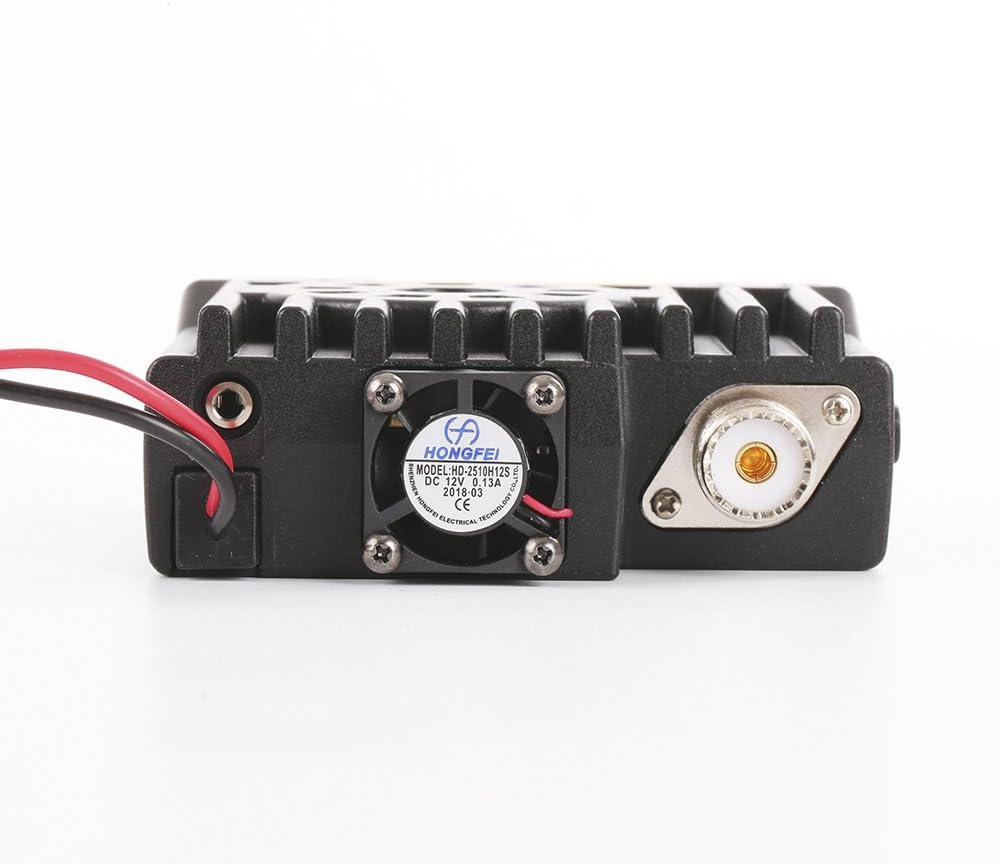
Figure 4.1: Rear Panel of the KT-8900 showing Antenna Connector and Cooling Fan.
4.4 Microphone Connection
Plug the speaker microphone into the RJ45 port on the front panel of the radio. Ensure the connector is fully inserted.

Figure 4.2: QYT KT-8900 Speaker Microphone.
5. Operating Instructions
5.1 Basic Operation
- Power On/Off: Press and hold the power button (⑂) on the front panel to turn the radio on or off.
- Volume Control: Rotate the VOL knob to adjust the audio output level.
- Channel/Frequency Selection: Use the UP/DOWN buttons on the microphone or the main rotary knob on the radio to change channels or frequencies.
- Transmit (PTT): Press and hold the Push-To-Talk (PTT) button on the side of the microphone to transmit. Release to receive.
- VFO/Memory Mode: Press the V/M button to switch between VFO (Variable Frequency Oscillator) mode for direct frequency input and Memory mode for recalling programmed channels.
- Band Switching: Press the EXIT/AB button to switch between the A and B display bands.
- FM Radio: Press the FM button to activate the built-in FM broadcast radio.
5.2 Advanced Features and Programming
The KT-8900 offers various advanced functions accessible through its menu system and programming software.
- Menu Navigation: Press the MENU button on the microphone to enter the menu. Use the UP/DOWN buttons to navigate and the MENU button again to confirm selections.
- CTCSS/DCS Tones: Configure CTCSS (Continuous Tone-Coded Squelch System) or DCS (Digital Coded Squelch) tones for private group communication. Refer to the radio's menu for specific settings.
- Channel Naming: Assign custom names to memory channels for easier identification.
- Programming with Software: The KT-8900 is best programmed using dedicated software like CHIRP. The included programming cable connects the radio to your computer.
- Driver Installation: For the programming cable to function correctly, specific drivers may be required. Refer to resources like the Miklor site for driver downloads and programming guides relevant to your computer's operating system.
6. Maintenance
Proper maintenance ensures the longevity and optimal performance of your QYT KT-8900 mobile radio.
- Cleaning: Use a soft, dry cloth to clean the radio's exterior. Avoid using harsh chemicals or abrasive cleaners.
- Ventilation: Ensure the cooling fan and heat sink fins are free from dust and debris to maintain proper airflow. The radio is designed with a cooling fan to manage heat during operation.
- Connections: Periodically check all cable connections (power, antenna, microphone) to ensure they are secure and free from corrosion.
- Storage: When not in use for extended periods, store the radio in a cool, dry place away from direct sunlight and extreme temperatures.

Figure 6.1: Top View of KT-8900 with Cooling Fan. Note: Surface may become hot during extended transmission.
7. Troubleshooting
If you encounter issues with your QYT KT-8900, refer to the following common problems and solutions:
| Problem | Possible Cause | Solution |
|---|---|---|
| Radio does not power on. | No power, incorrect wiring, blown fuse. | Check power cable connections. Verify 13.8V DC supply. Check inline fuse on power cable. |
| No audio from speaker. | Volume too low, squelch set too high, faulty speaker/microphone. | Increase volume. Adjust squelch level. Test with another microphone if available. |
| Cannot transmit or receive. | Incorrect frequency/channel, antenna issue, PTT button stuck, incorrect CTCSS/DCS. | Verify frequency/channel. Check antenna connection and SWR. Ensure PTT button is not stuck. Check CTCSS/DCS settings. |
| Radio gets hot during operation. | Extended transmission, poor ventilation, high SWR. | Reduce transmission time. Ensure cooling fan is clear and functional. Check antenna SWR. |
| Programming cable not recognized by computer. | Missing or incorrect drivers. | Install the correct USB drivers for the programming cable. Refer to the Miklor site for driver downloads. |
If the problem persists after attempting these solutions, please contact QYT customer support or a qualified radio technician.
8. Specifications
Detailed technical specifications for the QYT KT-8900 mobile radio:
| Feature | Specification |
|---|---|
| Frequency Range | VHF: 136-174MHz, UHF: 400-480MHz |
| Output Power | VHF: 25W, UHF: 20W |
| Channel Spacing | 25KHz / 20KHz / 12.5KHz |
| Frequency Stability | ±2.5ppm |
| Operating Temperature | -20°C to +60°C (-4°F to +140°F) |
| Operating Voltage | 13.8V DC ± 15% |
| Dimensions (H x W x D) | 1.9 x 5.7 x 7.5 inches |
| Weight (with bracket) | 2.1 lb (0.95 kg) |
| Number of Channels | 200 |
| Receiver Sensitivity | 0.25μV / 0.35μV |
| Audio Output Power | ≥2W @ 10% |
| Water Resistance Level | Water Resistant |

Figure 8.1: Bottom View of KT-8900 with Product Label. Serial Number: 1803221642.
9. Warranty and Support
For warranty information and technical support regarding your QYT KT-8900 mobile radio, please refer to the documentation provided at the time of purchase or contact QYT directly through their official channels. Additional support resources, including drivers and software, can often be found on reputable amateur radio community websites like Miklor.com.
You can also visit the official QYT Store on Amazon for product information and customer service contacts.