
Studebaker SB3703MW
Studebaker SB3703MW Personal CD/MP3 Player User Manual
Model: SB3703MW | Brand: Studebaker
Introduction
This manual provides detailed instructions for the operation and maintenance of your Studebaker SB3703MW Joggable Personal CD/MP3 Player. Please read this manual thoroughly before using the device to ensure proper function and longevity.
Package Contents
- Studebaker SB3703MW Personal CD/MP3 Player
- Stereo Earbuds
- User Manual (this document)
Product Overview

Front view of the Studebaker SB3703MW player in mint/white, showing the main controls and connected earbuds.

Top view of the player, highlighting the digital LCD display showing "88.5 P03", indicating FM radio mode and a preset.
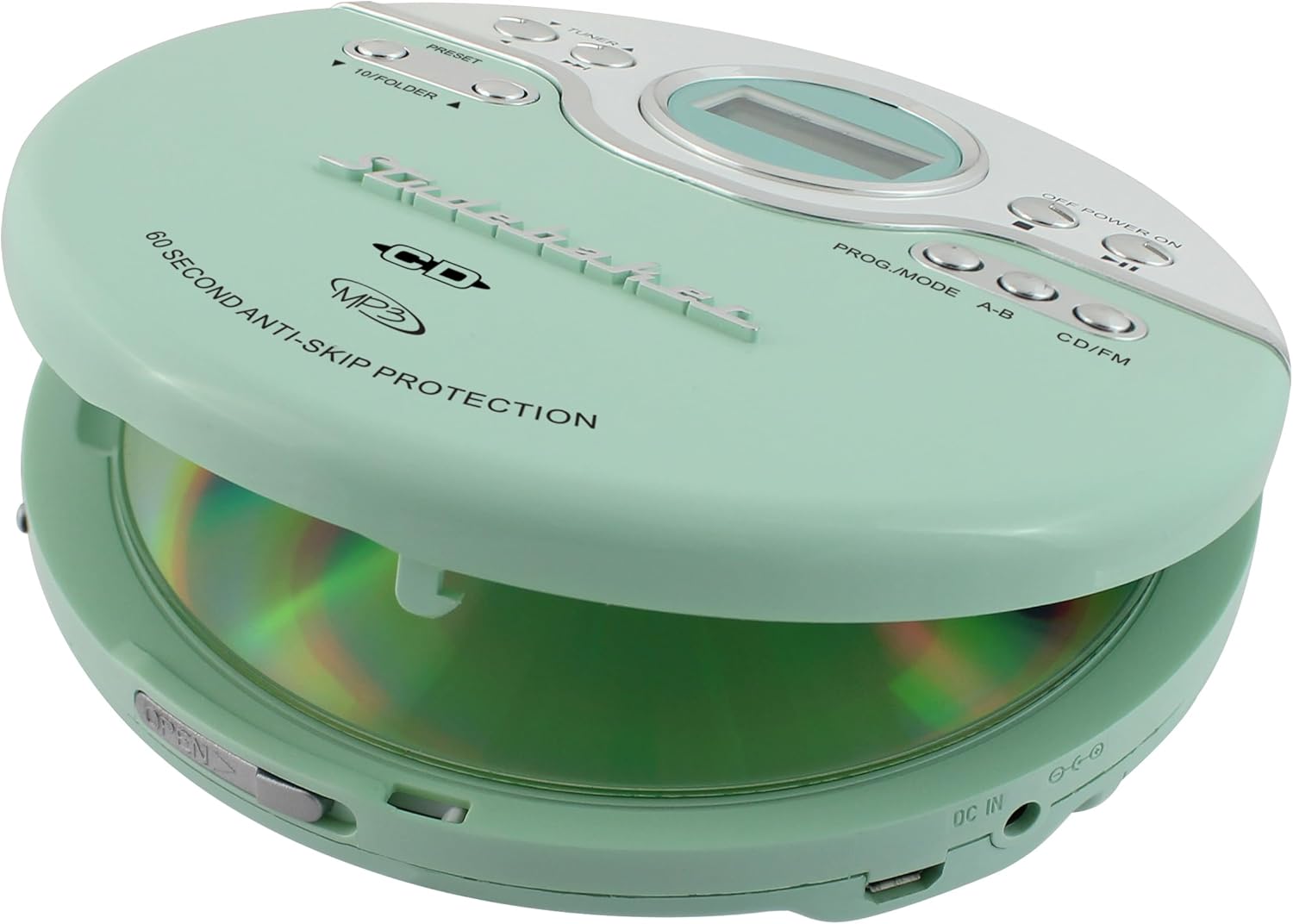
The player with its lid open, revealing the CD compartment ready for disc insertion.

Close-up of the player's LCD display, showing "PROG" indicating the programmable memory function is active.
The Studebaker SB3703MW is a portable CD/MP3 player equipped with an FM PLL radio. It features 60-second Anti-Skip protection, a digital LCD display, and various playback controls. It supports both CD-R/RW and 5" & 3" discs. Power can be supplied via AA batteries or a Micro USB connection.
Setup
1. Powering the Unit
The SB3703MW can be powered in two ways:
- Battery Power: Insert two (2) 'AA' (UM-3) batteries into the battery compartment located on the bottom of the unit. Ensure correct polarity (+/-) as indicated inside the compartment. Batteries are not included.
- USB Power: Connect a standard Micro USB cable (not included) to the Micro USB port on the unit and to a computer USB port or any compatible USB power adapter (not included). This allows the unit to operate without batteries.
2. Connecting Earbuds
Plug the included stereo earbuds into the HEADPHONE JACK on the side of the unit. For optimal sound quality, ensure the plug is fully inserted.
Operating Instructions
Basic Controls
| Button/Feature | Function |
|---|---|
| OFF POWER ON switch | Slides to turn the unit ON or OFF. |
| PLAY/PAUSE (►/−−) | Press to start or pause playback. |
| STOP (■) | Stops playback. Press twice to turn off the unit in CD mode. |
| SKIP/SEARCH (◀◀ / ►►) | Press briefly to skip to the previous/next track. Press and hold to search backward/forward within a track. |
| VOLUME dial | Rotates to adjust the listening volume. |
| CD/FM button | Switches between CD/MP3 playback mode and FM radio mode. |
| DBBS (Dynamic Bass Boost System) switch | Slides to enhance bass output. |
CD/MP3 Playback
- Slide the OFF POWER ON switch to ON.
- Press the OPEN button on the side of the unit to open the CD compartment lid.
- Carefully place a CD or MP3 disc onto the center spindle with the label side facing up.
- Close the CD compartment lid firmly until it clicks.
- Press the CD/FM button to ensure the unit is in CD mode. The display will show "CD" or "MP3".
- Press the PLAY/PAUSE (►/−−) button to begin playback.
- Use the SKIP/SEARCH buttons to navigate tracks.
- Adjust the VOLUME dial to your desired listening level.
- 60-Second Anti-Skip Protection: This feature helps prevent audio interruptions during movement. It buffers audio data to ensure continuous playback.
- Programmable Memory (24 Tracks):
- In STOP mode, press the PROG/MODE button. "PROG" will flash on the display.
- Use the SKIP/SEARCH buttons to select the desired track number.
- Press PROG/MODE again to confirm the track. Repeat for up to 24 tracks.
- Press PLAY/PAUSE to play the programmed sequence.
- Repeat Function: Press the PROG/MODE button during playback to cycle through repeat modes (e.g., repeat current track, repeat all tracks).
- Audio Book Compatibility & Bookmark Feature: This player supports audio book playback and includes a bookmark feature to resume listening from where you left off. Specific operation details for bookmarking are typically automatic or tied to the power cycle.
FM Radio Operation
- Slide the OFF POWER ON switch to ON.
- Press the CD/FM button to switch to FM radio mode. The display will show the radio frequency.
- Use the TUNER ◀◀ / ►► buttons to manually tune to a desired FM frequency. Press and hold to auto-scan for the next available station.
- Preset Stations:
- To store a station: Tune to the desired station. Press the PRESET button. Use the 10/FOLDER ▼ / ▲ buttons to select a preset number (P01-P20). Press PRESET again to save.
- To recall a stored station: Press the PRESET button repeatedly or use the 10/FOLDER ▼ / ▲ buttons to cycle through stored presets.
- Adjust the VOLUME dial to your desired listening level.
Maintenance
- Cleaning: Use a soft, dry cloth to clean the exterior of the unit. Do not use abrasive cleaners or solvents. For the CD lens, use a specialized CD lens cleaner kit.
- Battery Care: Remove batteries if the unit will not be used for an extended period to prevent leakage. Do not mix old and new batteries, or different types of batteries.
- Storage: Store the unit in a cool, dry place away from direct sunlight and extreme temperatures.
Troubleshooting
| Problem | Possible Cause | Solution |
|---|---|---|
| Unit does not power on. | Batteries are dead or inserted incorrectly; USB power not connected or faulty. | Replace batteries, check polarity; ensure USB cable is securely connected to a working power source. |
| CD/MP3 disc does not play or skips frequently. | Disc is dirty, scratched, or inserted incorrectly; Anti-skip protection overwhelmed; unit is on an unstable surface. | Clean disc with a soft cloth; ensure disc is seated properly; avoid excessive shaking; try a different disc. |
| No sound from earbuds. | Earbuds not fully plugged in; volume too low; earbuds are faulty. | Ensure earbuds are fully inserted; increase volume; try a different pair of earbuds. |
| Poor FM radio reception. | Weak signal; interference. | Adjust unit position; try tuning to a stronger station; avoid placing near other electronic devices. |
Specifications
- Model: SB3703MW
- Power Source: 2 x 'AA' (UM-3) Batteries (not included) or Micro USB (DC 5V)
- Disc Compatibility: CD, CD-R/RW, 5" & 3" discs
- Anti-Skip Protection: 60 seconds
- Radio Frequency: FM PLL Radio
- Programmable Memory: 24 tracks
- Dimensions (approx.): 1 x 5.71 x 5.55 inches (H x W x D)
- Weight (approx.): 9.6 ounces (without batteries)
- Connectivity: 3.5mm Headphone Jack, Micro USB port
- Special Features: DBBS Bass Boost, Digital LCD Display, Audio Book Compatibility, Bookmark Feature
Warranty and Support
For warranty information and technical support, please refer to the warranty card included with your product or visit the official Studebaker website. Keep your purchase receipt as proof of purchase for warranty claims.
Manufacturer: Spectra Merchandising Intl
For further assistance, you may contact Studebaker customer service through their official channels.
Important Safety Information
- Do not expose the unit to extreme temperatures, humidity, or direct sunlight.
- Avoid dropping or subjecting the unit to strong impacts.
- Do not disassemble the unit. Refer all servicing to qualified personnel.
- Prolonged listening at high volume levels may cause hearing damage.
- Dispose of batteries properly according to local regulations.
- This product contains chemicals known to the State of California to cause cancer and birth defects or other reproductive harm.
Related documentsSB3703MW


Ask a question about this manual
Ask about setup, troubleshooting, compatibility, parts, safety, or missing instructions. Manuals+ will review the question and use this page’s manual context to help answer it.