
1. Introduction
This user manual provides comprehensive instructions for the installation, operation, and maintenance of your NOLAN B901 S Communication System. Please read this manual thoroughly before using the product to ensure proper function and safety. The B901 S system is designed to integrate seamlessly with compatible Nolan helmets, offering advanced communication features for motorcycle riders.
2. Safety Information
Always prioritize safety when operating your motorcycle. Ensure the communication system is securely installed and does not interfere with helmet functionality or your field of vision. Do not attempt to operate the system in a way that distracts you from riding. Keep volume at a level that allows you to hear ambient traffic sounds. All Nolan helmets pre-arranged for the N-Com system are homologated with the system installed and comply with ECE/ONU 22-05 regulations.

Figure 2.1: The NOLAN B901 S system is designed to integrate with helmets that meet safety standards.
3. Package Contents
Verify that all components are present in the package:
- NOLAN B901 S Communication System main unit
- Microphone with boom arm
- Speakers (pre-installed or separate, depending on helmet model)
- USB charging cable
- User Manual (this document)
- Mounting hardware (if applicable)

Figure 3.1: The NOLAN B901 S Communication System as packaged.
4. Setup and Installation
The NOLAN B901 S system is designed for easy integration into compatible Nolan helmets. Follow these steps for installation:
- Prepare the Helmet: Ensure your Nolan helmet has the necessary pre-drilled slots and recesses for the N-Com system. Refer to your helmet's specific manual for details on N-Com compatibility.
- Install the Main Unit: Carefully insert the main communication unit into the designated slot on the side of the helmet. Ensure it clicks securely into place.
- Connect the Microphone: Attach the microphone boom arm to its port on the main unit. Position the microphone approximately 1 cm from your mouth for optimal voice clarity.
- Position the Speakers: If not pre-installed, place the speakers into the helmet's ear recesses. Ensure they are flat and do not cause discomfort. The joint development of the intercom and helmet ensures ideal speaker and microphone placement for high audio quality.
- Cable Management: Route all cables neatly within the helmet lining to prevent interference or discomfort.
- Final Integration Check: Confirm that the system is flush with the helmet's exterior and all components are secure. The B901 S has been specifically developed for compatible Nolan helmets, ensuring perfect integration and maintaining internal helmet comfort.
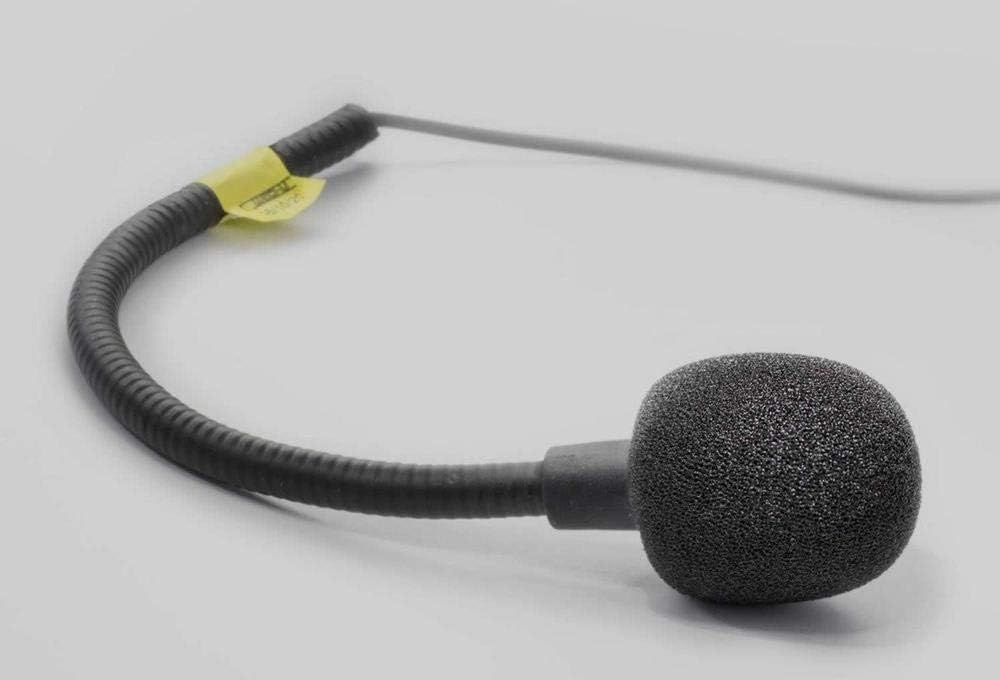
Figure 4.1: The microphone component of the B901 S system.

Figure 4.2: Optimized microphone design for clear communication.

Figure 4.3: Seamless integration of the B901 S system into a Nolan helmet.

Figure 4.4: A Nolan helmet with the B901 S system fully installed.
5. Operating Instructions
The B901 S features an ergonomic keypad for easy control, even with motorcycle gloves.

Figure 5.1: Ergonomic control buttons of the B901 S.
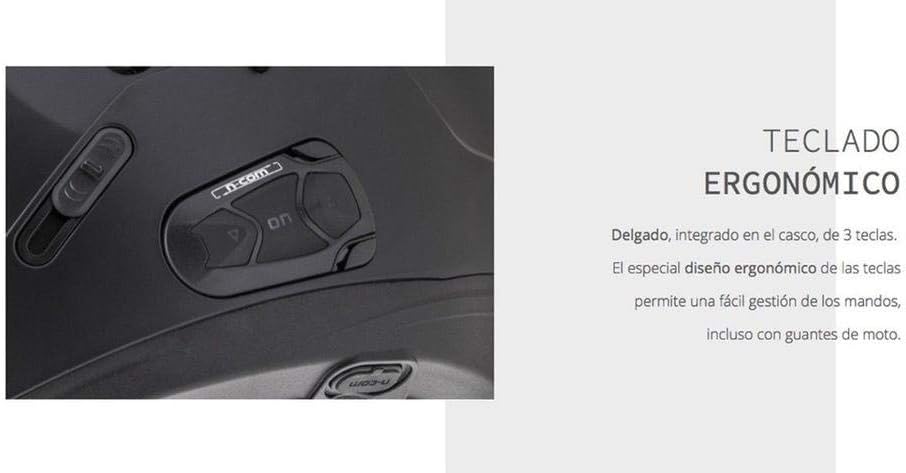
Figure 5.2: The slim, integrated keypad with 3 buttons for easy management.
5.1. Power On/Off
- To Power On: Press and hold the 'ON' button for approximately 3 seconds until you hear an audible confirmation tone.
- To Power Off: Press and hold the 'ON' button for approximately 5 seconds until you hear a power-off tone.
5.2. Bluetooth Pairing
To pair your B901 S with a mobile phone, GPS device, or another N-Com system:
- Ensure the B901 S is powered off.
- Press and hold the 'ON' button for about 7 seconds until the LED indicator flashes rapidly, indicating pairing mode.
- On your device, enable Bluetooth and search for "N-Com B901 S".
- Select the device and confirm pairing. A successful connection will be indicated by a steady LED light and an audible tone.
5.3. Intercom Function
The B901 S supports rider-to-passenger and bike-to-bike intercom communication.
- Initiate Intercom: Once paired, a short press of the 'Intercom' button (if available, or a specific combination) will initiate communication.
- End Intercom: Another short press will end the intercom session.
5.4. Music and GPS Audio
Once paired with your smartphone or GPS device, audio will be streamed directly to your helmet speakers.
- Play/Pause: Short press the 'Play/Pause' button.
- Volume Adjustment: Use the '+' and '-' buttons to increase or decrease volume.
- Next/Previous Track: Long press the '+' or '-' buttons to skip tracks.
6. Maintenance
Proper maintenance ensures the longevity and optimal performance of your NOLAN B901 S Communication System.
- Cleaning: Use a soft, damp cloth to clean the exterior of the unit. Do not use abrasive cleaners or solvents.
- Charging: Charge the unit using the provided USB cable. Ensure the charging port is dry before connecting the cable.
- Storage: When not in use for extended periods, store the system in a cool, dry place. It is recommended to fully charge the battery before long-term storage.
- Firmware Updates: Periodically check the Nolan N-Com website for firmware updates. Updates can improve performance and add new features.
7. Troubleshooting
| Problem | Possible Cause | Solution |
|---|---|---|
| No power | Battery discharged | Charge the unit fully. |
| Cannot pair with device | Incorrect pairing procedure; device out of range; interference | Ensure unit is in pairing mode. Move closer to device. Restart both devices. |
| Poor audio quality | Microphone not positioned correctly; speakers misaligned; high wind noise | Adjust microphone position. Reposition speakers. Ensure helmet visor is closed. |
| Intercom connection unstable | Distance too great; obstacles; multiple devices trying to connect | Reduce distance between units. Ensure clear line of sight. Disconnect other Bluetooth devices. |
8. Specifications
- Model: BNCOM00000030
- Dimensions: 26.2 x 17.6 x 5.9 cm (packaging)
- Weight: 400 grams (packaging)
- Connectivity: Bluetooth
- Compatibility: Specific Nolan helmet models
- Manufacturer: NOLAN
- First Available Date: November 15, 2017
9. Warranty and Support
NOLAN products are manufactured with high-quality materials and undergo rigorous quality control. For warranty information and technical support, please refer to the official NOLAN website or contact your authorized dealer. Keep your proof of purchase for warranty claims.
Nolangroup is an Italian company founded in 1972, dedicated to the production of motorcycle helmets and communication systems. They are known for their integrated production process in Italy, ensuring high standards of quality.


