
PNI MICRON UV
PNI Micron UV Dual Band Radio User Manual
Model: MICRON UV
Introduction
This manual provides comprehensive instructions for the setup, operation, and maintenance of your PNI Micron UV Dual Band Radio. Please read this manual thoroughly before using the device to ensure proper functionality and safety.
The PNI Micron UV is a versatile dual-band radio designed for VHF (144-146 MHz) and UHF (430-440 MHz) frequencies. It features 200 programmable channels, adjustable power output, and various functions including Talk, Scan, and Timer.
Package Contents
Upon opening the package, verify that all the following items are present:
- PNI Micron UV Dual Band Radio (UHF and VHF)
- Microphone
- Power cable
- Support mounting bracket
- User manual (this document)

Figure 1: PNI Micron UV Dual Band Radio with its connected microphone.
Setup
1. Power Connection
Connect the provided power cable to the radio's power input port, typically located at the rear of the unit. Ensure the power source is 13.8 Vdc. Observe polarity when connecting to a DC power supply.

Figure 2: Rear view of the radio, highlighting the power input and antenna connection points.
2. Antenna Connection
Attach a suitable dual-band antenna (VHF/UHF) to the antenna connector on the rear of the radio. Ensure the connection is secure to prevent signal loss and potential damage to the radio.
3. Microphone Connection
Plug the microphone cable into the designated port on the front panel of the radio. The microphone is essential for transmitting and provides access to various control functions.

Figure 3: Angled view of the radio with the microphone properly connected to the front panel.
4. Mounting (Optional)
Use the provided support mounting bracket to install the radio in a stable location, such as a vehicle or a fixed station. Ensure adequate ventilation around the unit.
Operating Instructions
1. Power On/Off
Press the red power button located on the front panel to turn the radio on or off.
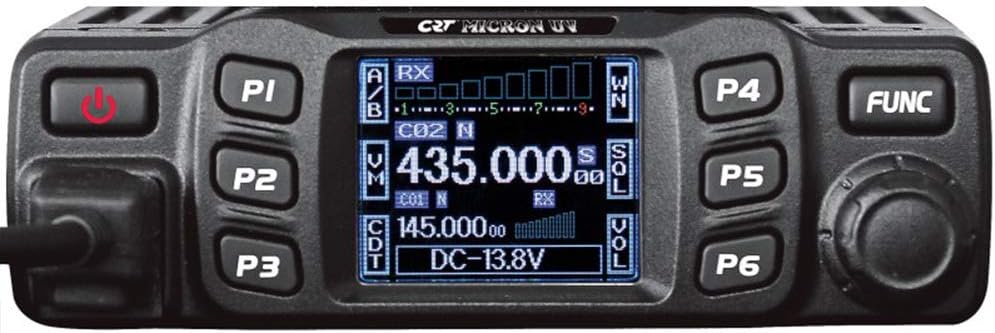
Figure 4: Front panel of the radio, showing the display, power button, and programmable function keys.
2. Frequency Selection and Channel Programming
The radio supports 200 programmable channels. Frequencies can be set within the VHF FM (144-146 MHz) and UHF FM (430-440 MHz) bands. Channel programming can be done via software (not included) or directly through the radio's interface, if supported by the specific firmware version.
- Frequency Step: The frequency step can be set to 12.5 KHz, 20 KHz, or 25 KHz.
- Display: The radio features a clear display showing current frequencies, signal strength, and other operational parameters.
3. Power Output Adjustment
The radio supports Hi/Low power output settings. Refer to the on-screen menu or specific function keys (P1-P6) for adjusting the transmit power level according to your operational needs and local regulations.
4. Scan Function
Activate the scan function to automatically sweep through programmed channels or a defined frequency range to detect active transmissions. Consult the user interface for scan initiation and settings.
5. Timer Function
The radio includes a Timer function, which may refer to a Transmit Time-Out Timer (TOT) to prevent excessively long transmissions. This feature helps conserve battery life and prevent channel hogging.
Maintenance
Regular maintenance ensures the longevity and optimal performance of your PNI Micron UV radio.
- Cleaning: Use a soft, dry cloth to clean the radio's exterior. Avoid abrasive cleaners or solvents that could damage the casing or display.
- Connections: Periodically check all cable connections (power, antenna, microphone) to ensure they are secure and free from corrosion.
- Environment: Operate and store the radio within the specified operating temperature range of -25 to +55 degrees C. Avoid exposure to extreme temperatures, direct sunlight, dust, and moisture. The unit is not water resistant.
Troubleshooting
| Problem | Possible Cause | Solution |
|---|---|---|
| Radio does not power on. | No power supply; incorrect power cable connection; faulty power cable. | Check power cable connection. Ensure power supply is 13.8 Vdc. Test with a known good power source. |
| No signal reception or poor audio. | Antenna not connected; incorrect frequency; low signal strength; squelch level too high. | Ensure antenna is securely connected. Verify correct frequency. Adjust squelch level. Consider external antenna for better reception. |
| Cannot transmit. | Microphone not connected; transmit power set to low; frequency out of band; Time-Out Timer (TOT) activated. | Check microphone connection. Increase transmit power. Verify frequency is within legal limits. Wait for TOT to reset. |
Specifications
| Feature | Detail |
|---|---|
| Model | MICRON UV |
| Brand | PNI |
| Frequency Range (VHF) | 144-146 MHz |
| Frequency Range (UHF) | 430-440 MHz |
| Frequency Step | 12.5 / 20 / 25 KHz |
| Number of Channels | 200 |
| Power Supply | 13.8 Vdc |
| Operating Temperature | -25 to +55 degrees C |
| Dimensions (D x W x H) | 4.72 x 6.5 x 1.46 inches (120 x 165 x 37 mm) |
| Weight | 2.33 pounds (1.06 kg) |
| Talking Range Maximum | 8 Kilometer |
| Tuner Technology | VHF/UHF |
| Color | Black |
| Water Resistance Level | Not Water Resistant |
Warranty and Support
For warranty information and technical support, please refer to the official PNI website or contact your authorized dealer. Keep your purchase receipt as proof of purchase for warranty claims.
PNI Store Link: Visit the PNI Store on Amazon
Related Documents - MICRON UV
 |
PNI P18UV Dual Band Amateur Radio User Manual Comprehensive user manual for the PNI P18UV dual-band amateur radio, covering features, specifications, operation, and safety warnings. Learn about its dual band capabilities, channel memory, output power, and more. |
 |
PNI ECH01 Echo and Roger Beep Module User Manual Discover the PNI ECH01 Echo and Roger Beep module, an accessory for CB and VHF/UHF transceivers. Enhance your transmissions with echo effects and custom audio signals. Learn about its features and installation. |
 |
PNI Extra 40 CB Radio Antenna: User Manual and Specifications User manual and technical specifications for the PNI Extra 40 CB radio antenna. Learn about its features, installation, and performance for cars and trucks. Includes frequency, SWR, impedance, and power ratings. |
 |
PNI Escort HP 446 User Manual: UHF Radio Operation Guide This user manual provides comprehensive instructions and specifications for the PNI Escort HP 446 UHF radio. Learn about its features, operation, and technical details. |
 |
PNI Escort HP 40 Multistandard CB Radio User Manual Comprehensive user manual for the PNI Escort HP 40 multistandard CB radio, covering safety warnings, technical specifications, front panel description, operating instructions, function details, frequency band charts, and compliance information. |
 |
PNI CT36 Wireless Smart Thermostat User Manual and Installation Guide Comprehensive guide for the PNI CT36 wireless smart thermostat, covering installation, setup, Wi-Fi connection via Tuya Smart app, operation, daily programming, advanced settings, and troubleshooting. Includes technical specifications and connection diagrams for various central heating systems. |
Ask a question about this manual
Ask about setup, troubleshooting, compatibility, parts, safety, or missing instructions. Manuals+ will review the question and use this page’s manual context to help answer it.