
MINELAB SDC 2300
Contents
Minelab SDC 2300 Metal Detector User Manual
Model: SDC 2300
Introduction
The Minelab SDC 2300 is a high-performance, mid-range gold detector designed for finding elusive sub-gram nuggets on both land and underwater. This compact and waterproof detector features easy-to-use controls and is engineered for rugged conditions. It utilizes Minelab's advanced MPF (Multi Period Fast) technology for clear and sharp detection of very small gold.
This manual provides essential information for setting up, operating, maintaining, and troubleshooting your SDC 2300 metal detector and the included PRO-SONIC Wireless Audio System.

Figure 1: Overview of the Minelab SDC 2300 Metal Detector and its accompanying PRO-SONIC Wireless Audio System, including the detector unit, PRO-SONIC modules, headphones, and various charging accessories.
Setup
1. Unpacking and Initial Inspection
Carefully remove all components from the packaging. Verify that all items listed in the product contents are present. Inspect for any signs of damage during transit.
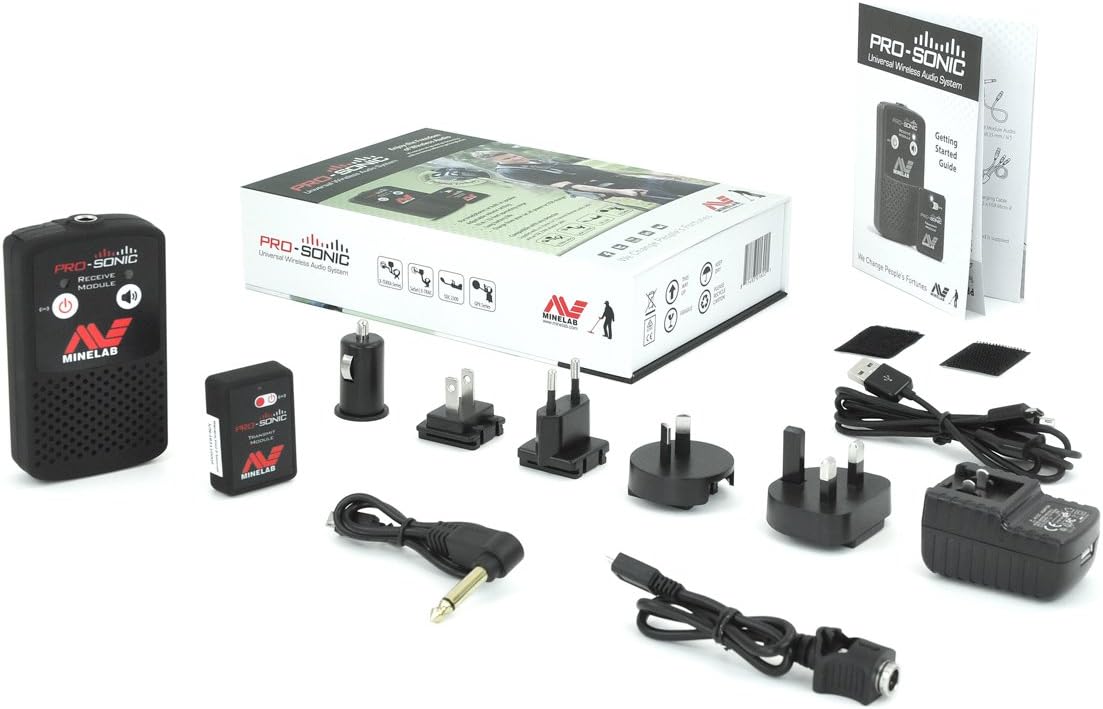
Figure 2: The PRO-SONIC Wireless Audio System components as they appear when unpacked, including the transmit and receive modules, various charging adapters, and cables.
2. Detector Assembly
The Minelab SDC 2300 is designed for assembly-free operation. It features a compact, foldable design for easy transport and quick deployment. Simply unfold the detector until it locks into its operating position.

Figure 3: The Minelab SDC 2300 detector in its compact, folded state, highlighting its portability and readiness for quick setup.
3. Charging the PRO-SONIC Wireless Audio System
The PRO-SONIC system includes a Receive Module and a Transmit Module. Ensure both modules are fully charged before use. Use the provided USB cables and power adapters to charge them. The charging indicator light will change when fully charged.

Figure 4: Close-up view of the PRO-SONIC Receive and Transmit Modules along with their charging cables and various international power adapters.
4. Connecting the PRO-SONIC System
To use the wireless audio system:
- Connect the PRO-SONIC Transmit Module to the SDC 2300 detector's audio output port.
- Power on both the Transmit Module and the Receive Module.
- Ensure they are paired. A blue indicator light typically confirms a successful connection.
- Connect your headphones to the 6.35mm (¼") headphone socket on the PRO-SONIC Receive Module.

Figure 5: Detailed view of the PRO-SONIC Receive Module (left) and Transmit Module (right), showing their power buttons and connection indicator lights.

Figure 6: Minelab branded headphones, designed for comfortable use during metal detecting sessions.
Operating the SDC 2300
1. Powering On and Basic Controls
To power on the SDC 2300, locate the power button on the control panel. The detector is designed with intuitive controls for ease of use. Refer to the markings on the control panel for specific functions such as sensitivity, threshold, and ground balance.
2. Understanding MPF Technology
The SDC 2300 utilizes Minelab's MPF (Multi Period Fast) technology. This advanced Pulse Induction system rapidly switches between transmit (Tx) and receive (Rx) signals, minimizing residual transmit signal during the receive cycle. This allows for clear and sharp detection of very small gold nuggets, even in heavily mineralized ground.
3. Detecting in Various Environments
- Land Detection: The SDC 2300 excels at finding sub-gram gold in various soil conditions. Adjust the ground balance setting to optimize performance for your specific terrain.
- Underwater Detection: The detector is fully submersible up to 10 feet (3 meters), making it suitable for detecting in riverbeds, shallow streams, and shorelines. Ensure all seals are secure before submerging the unit.
4. Audio Interpretation
Pay close attention to the audio signals from the PRO-SONIC system. Changes in pitch or volume indicate the presence of a target. With practice, you will learn to differentiate between various target types and ground noise.
Maintenance
1. Cleaning
- After each use, especially in wet or muddy conditions, wipe down the detector and coil with a damp cloth.
- For underwater use, rinse the detector with fresh water to remove salt or sediment.
- Avoid using harsh chemicals or abrasive cleaners, as these can damage the detector's finish or seals.
2. Storage
- Store the SDC 2300 in a cool, dry place away from direct sunlight and extreme temperatures.
- When storing for extended periods, ensure the PRO-SONIC modules are partially charged (around 50%) to preserve battery life.
- Utilize the compact folded position for convenient storage and transport.
3. Battery Care
- Regularly charge the PRO-SONIC modules. Avoid fully discharging the batteries frequently, as this can reduce their lifespan.
- Use only the charging cables and adapters supplied by Minelab or approved replacements.
Troubleshooting
This section addresses common issues you might encounter with your Minelab SDC 2300 and PRO-SONIC Wireless Audio System.
| Problem | Possible Cause | Solution |
|---|---|---|
| No power to detector. | Detector battery depleted or internal issue. | Ensure the detector is fully charged if it has an internal battery. If issues persist, contact Minelab support. |
| No audio from PRO-SONIC system. | Modules not charged, not paired, or headphones not connected/faulty. | Charge both Transmit and Receive Modules. Re-pair the modules. Check headphone connection and test with another audio source if possible. |
| Excessive ground noise. | Incorrect ground balance setting for the terrain. | Perform a ground balance procedure as per the detector's specific instructions to match the soil conditions. |
| Detector not folding/unfolding smoothly. | Obstruction or mechanism issue. | Check for any debris or obstructions in the folding mechanism. Do not force it. If stuck, contact support. |
Specifications
| Feature | Detail |
|---|---|
| Brand | MINELAB |
| Model | SDC 2300 |
| Technology | MPF (Multi Period Fast) Pulse Induction |
| Waterproof Capability | Fully submersible to 10 feet (3 meters) |
| Compact Folded Size | 8.5 inches (216mm) by 15.7 inches (400mm) |
| Power Source | Battery Powered (internal for detector, rechargeable for PRO-SONIC) |
| Item Weight | 10.06 pounds (4.56 kg) |
| Product Dimensions | 10 x 22 x 5.5 inches (approximate, likely for packaging) |
| Extended Length | 1.5E+3 Millimeters (1500mm or 1.5 meters) |
| Adjustable Length | Yes |
| International Protection Rating | IP54 |
| Display Type | LED |
Warranty and Support
Warranty Information
Minelab products are covered by a manufacturer's warranty. For detailed information regarding the warranty period, terms, and conditions for your SDC 2300 metal detector and PRO-SONIC Wireless Audio System, please refer to the warranty card included with your product or visit the official Minelab website. Retain your proof of purchase for warranty claims.
Customer Support
Should you require technical assistance, have questions about operation, or need to report a fault, please contact Minelab customer support. Contact details and further resources can typically be found on the official Minelab website or in the documentation provided with your product.
For the most up-to-date support information, please visit: www.minelab.com
Ask a question about this manual
Ask about setup, troubleshooting, compatibility, parts, safety, or missing instructions. Manuals+ will review the question and use this page’s manual context to help answer it.