1. Introduction
This manual provides comprehensive instructions for the installation and use of your Dayton Audio 2.5k-LPF-4 Low-Pass Filter. This passive crossover component is designed to integrate seamlessly into your audio system, ensuring that only frequencies below 2500 Hz are passed to the connected speaker driver, typically a woofer or subwoofer. Proper installation is crucial for optimal audio performance and component longevity.
2. Safety Information
- Electrical Safety: Always disconnect power from your audio amplifier or receiver before making any connections to prevent electrical shock or damage to components.
- Component Handling: Handle the filter board by its edges to avoid touching electronic components directly.
- Proper Tools: Use appropriate tools for wiring connections to ensure secure and reliable contacts.
- Ventilation: Ensure adequate ventilation around all audio components to prevent overheating.
- Intended Use: This product is designed for use in passive audio crossover networks. Do not use it for purposes other than its intended function.
3. Product Overview
The Dayton Audio 2.5k-LPF-4 is a high-performance, 2nd-order (12 dB/Octave) passive low-pass filter designed for 4 Ohm speaker applications. It features a crossover frequency of 2500 Hz, effectively directing lower frequencies to your woofer while attenuating higher frequencies. The board is constructed with quality film capacitors and network coils to ensure accurate frequency response and power handling.
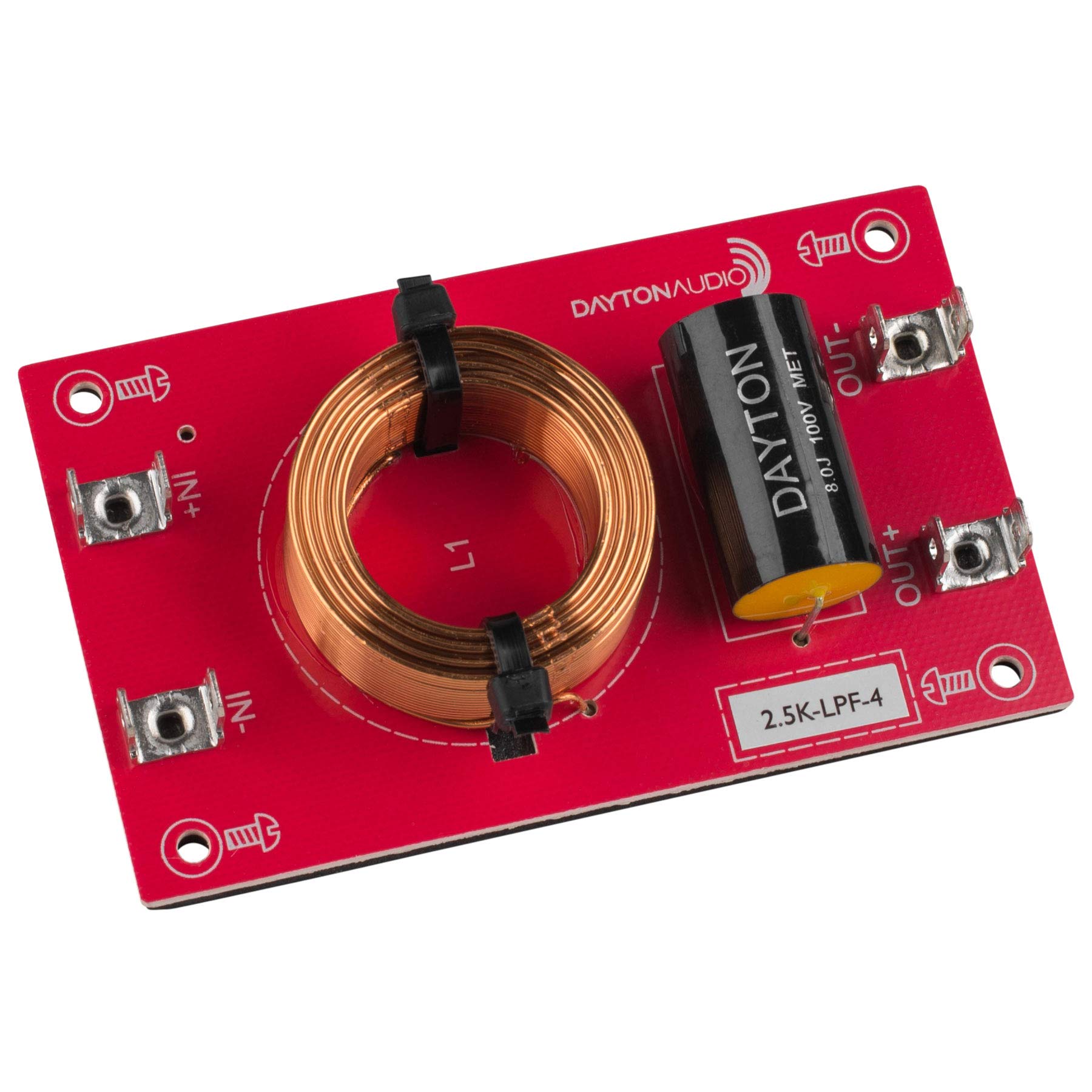
Figure 1: Dayton Audio 2.5k-LPF-4 Low-Pass Filter. The image displays the red circuit board with a large copper coil (inductor) labeled 'L1' and a black cylindrical capacitor. Input terminals are marked 'IN+' and 'IN-', and output terminals are marked 'OUT+' and 'OUT-'. The model number '2.5K-LPF-4' is also visible on the board.
4. Specifications
| Feature | Specification |
|---|---|
| Model Number | 2.5k-LPF-4 |
| Crossover Frequency | 2500 Hz |
| Slope | 12 dB/Octave (2nd Order) |
| Impedance | 4 Ohm |
| Capacitor Value | 8 µF |
| Inductor Value | 0.51 mH |
| Speaker Type | Component |
| Recommended Use | Speaker systems, surround sound systems, audio equipment |
| Maximum Power Output | 250 Watts |
5. Setup and Wiring Instructions
Follow these steps to correctly integrate the 2.5k-LPF-4 into your audio system:
- Power Off: Ensure all power to your amplifier or receiver is disconnected before beginning any wiring.
- Identify Terminals: Refer to Figure 1 for the location of the input and output terminals on the filter board.
- IN+ / IN-: These are the input terminals, connecting to the output of your amplifier.
- OUT+ / OUT-: These are the output terminals, connecting to your low-frequency speaker driver (woofer/subwoofer).
- Connect Amplifier to Filter Input: Connect the positive (+) output from your amplifier to the 'IN+' terminal on the filter board. Connect the negative (-) output from your amplifier to the 'IN-' terminal on the filter board.
- Connect Filter Output to Speaker: Connect the 'OUT+' terminal on the filter board to the positive (+) terminal of your woofer/subwoofer. Connect the 'OUT-' terminal on the filter board to the negative (-) terminal of your woofer/subwoofer.
- Secure Connections: Ensure all wire connections are tight and secure to prevent intermittent sound or short circuits.
- Verify Polarity: Double-check that all positive connections are made to positive terminals and all negative connections are made to negative terminals. Incorrect polarity can lead to phase issues and degraded sound quality.
- Power On: Once all connections are verified, you may reconnect power to your amplifier and test your audio system.
6. Operating Principles
The Dayton Audio 2.5k-LPF-4 is a passive component, meaning it does not require external power for operation. Once correctly wired into your audio system, it functions automatically to filter the audio signal. It allows frequencies below 2500 Hz to pass through to the connected speaker, while significantly reducing frequencies above this point. This ensures that your woofer or subwoofer receives only the appropriate frequency range, improving overall sound clarity and preventing damage to drivers from reproducing frequencies they are not designed for.
7. Maintenance
The 2.5k-LPF-4 Low-Pass Filter requires minimal maintenance. To ensure continued optimal performance:
- Keep Clean: Periodically inspect the board for dust or debris and gently clean with a soft, dry cloth if necessary. Avoid using liquids or harsh chemicals.
- Inspect Connections: Occasionally check all wiring connections to ensure they remain secure and free from corrosion.
- Avoid Physical Damage: Protect the filter board from impacts, excessive moisture, and extreme temperatures.
8. Troubleshooting
If you experience issues after installing the low-pass filter, consider the following troubleshooting steps:
- No Sound from Speaker:
- Verify all wiring connections are secure and correctly terminated.
- Check the amplifier output and speaker input for continuity.
- Ensure the amplifier is powered on and functioning correctly.
- Distorted or Unbalanced Sound:
- Re-check all wiring for correct polarity (+ to + and - to -). Incorrect polarity can cause phase cancellation.
- Ensure the speaker impedance matches the filter's design (4 Ohm).
- Confirm that the filter is connected to the correct driver (low-frequency driver for a low-pass filter).
- Overheating Components:
- Ensure the filter is not being overdriven by an amplifier that exceeds its power handling capacity (250 Watts).
- Check for short circuits in the wiring.
9. Warranty and Support
For warranty information regarding your Dayton Audio 2.5k-LPF-4 Low-Pass Filter, please refer to the documentation provided at the time of purchase or contact your retailer. For technical support or further assistance, please visit the official Dayton Audio website or contact their customer service department.


