
1. Introduction
Thank you for choosing the KAFF Built-in Microwave Oven KB5A. This manual provides essential information for the safe and efficient operation, installation, and maintenance of your appliance. Please read these instructions thoroughly before using the oven and retain them for future reference.
2. Safety Instructions
To prevent the risk of fire, electric shock, personal injury, or exposure to excessive microwave energy, observe the following basic safety precautions:
- Do not attempt to operate this oven with the door open or if the door is damaged.
- Do not place any object between the oven front face and the door, or allow soil or cleaner residue to accumulate on sealing surfaces.
- Do not operate the oven if it is damaged. Ensure the door closes properly and there is no damage to the door, hinges, latches, or door seals.
- Only qualified service personnel should adjust or repair this appliance.
- Always use microwave-safe cookware. Metal containers are not suitable for microwave cooking.
- Supervise children closely when the oven is in use. This appliance features a Child Lock function for added safety.
- Do not heat liquids or other foods in sealed containers as they are liable to explode.
- Regularly clean the oven cavity, door, and seals to prevent grease buildup.
3. Product Overview
The KAFF KB5A is a versatile built-in microwave oven offering microwave, grill, convection, and combination cooking functions. It features a sleek matte black finish and a user-friendly control panel.
3.1 Components
- Microwave Oven Unit
- Rotating Glass Plate
- Grill Stand
- User Manual (this document)
- Warranty Card
3.2 Control Panel and Features
The appliance is equipped with a digital display, a rotary control dial for setting time and power, and various function buttons.

Figure 1: Front view of the KAFF Built-in Microwave Oven KB5A, showing the digital display, control dial, and function buttons.
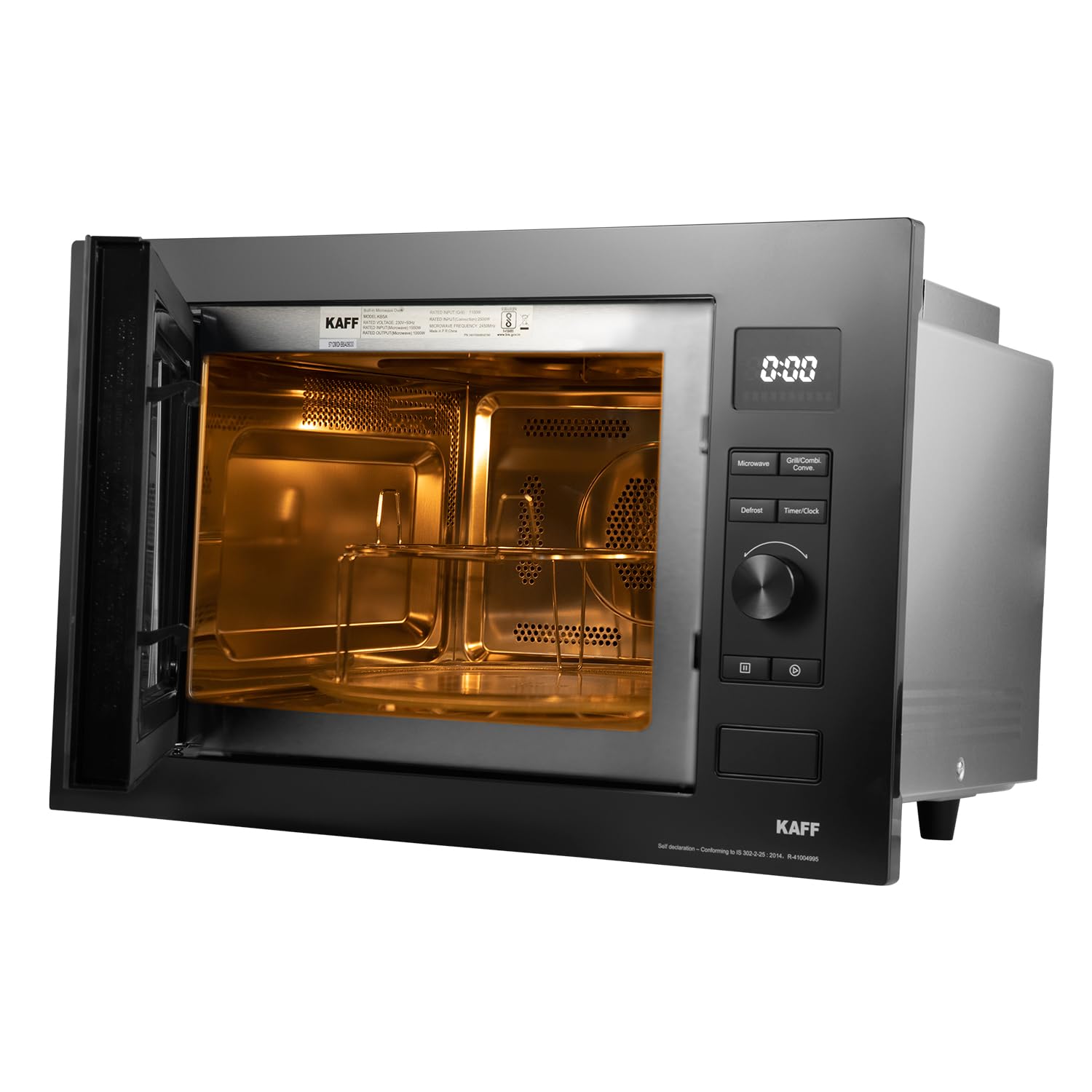
Figure 2: Interior view of the KAFF Built-in Microwave Oven KB5A with the door open, showing the stainless steel cavity and the included grill stand.
Key features include:
- Digital Display: Shows time, cooking settings, and status.
- Rotary Control Dial: Used for adjusting time, weight, and power levels.
- Push-Door Opening Button: For easy access to the oven cavity.
- Function Buttons: Dedicated buttons for Microwave, Grill/Combi, Defrost, and Timer/Clock settings.
- Child Lock: Prevents unintended operation.
4. Setup and Installation
This appliance is designed for built-in installation. Proper installation is crucial for safety and optimal performance. It should be installed by a qualified technician.
4.1 Installation Requirements
- Ensure the cabinet opening dimensions match the oven's specifications.
- The electrical supply must be 220 Volts (AC) and adequately grounded.
- Allow sufficient ventilation space around the oven as specified in the installation diagram.
4.2 Dimensions
Refer to the diagram below for precise installation dimensions.

Figure 3: Installation diagram showing the required cabinet dimensions for the KAFF Built-in Microwave Oven KB5A. Product dimensions are approximately 58.4 cm (Depth) x 68.6 cm (Width) x 48.2 cm (Height).
4.3 Initial Setup
- After installation, clean the oven interior with a damp cloth.
- Place the rotating glass plate and its support ring correctly inside the oven cavity.
- Plug the oven into a grounded electrical outlet.
5. Operating Instructions
This section details how to use the various functions of your KAFF Built-in Microwave Oven.
5.1 Setting the Clock
- Press the 'Timer/Clock' button once.
- Rotate the control dial to set the hour. Press 'Timer/Clock' again.
- Rotate the control dial to set the minutes. Press 'Timer/Clock' to confirm.
5.2 Microwave Cooking
- Place food in a microwave-safe container inside the oven.
- Press the 'Microwave' button.
- Rotate the control dial to select the desired power level (e.g., P100 for 100% power).
- Press 'Microwave' again to confirm power.
- Rotate the control dial to set the cooking time.
- Press 'Start' (usually the rotary dial itself or a dedicated button) to begin cooking.
5.3 Grill Cooking
Use the grill stand for best results during grilling.
- Place food on the grill stand.
- Press the 'Grill/Combi' button repeatedly until the grill icon appears.
- Rotate the control dial to set the grilling time.
- Press 'Start' to begin.
5.4 Convection Cooking
Preheating may be required for convection cooking, similar to a conventional oven.
- Press the 'Grill/Combi' button repeatedly until the convection icon appears.
- Rotate the control dial to set the desired temperature.
- Press 'Grill/Combi' to confirm temperature.
- Rotate the control dial to set the cooking time.
- Press 'Start' to begin.
5.5 Combination Cooking
This mode combines microwave power with grill or convection heat for faster and more even cooking.
- Press the 'Grill/Combi' button repeatedly to select the desired combination mode (e.g., Microwave + Grill, Microwave + Convection).
- Follow the on-screen prompts or manual instructions to set power levels and cooking time for each component of the combination.
- Press 'Start' to begin.
5.6 Defrost Function
The oven offers auto defrost by weight and time.
- Press the 'Defrost' button.
- Rotate the control dial to select defrost by weight or time.
- Adjust the weight or time using the control dial.
- Press 'Start' to begin defrosting.
5.7 Auto Cooking Menu
The oven includes pre-programmed settings for various popular dishes. Refer to the detailed instructions in the full manual for specific auto cooking menu options and usage.
5.8 Child Lock
To activate the Child Lock, press and hold the 'Stop/Cancel' button (or indicated lock button) for approximately 3 seconds until a lock indicator appears on the display. To deactivate, repeat the process.
6. Maintenance and Cleaning
Regular cleaning and maintenance will ensure the longevity and optimal performance of your microwave oven.
6.1 Exterior Cleaning
Wipe the exterior surfaces with a soft, damp cloth. For the anti-finger stainless finish, use a non-abrasive cleaner specifically designed for stainless steel.
6.2 Interior Cleaning
Clean the oven cavity after each use. Wipe with a damp cloth and mild detergent. For stubborn food residue, place a bowl of water with lemon juice inside and microwave for a few minutes to loosen the grime, then wipe clean.
6.3 Glass Plate and Grill Stand
The rotating glass plate and grill stand can be removed and washed in warm, soapy water or in a dishwasher.
7. Troubleshooting
If you encounter issues with your oven, refer to the following common problems and solutions:
| Problem | Possible Cause | Solution |
|---|---|---|
| Oven does not start | Power cord unplugged; Door not closed properly; Fuse blown or circuit breaker tripped. | Ensure power cord is securely plugged in; Close the door firmly; Check household fuse or reset circuit breaker. |
| Food not heating | Incorrect cooking time/power level; Microwave-safe cookware not used. | Adjust cooking time and power level; Use appropriate microwave-safe dishes. |
| Light not working | Bulb needs replacement. | Contact customer service for bulb replacement. |
| Excessive steam inside oven | High moisture content in food. | This is normal for some foods. Wipe interior after use. |
If the problem persists after attempting these solutions, please contact KAFF customer support.
8. Specifications
| Feature | Specification |
|---|---|
| Brand | KAFF |
| Model | KB5A |
| Capacity | 28 Litres |
| Installation Type | Built-In |
| Microwave Input Power | 1550 W |
| Microwave Output Power | 1000 W |
| Grill Input Power | 1100 W |
| Convection Input Power | 2500 W |
| Voltage | 220 Volts (AC) |
| Material (Inner/Outer) | Stainless Steel |
| Product Dimensions (LxWxH) | 58.4D x 68.6W x 48.2H Centimeters |
| Item Weight | 5 kg |
| Special Features | Anti-Finger Stainless Finish, Defrost, Programmable |
9. Warranty and Support
9.1 Warranty Information
Your KAFF Built-in Microwave Oven KB5A comes with a 2-year warranty on the product from the date of purchase. Please retain your purchase receipt and warranty card for any warranty claims.
9.2 Customer Support
For any assistance, service requests, or queries regarding your appliance, please contact KAFF Customer Care:
Toll-Free Number: 18001802221
Manufacturer: Kaff Appliances (I) Pvt.Ltd, S.S. Plaza, 4th Floor, Sector -47, Gurgaon -122018 Haryana.