
Introduction
The Streamlight Twin-Task USB Headlamp is a versatile lighting tool designed for various tasks, offering two distinct light sources. It features a 375 Lumen main beam for distance illumination and a 250 Lumen COB flood LED for close-up work. This headlamp utilizes advanced power LED technology and offers the convenience of USB recharging. With five lighting levels and a durable impact-modified Nylon case, it is built for extended use and reliability. This manual provides essential information for the proper use and maintenance of your Twin-Task USB Headlamp.
Setup
1. Unpacking and Initial Inspection
Carefully remove the headlamp from its packaging. Inspect all components for any signs of damage. The package should include the Twin-Task USB Headlamp, a USB charging cord, and an elastic head strap.
2. Headband Adjustment
Adjust the elastic head strap to ensure a comfortable and secure fit on your head. The headlamp should be snug enough to stay in place during activity but not so tight as to cause discomfort. The battery pack is designed to sit at the back of the head for balanced weight distribution.

Image: The Streamlight Twin-Task USB Headlamp shown worn on a head, demonstrating proper placement and fit.
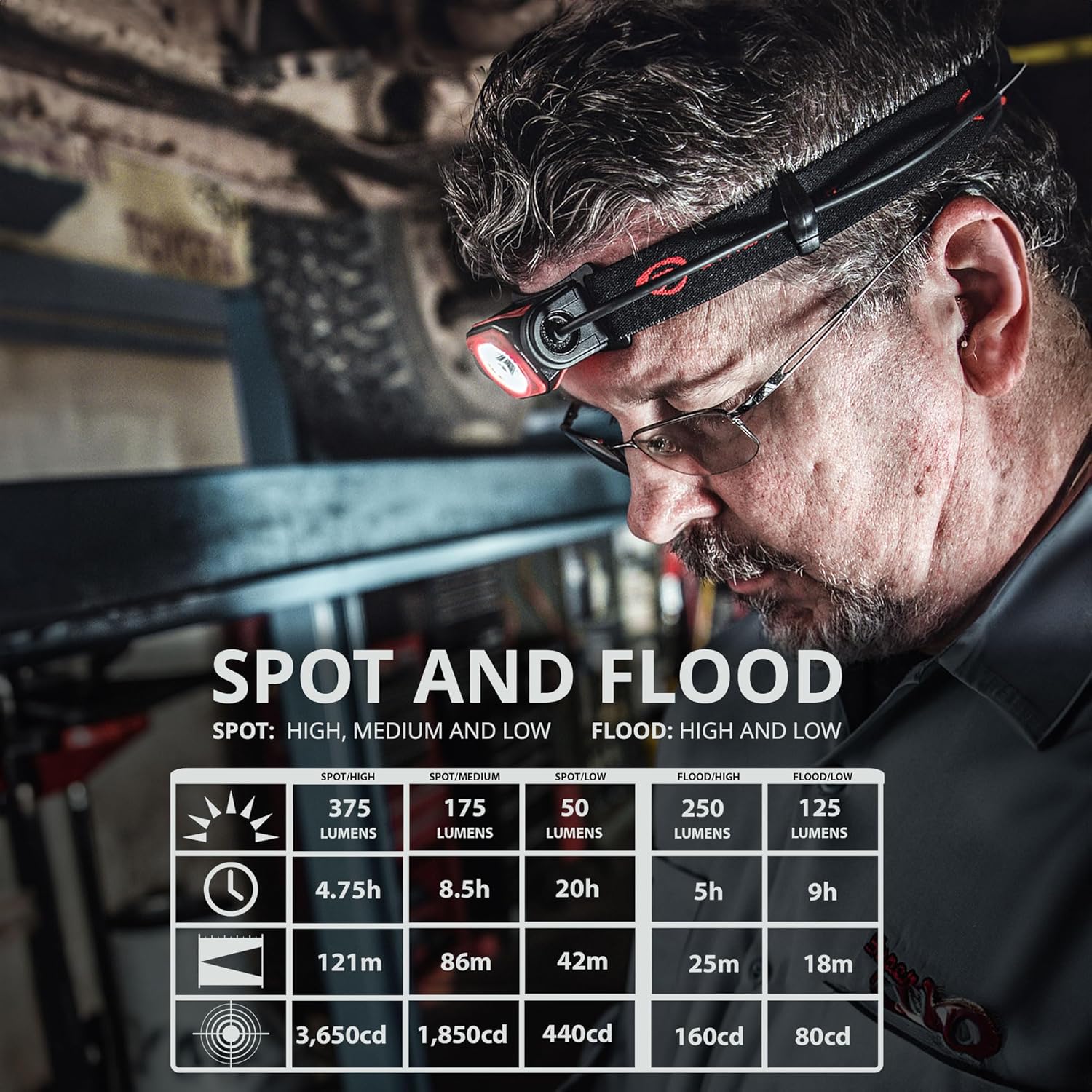
Image: A side profile of the headlamp on a head, highlighting the low-profile design and battery pack placement.
3. Initial Charging
Before first use, fully charge the headlamp's Lithium Ion battery. Locate the micro USB charging port, typically covered by a protective rubber flap. Connect the provided USB cord to the headlamp and a suitable USB power source. A full charge takes approximately 4.5 hours.

Image: A detailed view of the micro USB charging port, showing the protective cover and connection point.
Operating Instructions
1. Power On/Off and Mode Selection
The Twin-Task USB Headlamp features two distinct light sources: a spot beam and a COB flood beam. Each has multiple output levels:
- Spot Beam: High (375 lumens), Medium (175 lumens), Low (50 lumens)
- COB Flood Beam: High (250 lumens), Low (125 lumens)
Press the power button to cycle through the available modes. The headlamp is equipped with a memory function that recalls the last used mode when turned back on.

Image: A visual guide detailing the different spot and flood modes, including their respective lumen outputs, runtimes, and beam distances.
2. Tilting Head Functionality
The headlamp features a 120-degree tilting head, allowing you to direct the light precisely where needed without adjusting the head strap. Simply grasp the light housing and tilt it to the desired angle.

Image: This image highlights key features including the micro USB charging, the 120-degree tilting head, and the overall low-profile design of the headlamp.
3. Battery Pack Positioning
For enhanced comfort, especially when lying on your back (e.g., working under a vehicle), the battery pack can be rotated to the side of your head. This prevents the pack from pressing against your head or a surface, improving user comfort during prolonged use in various positions.
Maintenance
1. Charging the Battery
To maintain optimal performance, regularly charge the headlamp's Lithium Ion battery. The USB charging port is located on the battery pack. Ensure the protective rubber flap is securely closed when not charging to prevent dust and moisture ingress. The battery can also be replaced with a charged Streamlight Strion Lithium Ion battery if you have a compatible piggyback charger, allowing for continuous operation without waiting for a full charge.
2. Cleaning
Clean the headlamp and strap with a damp cloth as needed. Avoid using harsh chemicals or abrasive cleaners, as these can damage the unit. Ensure the charging port cover is closed during cleaning.
3. Water and Impact Resistance
The Twin-Task USB Headlamp is IPX4 water-resistant, meaning it is protected against splashing water from any direction. It is also tested for 2-meter impact resistance. While durable, avoid submerging the headlamp in water or subjecting it to severe impacts to prolong its lifespan.
Troubleshooting
1. Headlamp Not Turning On or Dim
- Check Battery Charge: Ensure the battery is fully charged. Connect the headlamp to a USB power source and observe the charging indicator.
- Battery Connection: Verify that the battery is correctly seated within its compartment.
- Battery Lifespan: If the battery is old and no longer holds a charge effectively, it may need to be replaced. Streamlight offers replacement batteries.
2. Charging Issues
- USB Cable/Port: Try using a different USB cable or power adapter to rule out a faulty accessory. Ensure the USB port on the headlamp is clean and free of debris.
- Charging Indicator: If the charging indicator light does not activate, there might be an issue with the charging circuit or the battery itself.
3. Light Modes Not Cycling Correctly
- Button Functionality: Ensure the power button is not stuck or damaged. Repeatedly press the button to see if it restores normal function.
If these troubleshooting steps do not resolve the issue, please refer to the warranty and support section for further assistance.
Specifications
| Feature | Detail |
|---|---|
| Model Number | 51064 |
| Light Output (Spot High) | 375 Lumens |
| Beam Distance (Spot High) | 121 Meters |
| Run Time (Spot High) | 4.75 Hours |
| Light Output (Flood High) | 250 Lumens |
| Run Time (Flood High) | 5 Hours |
| Light Output (Spot Low) | 50 Lumens |
| Run Time (Spot Low) | 20 Hours |
| Light Output (Flood Low) | 125 Lumens |
| Run Time (Flood Low) | 9 Hours |
| Battery Type | Lithium Ion (1 included) |
| Charging Time | Approx. 4.5 hours via USB |
| Material | Impact modified Nylon |
| Water Resistance | IPX4 (Water Resistant) |
| Impact Resistance | 2 Meter tested |
| Item Weight | 172.93 Grams (6.1 ounces) |
| Product Dimensions | 4"D x 4"W x 3"H |
Warranty Information
The Streamlight Twin-Task USB Headlamp is covered by a Limited Lifetime Warranty. This warranty covers defects in materials and workmanship for the lifetime of the product, excluding batteries and bulbs, abuse, and normal wear and tear. For specific details regarding warranty claims and coverage, please refer to the official Streamlight website or contact their customer support.
Customer Support
For additional support, product registration, or to purchase accessories and replacement parts, please visit the official Streamlight website or their Amazon store:
- Streamlight Official Store: Visit the Streamlight Store on Amazon
You may also contact Streamlight customer service directly for technical assistance or warranty service.


