Introduction
This manual provides detailed instructions for setting up, operating, and maintaining your Motorola MB7621 Cable Modem. The MB7621 is designed to deliver high-speed internet connectivity, supporting cable internet service plans up to 900 Mbps. It is compatible with major cable internet service providers such as Comcast Xfinity, Cox, and Spectrum.
Owning your own modem can help reduce monthly rental fees from your internet service provider.
Package Contents
Verify that your package contains the following items:
- Motorola MB7621 Cable Modem
- Power Adapter
- Ethernet Cable
- Quick Start Guide
Setup Guide
Follow these steps to set up your Motorola MB7621 Cable Modem:
- Connect the Coaxial Cable: Connect a coaxial cable from your cable wall outlet to the COAX port on the back of your MB7621 modem. Ensure the connection is finger-tight.
- Connect the Ethernet Cable: Connect one end of the Ethernet cable to the Ethernet port on your MB7621 modem and the other end to the WAN (Internet) port of your WiFi router. If you do not have a separate router, you can connect the Ethernet cable directly to your computer's Ethernet port.
- Connect the Power Adapter: Plug the power adapter into the POWER port on the modem and then into an electrical outlet.
- Power On: Press the ON/OFF button on the modem. The modem will begin its startup sequence. Wait for the front panel LED lights to stabilize (Power, Downstream, Upstream, and Online indicators should be solid green or blue). This may take a few minutes.
- Activate Your Internet Service: Contact your cable internet service provider (ISP) to activate your new modem. You will need the MAC address (found on a sticker on the modem) and your account information.

Figure 1: Diagram showing how to connect the Motorola MB7621 Cable Modem to a wall outlet and a WiFi router.
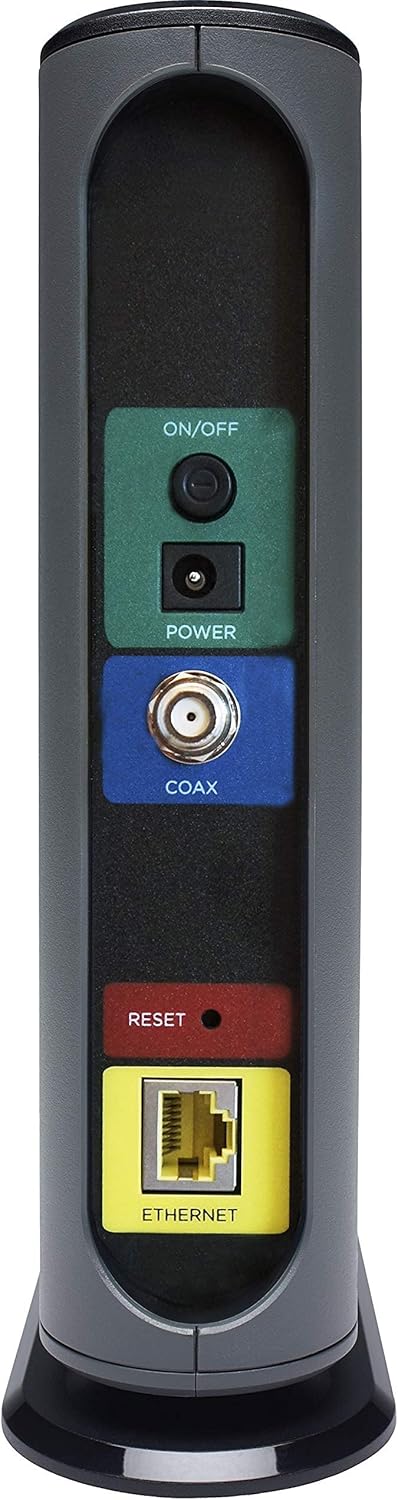
Figure 2: Close-up view of the rear panel of the Motorola MB7621 Cable Modem, showing the ON/OFF button, Power port, COAX port, Reset button, and Ethernet port.
Operating Your Modem
Once your modem is successfully set up and activated, it will provide internet access to your connected devices. The Motorola MB7621 is designed to pair seamlessly with any WiFi router, allowing you to connect all your wireless devices. This cable modem does not have a built-in wireless router or telephone call capability.
The modem supports internet plans with speeds up to 900 Mbps, ensuring fast and reliable performance for streaming, gaming, and general internet use.

Figure 3: The Motorola MB7621 Cable Modem shown next to a separate WiFi router, illustrating its compatibility.

Figure 4: A bar chart illustrating various Xfinity internet speed tiers in Mbps, highlighting the modem's capability to support speeds up to 900 Mbps.
Maintenance
To ensure optimal performance and longevity of your Motorola MB7621 Cable Modem, consider the following maintenance tips:
- Regular Reboots: Periodically reboot your modem by unplugging the power adapter for 10-15 seconds and then plugging it back in. This can resolve minor connectivity issues and improve performance.
- Keep Ventilated: Ensure the modem is placed in a well-ventilated area to prevent overheating. Avoid placing it in enclosed spaces or stacking other devices on top of it.
- Clean Gently: Use a soft, dry cloth to clean the exterior of the modem. Avoid using liquid cleaners or abrasive materials.
Troubleshooting
If you experience issues with your Motorola MB7621 Cable Modem, try the following troubleshooting steps:
- No Internet Connection:
- Check all cable connections (coaxial, Ethernet, power) to ensure they are secure.
- Verify that the modem's LED lights are stable. If the "Online" light is blinking or off, there might be an issue with your ISP connection.
- Reboot your modem and router.
- Contact your ISP to confirm service status and modem activation.
- Slow Internet Speeds:
- Ensure your internet plan supports the speeds you expect.
- Perform a speed test with a wired connection to rule out WiFi issues.
- Check for excessive network traffic from other devices in your home.
- Consider rebooting your modem and router.
- Modem Lights Not On:
- Verify the power adapter is securely connected to the modem and a working electrical outlet.
- Ensure the ON/OFF button is pressed.
Specifications
| Feature | Detail |
|---|---|
| Model Number | MB7621 |
| DOCSIS Standard | DOCSIS 3.0 |
| Max Internet Speed | Up to 900 Mbps (actual service speeds) |
| Connectivity Technology | Ethernet |
| Ethernet Ports | 1 Gigabit Ethernet Port |
| Compatible ISPs | Comcast Xfinity, Cox, Spectrum, BrightHouse, Charter Spectrum, Time Warner Cable |
| Product Dimensions | 7.25"L x 2.25"W x 7.88"H |
| Item Weight | 1.12 ounces |
| Built-in WiFi | No |
| Telephone Port | No |

Figure 5: An image summarizing key features of the Motorola MB7621, including DOCSIS 3.0 compatibility, speed support, ISP approval, and lack of built-in WiFi or telephone port.
Warranty and Support
For warranty information and technical support, please refer to the documentation included with your product or visit the official Motorola support website. Protection plans are available for purchase separately to extend coverage beyond the standard warranty period.
Typical protection plans offered:
- 3-Year Protection Plan
- 4-Year Protection Plan
- Complete Protect (monthly billing option)