
1. Introduction
This manual provides essential information for the proper setup, operation, and maintenance of your Supermicro SYS-6019P-WTR server. The Supermicro WIO serverboard product family, including this model, offers a range of I/O options for accelerated computing. It is designed for optimizing storage and networking to enhance performance and efficiency across various applications. This server is suitable for general purpose, ERP/MRP, and network and security appliance applications.
2. Key Features
The Supermicro SYS-6019P-WTR server incorporates advanced features for high performance and reliability:
- Supports up to 1.5TB ECC 3DS LRDIMM or RDIMM DDR4-2666MHz memory across 12 DIMM slots.
- Features 3/6 Add-on Cards in 1U/2U configurations.
- Includes 10 SATA 3.0 (6Gbps) ports with Intel C620 controller.
- Equipped with hot-swap 2.5" or 3.5" drive bays, supporting SATA3 and NVMe hybrid ports, with optional NVMe drives.
- LAN options include up to 2x 10GBase-T or 2 GbE ports.
- Redundant Platinum Level (95%) 750W power supplies for enhanced reliability.
- Integrated IPMI 2.0 with KVM over dedicated LAN for remote management.
- Supports dual or single Intel Xeon Scalable Processor Family with up to 28 cores and 205W TDP.
- Compatible with Supermicro chassis models: SC113TQ, SC116TQ, SC213A, SC825TQ, and SC815TQ.
3. System Setup and Component Identification
3.1. Angled View - System Overview
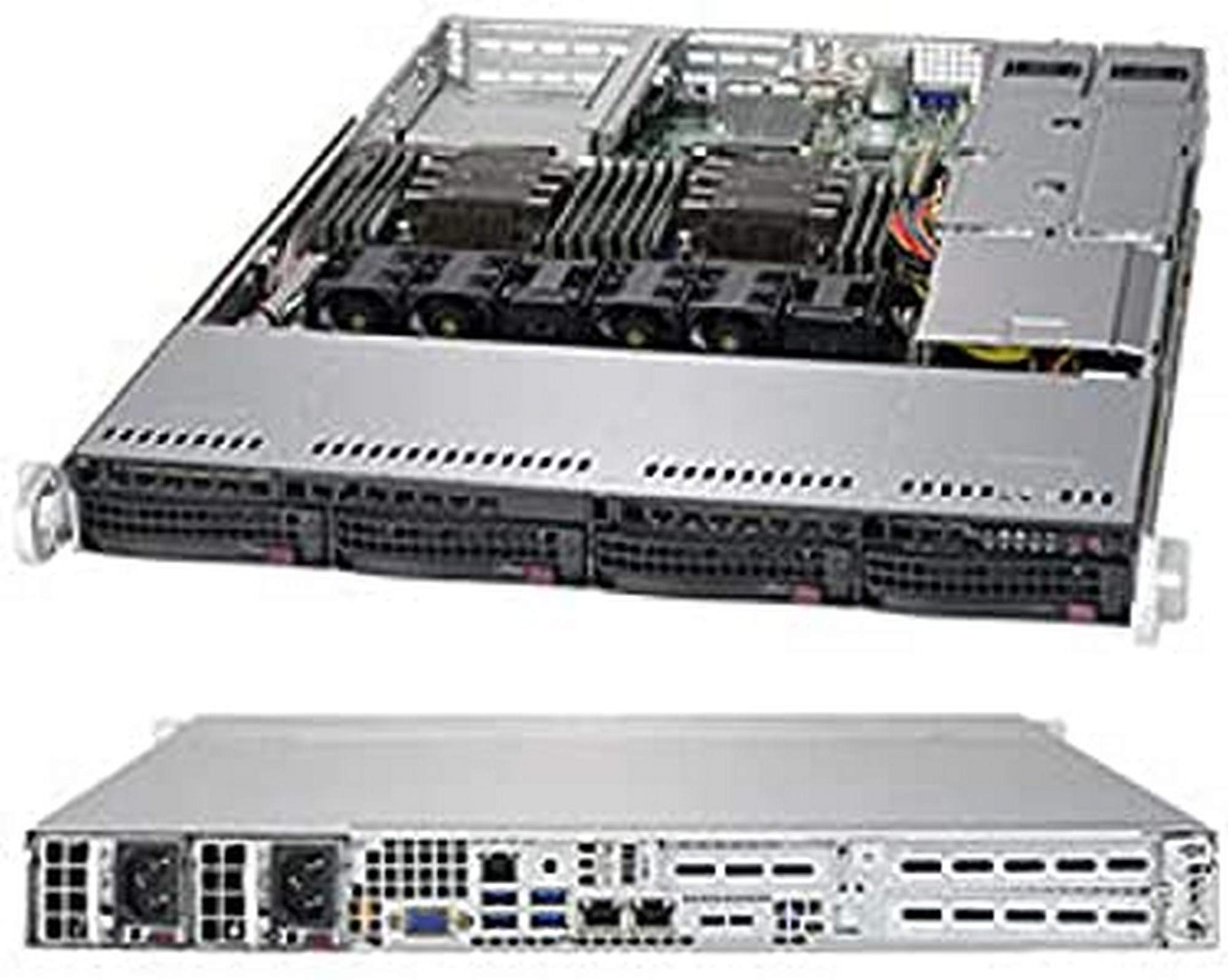
Figure 3.1: Angled view of the Supermicro SYS-6019P-WTR server, highlighting its 25.6" depth and four 3.5" hot-swap SAS3/SATA3 drive bays.
This view provides an overall perspective of the server chassis. Note the 25.6-inch depth, indicating its rack-mount form factor. The front panel features four 3.5-inch hot-swap drive bays, compatible with SAS3 or SATA3 drives, allowing for easy installation and replacement of storage devices without powering down the system.
3.2. Top View - Internal Components

Figure 3.2: Top view of the Supermicro SYS-6019P-WTR server, showing key internal components such as the M.2 slot, SuperDOM ports, AOM slot, DIMM slots, Xeon processors, and system fans.
The top view reveals the server's internal layout. Key components include:
- M.2 Slot: For high-speed NVMe SSDs.
- 2 SuperDOM Ports: Dedicated ports for Supermicro Disk-on-Module (DOM) devices, often used for OS or boot drives.
- 1 AOM Slot: Add-on Module slot, typically for specialized network or storage expansion.
- 12 DIMM Slots: Supports DDR4-2666MHz memory modules, allowing for significant memory capacity.
- Dual Intel Xeon Scalable Processors: Supports up to 165W TDP processors for powerful computing.
- 4 System Fans: Essential for maintaining optimal operating temperatures within the chassis.
3.3. Front View - Controls and Indicators

Figure 3.3: Front view of the Supermicro SYS-6019P-WTR server, detailing the power button, reset button, UID LED, status LEDs, DVD ROM slot, and hot-swap drive bays.
The front panel provides access to essential controls and indicators:
- Power Button: Used to power on or off the system.
- Reset Button: Initiates a system reset.
- UID LED: Unit Identification LED, used to locate the server in a rack.
- Status LEDs: Indicate system status, such as power, network activity, and drive activity.
- DVD ROM Slot: For optical media.
- 4x 3.5" Hot-swap SAS3/SATA3 Drive Bays: As seen in the angled view, these bays allow for easy drive management.
3.4. Rear View - Ports and Power

Figure 3.4: Rear view of the Supermicro SYS-6019P-WTR server, showing redundant power supplies, various I/O ports including VGA, USB 3.0, IPMI LAN, PCI-E slots, and RJ45 GbE LAN ports.
The rear panel provides connectivity for power, networking, and peripherals:
- Redundant 750W Platinum Level Power Supplies: Ensures continuous operation even if one power supply fails.
- 1 VGA Port: For connecting a display.
- 4 USB 3.0 Ports: For connecting peripherals.
- Dedicated IPMI LAN Port: For remote management via IPMI 2.0.
- 2 PCI-E 3.0 x8 LP slots: Low-profile PCI Express slots for expansion cards.
- 2 PCI-E 3.0 x16 slots: Full-height PCI Express slots for high-bandwidth expansion cards.
- 2 RJ45 GbE LAN Ports: Gigabit Ethernet ports for network connectivity.
4. Operating Instructions
4.1. Powering On/Off
- To Power On: Ensure all power cables are securely connected to the redundant power supplies and a power source. Press the Power Button on the front panel.
- To Power Off: Perform a graceful shutdown through the operating system. Once the OS has shut down, press and hold the Power Button on the front panel for 5 seconds, or until the system powers off. For emergency shutdown, disconnect all power cables.
4.2. Initial Configuration
Upon first power-on, access the BIOS/UEFI setup utility by pressing the designated key (usually DEL or F2) during boot. Configure boot order, RAID settings (if applicable), and other system parameters as required for your operating system installation.
4.3. Remote Management (IPMI)
The integrated IPMI 2.0 with KVM over dedicated LAN allows for remote management of the server. Connect the dedicated IPMI LAN port to your network. Access the IPMI web interface via a web browser using the IP address assigned to the IPMI port. Refer to the Supermicro IPMI User's Guide for detailed instructions on configuration and usage.
5. Maintenance
5.1. Regular Cleaning
Periodically clean the server's exterior and ensure ventilation openings are free from dust and obstructions. Use compressed air to gently clear dust from internal components, especially fans and heatsinks, to maintain optimal airflow and cooling efficiency. Ensure the server is powered off and disconnected from power before cleaning.
5.2. Firmware and Software Updates
Regularly check the Supermicro official website for the latest BIOS/UEFI firmware, IPMI firmware, and driver updates for your SYS-6019P-WTR server. Keeping firmware and drivers up-to-date ensures system stability, security, and optimal performance. Follow the instructions provided by Supermicro for all update procedures.
5.3. Drive Management
Utilize the hot-swap drive bays for easy replacement of failed drives. When replacing a drive in a RAID configuration, ensure the new drive is of the same or greater capacity and allow the RAID array to rebuild completely before further operations. Always back up critical data regularly.
6. Troubleshooting
This section provides basic troubleshooting steps for common issues. For more complex problems, refer to the Supermicro technical support resources.
- No Power:
- Verify power cables are securely connected to both the server's power supplies and the power outlet.
- Check if the power outlet is functional.
- Ensure both redundant power supplies are receiving power and their status LEDs are on.
- No Display Output:
- Confirm the monitor is connected to the VGA port and is powered on.
- Try connecting to the IPMI KVM over IP for remote display access.
- Reseat any installed graphics cards (if applicable).
- System Not Booting:
- Check for any POST (Power-On Self-Test) error codes or beeps. Consult the motherboard manual for beep code interpretations.
- Verify that RAM modules are properly seated in their DIMM slots.
- Ensure boot drives are correctly connected and configured in the BIOS/UEFI.
- Network Connectivity Issues:
- Check network cable connections to the RJ45 GbE LAN ports.
- Verify network adapter drivers are installed and up-to-date in the operating system.
- Confirm network settings (IP address, subnet mask, gateway) are correct.
7. Technical Specifications
| Feature | Specification |
|---|---|
| Model Name | SYS-6019P-WTR |
| Processor Support | Dual or Single Intel Xeon Scalable Processor Family (up to 28 cores, 205W TDP) |
| Memory Type | DDR4 SDRAM, ECC 3DS LRDIMM or RDIMM |
| Memory Slots | 12 DIMM slots |
| Max Memory Capacity | Up to 1.5TB |
| Hard Drive Bays | 4x 3.5" Hot-swap SAS3/SATA3 Drive Bays |
| Storage Interface | 10 SATA 3.0 (6Gbps) ports with Intel C620 controller, M.2 PCIe SSD support |
| Expansion Slots | 2 PCI-E 3.0 x16, 2 PCI-E 3.0 x8 LP, 1 AOM Slot |
| LAN Ports | 2 RJ45 GbE LAN Ports, Dedicated IPMI LAN Port |
| USB Ports | 4 USB 3.0 Ports (rear) |
| Video Output | 1 VGA Port |
| Graphics Coprocessor | Integrated Graphics |
| Power Supply | Redundant 750W Platinum Level (95%) |
| Dimensions (LxWxH) | 23.5 x 17.2 x 1.69 inches |
| Item Weight | 46 pounds |
| First Available Date | November 2, 2017 |
8. Warranty and Support
8.1. Product Warranty
This Supermicro server typically comes with a manufacturer's warranty. For specific warranty terms and conditions, including duration and coverage, please refer to the documentation provided with your purchase or visit the official Supermicro website. Extended protection plans, such as a 3-Year Protection Plan, may also be available for purchase.
8.2. Customer Support
For technical assistance, troubleshooting, or service requests, please contact Supermicro customer support. You can find contact information, including phone numbers and support portals, on the official Supermicro website. When contacting support, please have your server's model number (SYS-6019P-WTR) and serial number readily available.
For general inquiries or to explore additional resources, visit the Supermicro Official Website.
