1. Introduction
Welcome to the user manual for your new Whirlpool MWP 303 SB Microwave Oven. This manual provides essential information for the safe and efficient operation, installation, and maintenance of your appliance. Please read these instructions thoroughly before using the microwave oven and retain them for future reference.
1.1 Safety Information
- Always ensure the microwave oven is properly grounded.
- Do not operate the oven if the door is damaged, or if the seals are worn.
- Never heat sealed containers, baby bottles with narrow necks, or whole eggs in the microwave, as they may explode.
- Use only microwave-safe cookware.
- Supervise children when they are near the appliance.
- Do not attempt to service or repair the appliance yourself. Contact qualified service personnel.
- Liquids heated in the microwave can boil over unexpectedly. Allow standing time before removing.
2. Product Overview
The Whirlpool MWP 303 SB is a 30-liter microwave oven designed for versatile cooking. It features a touch control panel and a range of functions including microwave, grill, combination cooking, and specialized programs.
2.1 Key Features
- 30 Litre Capacity: Spacious interior for various dish sizes.
- Auto Cook with 29 Preset Recipes: Simplifies cooking for a variety of dishes.
- Yogurt Function: Dedicated program for preparing homemade yogurt.
- Soft/Melt Function: Ensures uniform heat distribution for delicate tasks like melting chocolate.
- Dough Raising Function: Maintains a stable temperature of 38°C for optimal dough proofing.
- Grill Function: For browning and crisping food.
- Defrost Function: Efficient thawing of frozen foods.
- Autoclean Function: Assists in cleaning the oven interior.

Figure 2.1: Angled front view of the Whirlpool MWP 303 SB Microwave Oven, showcasing its sleek black and silver design and touch control panel.

Figure 2.2: Front view of the Whirlpool MWP 303 SB Microwave Oven, highlighting the large door and integrated control panel on the right.
3. Setup and Installation
3.1 Unpacking
- Carefully remove the microwave oven and all packing materials from the carton.
- Check the oven for any damage, such as dents or a misaligned door. Do not operate if damaged.
- Remove any protective film from the cabinet surface and the control panel.
3.2 Placement
- Place the oven on a flat, stable surface strong enough to support its weight.
- Ensure adequate ventilation: leave a minimum of 10 cm (4 inches) clearance at the rear, 20 cm (8 inches) at the top, and 5 cm (2 inches) on each side.
- Do not block air vents.
- Keep the oven away from heat sources and strong magnetic fields.
3.3 Electrical Connection
- Plug the power cord into a grounded electrical outlet. Ensure the voltage matches the rating label on the oven.
- Do not use extension cords or adapters.
3.4 Turntable Assembly
- Place the turntable support ring in the center of the oven cavity.
- Position the glass turntable plate on top of the support ring, ensuring it sits securely in the center drive.

Figure 3.1: Interior view of the microwave oven with the door open, showing the glass turntable and roller ring in place.
4. Operating Instructions
The Whirlpool MWP 303 SB features a user-friendly touch control panel. Familiarize yourself with the buttons and display before operation.
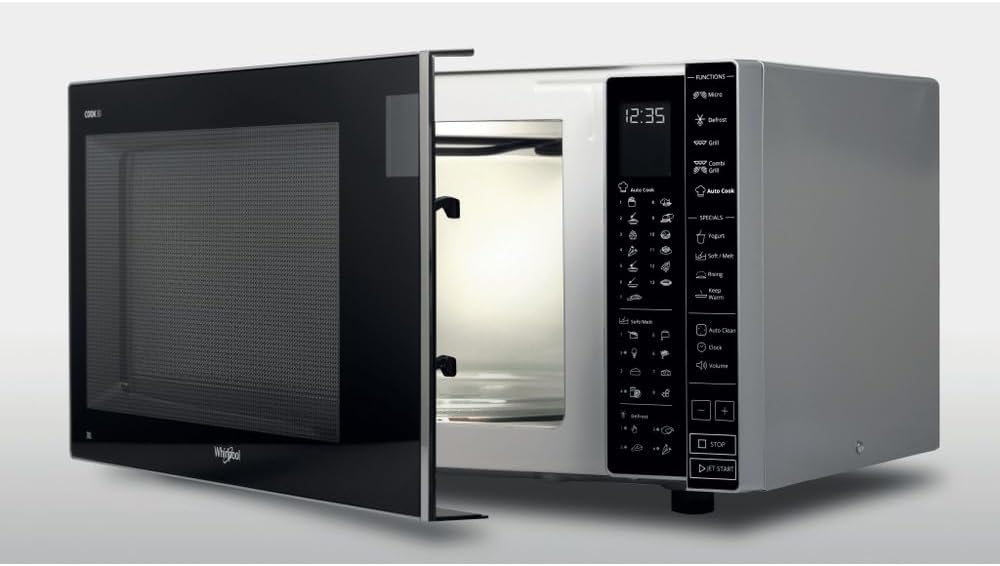
Figure 4.1: Angled view of the microwave oven with the door open, providing a clear view of the touch control panel on the right side.
4.1 Setting the Clock
- Press the Clock button.
- Use the + and - buttons to set the hour.
- Press the Clock button again.
- Use the + and - buttons to set the minutes.
- Press the Clock button one more time to confirm.
4.2 Basic Microwave Cooking
- Place food in a microwave-safe container on the turntable.
- Close the oven door securely.
- Press the Micro button repeatedly to select the desired power level (e.g., 900W, 750W, etc.).
- Use the + and - buttons to set the cooking time.
- Press JET START to begin cooking.
- To pause, press STOP once. To cancel, press STOP twice.
4.3 Grill Function
- Place food on the grill rack (if provided) or a heat-resistant dish.
- Press the Grill button.
- Use the + and - buttons to set the grilling time.
- Press JET START to begin.
4.4 Auto Cook Programs
The oven includes 29 preset Auto Cook recipes. Refer to the internal recipe guide (if available) or the full manual for specific program numbers and food types.
- Press the Auto Cook button.
- Use the + and - buttons to select the desired program number.
- Press JET START to confirm and begin.
4.5 Special Functions (Yogurt, Soft/Melt, Dough Raising)
- Yogurt: Place ingredients in a suitable container. Select the Yogurt function and follow on-screen prompts or manual instructions for quantity.
- Soft/Melt: Ideal for melting butter or chocolate. Place item in a microwave-safe dish. Select Soft/Melt and choose the appropriate setting based on food type and weight.
- Dough Raising: Place dough in a covered, microwave-safe bowl. Select Dough Raising function. The oven will maintain a temperature of 38°C for optimal proofing.
5. Maintenance and Cleaning
Regular cleaning helps maintain the performance and longevity of your microwave oven.
5.1 General Cleaning
- Always unplug the oven before cleaning.
- Interior: Wipe the inside of the oven with a damp cloth after each use. For stubborn stains, use a mild detergent or a specialized microwave cleaner. Do not use abrasive cleaners or scouring pads.
- Exterior: Clean the outer surface with a soft, damp cloth. Avoid getting water into the ventilation openings.
- Door and Seals: Wipe the door, door seals, and control panel with a soft, damp cloth to remove any spills or splatters.
- Turntable: The glass turntable and roller ring can be washed in warm soapy water or in a dishwasher.
5.2 Autoclean Function
The Autoclean function uses steam to loosen food residue, making manual cleaning easier.
- Place a microwave-safe bowl of water (e.g., 200ml) with a few drops of lemon juice inside the oven.
- Select the Autoclean function.
- After the cycle, carefully remove the bowl and wipe the interior with a damp cloth.
6. Troubleshooting
Before contacting customer service, please refer to the following common issues and solutions.
| Problem | Possible Cause | Solution |
|---|---|---|
| Oven does not start. | Power cord unplugged; door not closed properly; fuse blown. | Check power plug; ensure door is latched; check household fuse/circuit breaker. |
| Food not heating. | Incorrect power level/time set; door not closed properly. | Adjust power and time settings; ensure door is fully closed. |
| Sparking inside oven. | Metal in oven; food residue; damaged waveguide cover. | Remove metal objects; clean oven interior; contact service if waveguide cover is damaged. |
| Turntable not rotating. | Turntable not correctly placed; obstruction. | Reposition turntable and roller ring; remove any obstructions. |
7. Specifications
| Model Number | MWP 303 SB |
| Brand | Whirlpool |
| Capacity | 30 Liters |
| Power Consumption | 1050 Watts |
| Product Dimensions (Height x Width x Depth) | 39.8 x 53.9 x 30 cm |
| Turntable Diameter | 31.5 cm |
| Control Type | Touch |
| Material | Glass, Metal |
| Installation Type | Freestanding |

Figure 7.1: Diagram illustrating the external dimensions of the Whirlpool MWP 303 SB Microwave Oven, showing approximate width of 44cm, depth of 36cm, and height of 26cm. Note: These are approximate external measurements and may vary slightly from precise product specifications.
8. Warranty and Support
For warranty information and customer support, please refer to the warranty card included with your product or visit the official Whirlpool website. Do not attempt to repair the appliance yourself.
Whirlpool Official Website: www.whirlpool.com


