
1. Introduction
This manual provides comprehensive instructions for the Nettech Universal Replacement Remote Control SM-22+AL. This remote is designed to work with almost all Samsung TV models, including 3D, LCD, LED, HDTV, and Smart TVs. While not an original Samsung remote, it offers broad compatibility and includes a learning function for enhanced versatility.
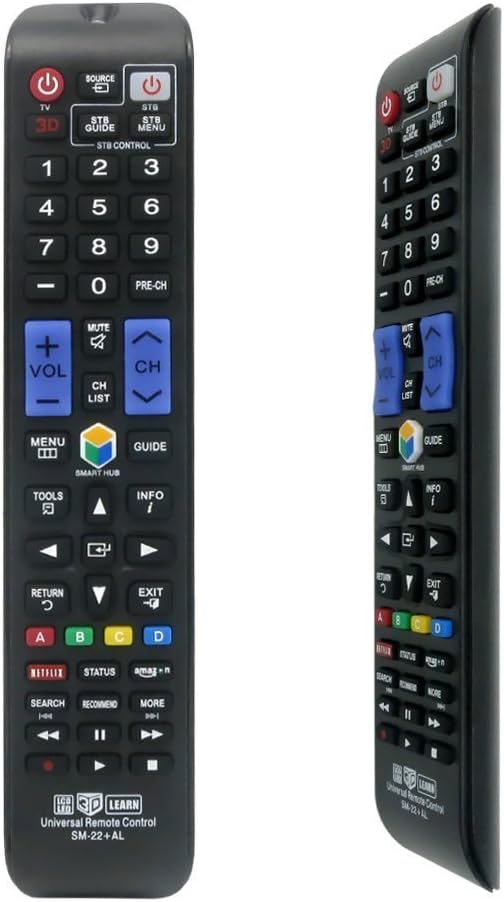
Figure 1.1: Front view of the Nettech Universal Remote Control SM-22+AL, showcasing its button layout.
2. Package Contents
Please verify that all items are present in your package:
- 1 x Nettech Universal Remote Control (SM-22+AL)
- Batteries are not included and must be purchased separately.
3. Key Features
- Material: Durable ABS construction.
- Frequency: Operates at 433 MHz.
- Remote Range: Effective range of approximately 10 meters (33 feet).
- Packaging: Supplied in a protective PVC box.
- Direct Channel Access: Enables direct channel access for digital TVs.
- Comprehensive TV Controls: Includes Power On/Off, Volume Up/Down, Mute, and TV Input selection.
- Media Playback Controls: Features Play/Pause, Skip Forward, Fast Forward, Skip Back, Fast Back, and Display functions.
- No Programming Required: Ready to use with most Samsung TVs right out of the box.
- Learning Function: Allows programming of specific buttons from an existing remote.
4. Setup
4.1 Battery Installation
The remote control requires two AAA batteries (not included). Follow these steps to install them:
- Locate the battery compartment cover on the back of the remote control.
- Press down on the arrow indicated on the cover and slide it downwards to open.
- Insert two AAA batteries, ensuring the positive (+) and negative (-) terminals align correctly with the markings inside the compartment.
- Slide the battery cover back into place until it clicks securely.

Figure 4.1: Step-by-step guide for installing batteries into the remote control.
4.2 Initial Use and Programming
This Nettech remote control is designed for immediate use with most Samsung TVs without any prior programming. Simply insert the batteries and point the remote towards your Samsung TV.
If your TV does not respond, or if you wish to program specific functions from another remote (e.g., for a cable box or a specific Smart Hub button), utilize the remote's learning function:
- Ensure both the Nettech remote and the original remote are working and have fresh batteries.
- Place the two remotes head-to-head, about 1-2 inches apart.
- On the Nettech remote, press and hold the button you wish to program (e.g., Smart Hub, STB Power) until the indicator light (if present) blinks or stays solid, indicating learning mode.
- While still holding the button on the Nettech remote, press the corresponding button on your original remote.
- The indicator light on the Nettech remote should blink rapidly or change color to confirm successful learning.
- Release both buttons. Repeat for any other buttons you wish to program.
5. Operating Instructions
5.1 Button Functions Overview
The Nettech Universal Remote Control features a standard layout for intuitive operation. Refer to the diagram below for a visual guide to the main buttons and their functions:

Figure 5.1: Button layout and corresponding functions of the remote control.
5.2 Basic TV Control
- Power (TV): Turns the television on or off.
- Source: Displays and selects available video input sources (e.g., HDMI 1, AV, TV).
- Volume (+/-): Increases or decreases the audio volume.
- Mute: Silences or restores the audio.
- Channel (CH +/-): Changes the television channel up or down.
- Pre-CH: Returns to the previously viewed channel.
- Number Buttons (0-9): Directly enters channel numbers.
5.3 Smart TV and Media Functions
- Smart Hub: Brings up the Smart Hub applications menu on compatible Samsung Smart TVs.
- Netflix: Provides direct access to the Netflix online streaming service.
- Amazon: Provides direct access to the Amazon Prime Video service.
- Menu: Opens the TV's main menu for settings and options.
- Tools: Accesses quick settings or contextual options.
- Info: Displays information about the current program or input.
- Return: Returns to the previous screen or menu.
- Exit: Exits the current menu or application.
- Directional Pad (Up/Down/Left/Right) & Enter: Navigates through menus and confirms selections.
- Media Playback Controls (Play/Pause, Stop, Fast Forward, Rewind, Skip Forward, Skip Back): Controls media playback for connected devices or Smart TV apps.
6. Maintenance
- Cleaning: Wipe the remote control with a soft, dry cloth. Do not use liquid cleaners or abrasive materials.
- Battery Replacement: Replace batteries when the remote's response becomes sluggish or stops working. Always replace both batteries at the same time with new ones of the same type (AAA).
- Storage: If the remote will not be used for an extended period, remove the batteries to prevent leakage and damage. Store in a cool, dry place.
- Avoid Damage: Do not drop the remote, expose it to extreme temperatures, or immerse it in water.
7. Troubleshooting
| Problem | Possible Cause | Solution |
|---|---|---|
| Remote not responding to TV. | Dead or incorrectly inserted batteries. Remote not pointed at TV's IR receiver. Obstruction between remote and TV. | Replace batteries with fresh ones, ensuring correct polarity. Point remote directly at the TV. Remove any obstructions. |
| Specific buttons (e.g., Smart Hub) not working. | Button not compatible with your specific TV model. Button needs to be programmed using the learning function. | Refer to Section 4.2 for instructions on using the learning function to program specific buttons from your original remote. |
| Remote works intermittently. | Low battery power. Infrared emitter/receiver issues. | Replace batteries. Ensure the remote's IR emitter and the TV's IR receiver are clean and unobstructed. |
| Remote range is poor. | Low battery power. Interference. | Replace batteries. Ensure no strong light sources (like direct sunlight) are interfering with the IR signal. |
8. Specifications
| Attribute | Detail |
|---|---|
| Product Dimensions | 3 x 3 x 3 inches (Approximate) |
| Item Weight | 3 ounces |
| Model Number | LYSB01MCWF5DP-ELECTRNCS (SM-22+AL) |
| Manufacturer | Nettech |
| Color | Black |
| Special Feature | No Programming Required (for most Samsung TVs) |
| Max Number of Supported Devices | 2 (via learning function) |
| Compatible Devices | Samsung Televisions (LCD, LED, QLED, SUHD, UHD, HDTV, Curved, Plasma, 4K, 3D Smart TVs) |
9. Warranty Information
The Nettech Universal Replacement Remote Control SM-22+AL comes with a 1-Year Warranty from the date of purchase. This warranty covers manufacturing defects and ensures the product functions as intended under normal use.
Please retain your proof of purchase for any warranty claims. For warranty service or further inquiries, please contact your retailer or the manufacturer directly.